68kMLA Classic Interface
This is a version of the 68kMLA forums for viewing on your favorite old mac. Visitors on modern platforms may prefer the main site.
| Click here to select a new forum. | |
| LC II no sound after recap | |
| Posted by: mitchW on 2014-12-23 12:48:55 I have just recapped the LC II. After a recap, it worked correctly -- it had a steady picture, it chimed and it booted off the SCSI CD-ROM into System 7.5. Then I installed the Asante network card, which was originally installed, and it stopped to chime, but it boots and works correctly. Removing the card did nothing. Also the board was throughly cleaned twice, so there is no cap leak residue. I discovered that it actually chimes, but extremely quietly, if I put the speaker next to my ear, I can hear a faint chime sound. I also triple checked all my recap work, and found no problems. Also there is very very faint sound on the 3.5mm output. I believe that the audio amp IC is not working... or perhaps I missed something, any possible guesses? | |
| Posted by: uniserver on 2014-12-23 12:53:52 well you could bake it in the oven for 10 or 15 minutes ( just the main board ) @ 200f it won't hurt... might help. remove the pram battery and any simms too. | |
| Posted by: mitchW on 2014-12-23 13:27:32 I could actually bake the board, but I don't understand why would be this beneficial. The board has been throughly dried after a wash-up. | |
| Posted by: mitchW on 2014-12-23 14:21:21 Baked it @200F for about 15 mins, and now it makes something like a "moo" sound through the speaker, so something is going on. EDIT: It only did that when it was still warm, now when it is cold, it is the same as before. | |
| Posted by: uniserver on 2014-12-23 14:24:55 moo, ? haha.. yeah probably some cap goo related damage somewhere... it happens all the time. can i see a picture of your board? | |
| Posted by: mitchW on 2014-12-23 14:49:13 Here you go. I did some soldering around the sound IC, so there is some flux residue. 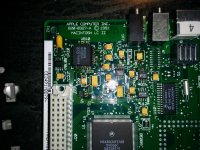 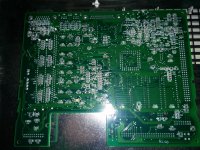 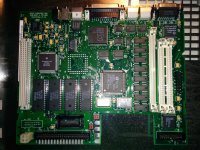 | |
| Posted by: uniserver on 2014-12-23 15:06:41 The issue is probably going to be somewhere around UB10. maybe clean up that residue with nail Polish remover or acetone. if you had a hot air re-flow maybe take that UB10 off clean up the pads, check the traces. and then solder it back down. | |
| Posted by: mitchW on 2014-12-23 15:34:55 Thanks. I also had the feeling that the UB10 is the problem. I will do that when my SMD station arrives, since I ordered it about a week ago. I also have a dead LC III board, from which I can salvage the UB10 IC, since they are the same. I will post the results | |
| Posted by: NickNick on 2014-12-25 05:12:45 Greetings. Did you ever figure out what happened? I as well have an LC that has a very faint chime, but just a Macintosh LC. As you mentioned I can only hear sound when my ear is up to the speaker or I have powered speakers plugged into the 3.5mm jack and the volume all the way up on the Macintosh and the powered speakers. Recapped it and still same issue. I as well am stumped and also think the issue is with the sound chip too. Computer works perfectly though. | |
| Posted by: mitchW on 2015-01-05 09:18:56 I received the hot-air soldering station today and replaced the UB10 chip (part 344S033-A) with one from LC III. Now sound works correctly, so it was the chip failure. Also at first, I tried resoldering the old chip, and but it didn't help. | |
Posted by: mitchW on 2015-01-05 11:37:05Greetings. Did you ever figure out what happened? I as well have an LC that has a very faint chime, but just a Macintosh LC. As you mentioned I can only hear sound when my ear is up to the speaker or I have powered speakers plugged into the 3.5mm jack and the volume all the way up on the Macintosh and the powered speakers. Recapped it and still same issue. I as well am stumped and also think the issue is with the sound chip too. Computer works perfectly though.Well it depends how faint sound is. I used powered speakers from my LCD and I couldn't hear a thing even if I maxed them out. I only heard a very faint sound if I held the internal speaker close to my ear. Usually when caps go bad, the sound is faint, but not that much. I only rememberer that on my SE/30 was also similarly quiet before doing a recap, but all LCs that I have recapped (about 10) played chime in normally audible levels. | |
| Posted by: uniserver on 2015-01-05 12:27:07 good job man! | |
| Posted by: mitchW on 2015-01-05 14:31:11 Thanks! I am still thinking about the reasons it died. This LC II has a TDK PSU that was in working state when I got it, so after I recapped the logic board, I powered on using this PSU. Then I inserted the network card an the sound died. Later I opened the PSU and found leaking caps, so perhaps it was a weak PSU that did the damage. Also the sound died AFTER I inserted the network card, so the PSU was more loaded at that moment. However, now the computer works okay even with the same net card inserted, and of course the PSU was also recapped. Or it was maybe just coincidence. | |
| Posted by: NickNick on 2015-01-06 05:26:32 Glad you got the machine to sound again. I as well think the chip is the reason my LC does not sound. Was it a very hard task? I have never done a chip replacement before. So that makes me want to try and replace the chip on my computer. Would a sound chip from a Macintosh Performa 475 work on a Macintosh LC? I have a broken Performa 475 with memory issues that I could take chips and such from. I then would have to get my hands on an air station. | |
| Posted by: Elfen on 2015-01-06 07:49:26 Only a power surge could kill a chip like that, not a power drop. I suspect that there is corrosion on the pins of the sound chip and resistance went up either limiting power in or sound out. Cleaning it up might fix the pins and the chip. But congrats on the repair, mitchW. That gives hope to all of us with similar situations. | |
Posted by: mitchW on 2015-01-06 16:49:51Glad you got the machine to sound again. I as well think the chip is the reason my LC does not sound. Was it a very hard task? I have never done a chip replacement before. So that makes me want to try and replace the chip on my computer. Would a sound chip from a Macintosh Performa 475 work on a Macintosh LC? I have a broken Performa 475 with memory issues that I could take chips and such from. I then would have to get my hands on an air station.No, the replacement was one of the easiest repairs I've done in years, as I only heated the chip and lifted it with tweezers. Then I cleaned the pads on the board and on the new (old) chip with flux and some new solder, then I put the chip in place. I then heated it again until the solder flowed. But I've done this before, so for you I recommend that you get few old broken PCBs and try soldering some chips off and on, just to get the feel. I also advise that you use a bit more flux as usual, as the pins and pads usually have some corrosion on. For the actual hot-air station, I paid only $80 USD incl. shipping, so it was real cheap, considering how much did these things cost 5-10 years ago. I believe that they changed the audio IC in the 475. Actually the LC III has the -B revision of the chip, not the -A one as the LC II has, but it works anyway. So if the 475 has the same IC as the LC, it must work, just check the chip markings. On the LC II it's 344S033-A, marked as UB10 (see the above pictures of my board). | |
| Posted by: NickNick on 2015-01-07 05:32:07 Thanx Mitch for your advice and your information. It does give me hope for that LC as I would really like to get it working fully. It does but no sound. Macs need sound lol. Part of the fun of the Macintoshes. I have had practice with re-flowing solder as I have done that to Video cards for computers; and also Sony Playstations; never a chip removal though. I will make sure to check the numbers on the chips to make sure they are the same. So with the removal, is it just a drop and go or did you have to find a driver or something for it to work. | |
| Posted by: NickNick on 2015-01-08 13:47:09 I just checked out the chips. They are not the same. A bigger chip is in the Performa. That's kind of a bummer. | |
| Posted by: zezba9000 on 2021-12-05 00:06:18 I ran into the same issue after recapping my LC II. However it was just a bad trace between one side of the 50v cap. Ran a trace wire & it was fixed. 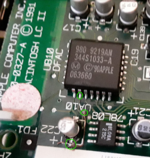 | |
| Posted by: mitchkramez on 2022-04-19 19:59:41 @zezba9000 - Thanks for that, I had the same broken trace, completely invisible, but the multimeter doesn't lie! I was able to scratch some solder mask away and put my capacitor at a slight angle and it worked perfectly! Thanks again! | |
| 1 > |