68kMLA Classic Interface
This is a version of the 68kMLA forums for viewing on your favorite old mac. Visitors on modern platforms may prefer the main site.
| Click here to select a new forum. | |
| screen geometry default CC | |
| Posted by: bibilit on 2017-11-11 04:57:31 My Classic Color has been repaired a couple of times, new caps in the Logic Board, new caps in the Analog Board (plus a lot of soldering here and there) This morning i adjusted the screen and the result is not too bad, screen is sharp and colors are good, but the left side is not straight (right is far better, not perfect) adjusting the pot can not give me the result i am looking for, any idea ? 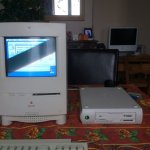 | |
| Posted by: techknight on 2017-11-11 16:11:00 that is the pincushion adjustment. Also if your horizontal width is too wide, you will get his effect as well. | |
| Posted by: bibilit on 2017-11-11 22:49:41 Any idea how to correct the problem in my CC ? | |
| Posted by: techknight on 2017-11-12 09:36:49 Adjustments. | |
| Posted by: bibilit on 2017-11-12 11:50:51 Already tried, not working, thanks anyway, will try again. | |
| Posted by: Bolle on 2017-11-12 11:57:00 Your picture looks to be too tall and too wide. See if reducing the width also reduces the barrel effect (it should do so) Then adjust the height to match the width you set. If the height can not be reduced your B+ might be a little bit too high, which happens sometimes after recapping. Did you measure the pots if resistance changes at all when turned? | |
| Posted by: bibilit on 2017-11-13 02:20:46 Great, thanks. | |
| Posted by: slomacuser on 2017-11-13 11:55:23 You can also use Larry Pina's Test Pattern Generator app http://macintoshgarden.org/apps/larry-pinas-test-pattern-generatorto help you get right measurement | |
| Posted by: 68krazy on 2017-11-13 12:13:53 Out of curiosity, does anybody know where to measure and how to adjust B+ on these boards? | |
| 1 |