68kMLA Classic Interface
This is a version of the 68kMLA forums for viewing on your favorite old mac. Visitors on modern platforms may prefer the main site.
| Click here to select a new forum. | |
| I want to buy this 4 MB RAM for apple //gs | |
| Posted by: xboxown on 2017-10-23 11:36:45 I just need to understand the proper installation https://console5.com/techwiki/images/1/11/BB-4MB-InstallGuide_v2.pdf. When in the document it says the arrow toward the front of the apple //gs like here "Observe the correct alignment of the board when inserting into the slot. The arrow marked with „Front“ ❶must be facing toward the front of the Apple® IIgs." Does that mean the chips are looking at the power supply? | |
| Posted by: Gorgonops on 2017-10-23 12:46:57 Does that orientation have the arrow pointing at the front of the computer? Seems pretty straightforward. | |
| Posted by: xboxown on 2017-10-23 13:56:55 I am just scared! Terrified! My apple //gs is my baby, I love her and I AM THOROUGHLY enjoying her!! Every day I play hours on it! I can't picture me damaging her. So I am being extra caution because I don't trust myself! | |
| Posted by: Gorgonops on 2017-10-23 15:14:25 Well, if you're absolutely certain you can't be trusted to follow the arrow you could try this card: https://www.ebay.com/itm/GGLABS-RAMGS-4-Apple-IIgs-4MB-memory-expansion-4M-RAM-GS-OS-/401095297373 That's the one I have and, though I could be wrong because I'm too lazy to pull out my IIgs to look, I *think* the "tail" that faces towards the back of the computer is long enough you wouldn't be able to physically close the case if you stuck it in backwards. But, seriously, it has an arrow on it. Here, I'll say it: I believe in you and your ability to identify which side of your IIgs is the "front". | |
| Posted by: xboxown on 2017-10-23 15:41:44 Nope! I have zero trust on myself! Sorry! I will go with the eBay auction instead. If it prevents me from being a moron and installing it the wrong way then so be it! Thanks for the link! By the way, is it possible you can take a picture of how your RAM looks like installed in your computer? I will use that as the manual guiide | |
Posted by: Juror22 on 2017-10-23 18:04:29Does that mean the chips are looking at the power supply?Yes. With the location of the memory slot (front right of the IIGS with the computer facing you) and the location of the arrow on the board (chip side) it is inserted into the memory slot with the chips facing the power supply. If you have decided to go another route, then the explanation is moot, but I needed to answer the question. | |
| Posted by: xboxown on 2017-10-23 18:54:31 PERFECT! THAT IS ALL I needed to know. I will buy the one with the arrow only because it have an LED light that will light up when the apple //gs powers up which is hot and second it seems dirt cheap for a 4 MB RAM solution which is all I ever need in an apple //gs anyways. 8 MB is just plain overkill to be honest. What I will do is place the card on the table standing still as if it is inserted into the slot of the machine then I will take pictures in all sides and do final confirmation if that is correct. When I get the green light, I will insert it into the apple //gs just the way I showed it in the picture and power her up! I should enjoy her then! In two weeks time I am ordering the card officially! Thank you guys for all the help! | |
| Posted by: olePigeon on 2017-10-24 09:03:08 Not to throw a monkey in your purchasing decision, but I'm planning on getting one of these the moment they're back in stock: http://www.a2heaven.com/webshop/index.php?rt=product/product&product_id=143 | |
Posted by: xboxown on 2017-10-24 10:26:26Not to throw a monkey in your purchasing decision, but I'm planning on getting one of these the moment they're back in stock: @_@ YOU SOLD ME!!! IT EVEN HAVE PICTURE SHOWING HOW IT IS INSTALLED! I AM IN! I AM IN! I AM IN! AHAHAHAHA I AM IN! AHAHAHAHAHAHHA EEEEEEEEEEEEEEEEEEEEEEEEEEEEEEEEEEEEEEEEEEEEEEEEEEEEEEEEEEEEEEEEEEEEEEEEEEEE!!!!!!!!!!!!!!!!! | |
| Posted by: Gorgonops on 2017-10-24 11:11:37 Whatever works for you, then. It really does seem to me that you're *vastly* overthinking this problem. With some of these cards you'd actually have some difficulty installing them the wrong way because the RAM slot is *pretty darn close* to the edge of the case, to the point that the jumper blocks/etc sticking up on them would be *very* close to hitting the RF shield. (The A2Heaven card might not fit at all thanks to the ROM piggyback board.) Here's what the GGlabs board looks like installed, with the original Apple card for comparison: 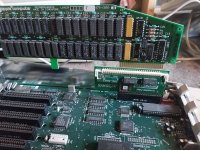 I was right, the tail would catch on the case if you absolutely insisted on trying to plug it in backwards. Obviously the original cards don't pose any risk of reverse insertion either. | |
Posted by: Gorgonops on 2017-10-24 11:22:30it seems dirt cheap for a 4 MB RAM solution which is all I ever need in an apple //gs anywaysAlso, just thought I'd mention that when I bought the GGlabs card they were having an half-off sale; at $40 it seemed like a pretty good deal. At $60 I probably would have been inclined to at least look at some of the 8MB cards. | |
Posted by: xboxown on 2018-01-31 10:01:51Whatever works for you, then. It really does seem to me that you're *vastly* overthinking this problem. With some of these cards you'd actually have some difficulty installing them the wrong way because the RAM slot is *pretty darn close* to the edge of the case, to the point that the jumper blocks/etc sticking up on them would be *very* close to hitting the RF shield. (The A2Heaven card might not fit at all thanks to the ROM piggyback board.) Thank you so much! It is official, I bought it https://www.ebay.ca/itm/GGLABS-RAMGS-4-Apple-IIgs-4MB-memory-expansion-4M-RAM-GS-OS/401095297373?hash=item5d6324895d:g:vIwAAOSw2GlXKFuv, paid for it in full and it is coming in it's way within two week. | |
| Posted by: david__schmidt on 2018-02-01 06:44:52 A picture is worth a kiloword, that's for sure. Cards in the GS ram slot are "backwards" relative to all the other slotted cards. | |
Posted by: xboxown on 2018-02-01 16:28:51A picture is worth a kiloword, that's for sure. Cards in the GS ram slot are "backwards" relative to all the other slotted cards.Did you notice that too? I guess it makes sense when back then cards where looooooooooooooooooooooooooooooooooooooooong...😀 I know that with that money i could buy an 8 MB RAM with 30 features build into it...but I don't trust my own self to save my own life. I would rather have a stranger who I never met to save me than my own self and because of that reason I decided to go that route. I love my Apple //gs and last thing I want to do is fry it because of my moronic self, especially WHEN IT HAVE AN MICRO SD HARD DRIVE NOW AND HAVE SYSTEM 6.0.4 INSTALLED AND I BOOT FROM HARD DRIVE AHAHAHAHAHAHAHAH!! - clears throat - | |
| Posted by: Unknown_K on 2018-02-01 16:33:13 Why didn't they just make an 8MB board with a 72 pin SIMM slot. Anybody who wants more then the 1MB OEM RAM board could use 8MB. | |
| Posted by: xboxown on 2018-02-01 16:34:08 Tell me about it @_@ | |
Posted by: Gorgonops on 2018-02-01 17:21:25Why didn't they just make an 8MB board with a 72 pin SIMM slot. Anybody who wants more then the 1MB OEM RAM board could use 8MB.A 72 pin SIMM is 32 bits wide. That would make it extremely awkward for the IIgs to use it without either wasting 3/4th of the capacity of a given SIMM (IE, you'd have to plug a 32MB in to get 8MB) or doing some *very* strange things to multiplex each address on the SIMM into looking like four to the IIgs. Writes in particular would be a nightmare. I think you'd need some sort of read-before-modify system so when the IIgs wrote to an address the card would read-out the 4 bytes inside the affected word, change the 8 bits the IIgs intended to change, and write the whole word back. Anyway, that's why they use 30 pin simms. 8 bit. | |
Posted by: xboxown on 2018-02-02 09:52:59A 72 pin SIMM is 32 bits wide. That would make it extremely awkward for the IIgs to use it without either wasting 3/4th of the capacity of a given SIMM (IE, you'd have to plug a 32MB in to get 8MB) or doing some *very* strange things to multiplex each address on the SIMM into looking like four to the IIgs. Writes in particular would be a nightmare. I think you'd need some sort of read-before-modify system so when the IIgs wrote to an address the card would read-out the 4 bytes inside the affected word, change the 8 bits the IIgs intended to change, and write the whole word back.I mean when you put it in that way.......it is obvious - blinks - @_@ | |
| Posted by: Rick Dangerous on 2018-02-02 10:26:48 Cool thread. Guess I should hold out for the A2 8mb card to come back in stock, though the 4mb is tempting... Installing these seems pretty easy, I think even if you don't "trust yourself" it's plug and play here. There's not much opportunity to break anything. | |
| 1 |