68kMLA Classic Interface
This is a version of the 68kMLA forums for viewing on your favorite old mac. Visitors on modern platforms may prefer the main site.
| Click here to select a new forum. | |
| iMac G3 - damaged CD ROM data cable (part 922-3594) | |
| Posted by: Alex on 2017-10-03 01:36:21 Hello I believe I have a cable that needs replacing. Recently I discovered an exploded battery and after close inspection it caused some damage to the CD-ROM data cable. In fact four pins from the socket have snapped off and are in fact stuck inside the data cable itself and I cannot get them out. I don't mind a non-apple part at all but I am not sure what I need. Does anyone know what kind of cable I need in terms of the connector? 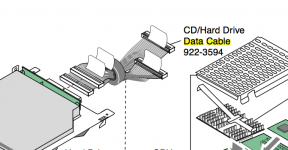 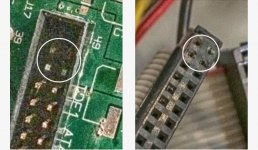 If anyone can provide some guidance I would be grateful. Kindest regards —Alex | |
| Posted by: Byrd on 2017-10-03 02:07:18 Hi Alex, I repaired an Amiga recently with similar problem - pins snapped off the IDE connector. The cable is a standard IDE 40 pin cable, easily replaced. You have two options of repair - rebuild the IDE connector (cutting away at the damaged black plastic with a blade then soldering new machine pins back through), or with the new IDE cable solder the three damaged wires directly to the PCB. | |
| Posted by: davidg5678 on 2017-10-03 16:48:36 From what I can remember, the disk drive connector in the iMac is slightly wider than an IDE cable. I don't think it is SCSI, but it was much bigger than the IDE connector on the hard drive. I would recommend checking to see if the connector from the hard drive fits the disk drive. | |
| Posted by: Alex on 2017-10-04 02:13:06 Hi I can tell you that the cable for the optical is thinner than the hard drive. It is different. The optical drive data cable is 50 pin. The HD data cable is 40 pin. 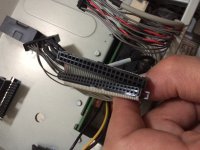 | |
| Posted by: Alex on 2017-10-04 02:15:35 Actually it's a 50 pin. The optical drive data cable is at the lower cable in the image. 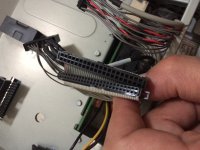 | |
| 1 |