68kMLA Classic Interface
This is a version of the 68kMLA forums for viewing on your favorite old mac. Visitors on modern platforms may prefer the main site.
| Click here to select a new forum. | |
| Apple M1296 12" RGB: No Raster | |
| Posted by: AwkwardPotato on 2017-09-17 11:44:07 I have a 12" RGB pizza-box-topper monitor connected to a PowerMac 6100, which according to this and this, should be able to output at the monitors 512x384 resolution. However, when starting the computer from either the OS 8.5 install, or the System 7 Disk Tools, the monitor doesn't display a raster. When powered on and off, I can hear it crackling, and the LED comes on. I've attempted adjusting the sub-brightness and sub-contrast controls, but to no avail. What are some things I should check for to attempt to repair it? Thanks in advance! | |
| Posted by: beachycove on 2017-09-17 12:17:00 Is there a functional pram battery in the 6100? If not, quickly turn the computer on, then off, then on and allow it to boot. | |
| Posted by: AwkwardPotato on 2017-09-17 14:24:33 The 6100 has a charged PRAM battery and works with both VGA monitors and the Multiple Scan 14 Display. | |
| Posted by: beachycove on 2017-09-17 17:05:37 You could try zapping the pram, I suppose. | |
| Posted by: AwkwardPotato on 2017-09-17 17:27:14 It isn't an issue with the 6100, the monitor is faulty. I'm trying to repair it in order for it to be ready for use with my Macintosh LC, after it is recapped. | |
| Posted by: Byrd on 2017-09-17 23:20:08 I'd test it on your (repaired) LC first though, before ruling out the monitor as faulty. It's an odd resolution for a PPC Mac so don't take the documentation you've found as gospel. | |
| Posted by: Cory5412 on 2017-09-25 14:42:10 I haven't tested the 6100 in particular, but the 7300 and 6500 have no trouble with 512x384 on this particular display, so there's no good reason it shouldn't work. | |
| Posted by: CelGen on 2017-09-25 19:44:59 I'm going from older knowledge here but if you can't even force the brightness up with an internal pot to see a raster check so see if the end of the tube has the orange glow of the heater. From experience one of two things has happened. Either the video stage itself has suffered a rather large failure and no signal is reaching the tube but the high voltage is good, or the cathode heater in the tube has failed, possibly from the monitor being very roughly handled or old age. | |
| Posted by: AwkwardPotato on 2017-10-09 13:25:00 I've looked inside and the cathode heater does indeed work, there is an orange glow at the neck of the tube. | |
| Posted by: CelGen on 2017-10-09 13:53:57 Okay then, so if the high voltage comes up and the heater lights then something is funky on your analog board. | |
| Posted by: Scott Baret on 2017-10-09 22:06:54 Re-cap your monitor boards!!! The CRTs and flybacks on these monitors are usually pretty reliable. However, bad caps will cause all sorts of issues, from poor focus to distorted rasters to monitors doing next to nothing. | |
| Posted by: techknight on 2017-10-13 16:24:43 I like these little monitors. Kinda cute for a CRT. lol. | |
| Posted by: CC_333 on 2017-10-29 20:10:36 Me too. They're not big and clunky looking like many contemporary PC monitors tended to be. I don't care too much about that myself, but I can see why an average person would have liked to not have a giant CRT take up most of their desk space (this it one of the many reasons LCDs became so popular, starting in the mid-2000's I think). The slightly bigger HiRes 13" is nice too, albeit a bit heavy (I have two of them, so yeah. Heavy). the 12" RGB is nice and light, at least for a CRT. c | |
| Posted by: 360alaska on 2017-10-30 11:42:18 I had one giving me some issues and I'm happy to say a recap and a adjustment fixed all my issues. 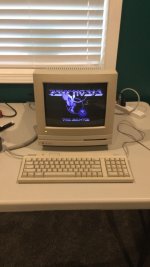 | |
| Posted by: AwkwardPotato on 2018-07-31 17:08:33 Thread necromancy, I know, but: I decided to investigate further with this monitor and found that the horizontal output transistor is shorted. I've watched techknight's videos on repairing his monitor and read up on similar instances of this happening and from what I can gather, there's likely something else causing the HOT to fail and whatever replacement I put in will end up failing as well. Where should I go from here? BTW, I do plan on recapping the monitor. | |
| Posted by: 360alaska on 2018-08-01 11:58:08 Hi, not an expert in the repair field, but doesn't a shorted horizontal transistor indicate a bad flyback? | |
| Posted by: techknight on 2018-08-01 17:33:12 Not always. HOTs are real sensitive to their drive signals, as well as the spikes that appear on the Collector of the transistor. The drive signals could get skewed on the front end, as well as the driven portion. So if the oscillator circuits or driver circuits and its coupling caps drag ass, it can destroy the HOT. As well as any overcurrent conditions on the flyback from either the flyback itself, or any secondary circuitry hooked up to the flyback. the Vertical output stage is hooked up to the flyback as well as other sweep circuits. Also, the B+ voltages divided between the different stages have to be clean as well. if its not clean it can distort the waveform which can destroy the HOT. | |
| 1 |