68kMLA Classic Interface
This is a version of the 68kMLA forums for viewing on your favorite old mac. Visitors on modern platforms may prefer the main site.
| Click here to select a new forum. | |
| Classic II/Performa 200 fail | |
| Posted by: BadGoldEagle on 2017-08-11 02:07:55 It's been recapped fairly well I think. (I checked polarity and everything already). I always clear the gunk in hot soapy water with a toothbrush, after removing the old water towers of course. This time there was a stain that proved to be quite stubborn as you can see... (around C8 and C9) I've never repaired bad traces before but some look quite eaten to me. The board appears to be in perfect condition otherwise (i.e. there's no damage elsewhere) 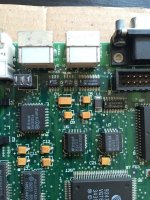 I don't have the trusty 1987 MMU with me at the moment, and I'm going on holiday later today so I won't be able to fix this thing right away but I need your guys opinion. I think the problem lays within this zone. Oh and here's what happens when I switch it on. 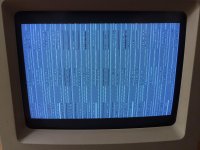 It chimes like it should, but then 1 second after, it plays the death chime... Adding/removing RAM seems to slow/accelerate the screen garbling effect. It starts with a few lines, then progressively adds more corrupt lines. Some are static, some keep changing. That looks to me like corrupt VRAM or UE8 on the SE/30, but what could be causing that on a Classic II logic board? Any help appreciated. Thanks! | |
| Posted by: BadGoldEagle on 2017-08-11 02:33:06 After closer inspection (the photo helped a lot, because when you look at it directly it looks a lot less damaged than it is), I think I should run a patch wire across these traces: 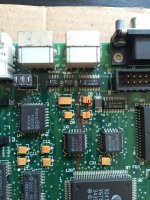 But, what type of wire should I use? I have some basic jumper wires laying around but I guess that's not going to cut it... | |
| Posted by: 360alaska on 2017-08-11 03:12:52 Get some 28 gauge wire for patch wires. Looking at your board and it's symptoms your problem probably lies in the lower left corner of the board where the 4 ram chips are. You likely need to remove them with hot air and check those traces. | |
| Posted by: apm on 2017-08-11 11:27:21 Wire wrap wire (usually 30AWG) works well for repairing bad traces. | |
| Posted by: techknight on 2017-08-11 14:47:04 meter them before patching them. But yep, its definitely a "classic" sign of bad traces. muahaha. I had to... But its true. | |
| Posted by: BadGoldEagle on 2017-08-12 01:43:41 Got it. Thanks guys. I was suspecting bad ram too but can someone confirm that the traces I was talking about are shot as well? Techknight, this is a classic "too"...lol | |
| Posted by: 68krazy on 2017-08-12 11:54:28 Do I detect a trace of humor in this thread? | |
| Posted by: techknight on 2017-08-13 12:44:49 yep. just a trace. trace is so small a bloodhound barely notices 😉 | |
| Posted by: BadGoldEagle on 2017-08-13 14:03:16 I thought there were multiple "traces" on that board. Spoiler content hidden. . | |
| Posted by: techknight on 2017-08-13 14:06:04 We both are.... LOL | |
| Posted by: BadGoldEagle on 2017-09-01 10:54:01 Some updates for you guys. I repaired the damaged trace a week ago. Yes, there was only one bad trace. It didn't work. Nothing changed. I took it to bibilit earlier today to double check my repairs and look for possible damage elsewhere. Apparently, all traces (at least on the top and bottom layers) are fine now. BUT here's the catch. Now the display doesn't even come up and it does not chime anymore. The CPU is still getting some power though. I don't think an internal trace can go that wrong in less than a week. That's why we think a chip might be bad somewhere on that board. Could be the EGRET... What do you think? | |
| Posted by: BadGoldEagle on 2017-09-09 10:52:12 Some more updates: We're back to square one again. Somehow it got "resurrected" but it's still a zombie... I didn't do a thing since last time... This further proves (I think) that the traces must be fine. Again, I wonder what the experts would say 'cos I certainly ain't one. NB: Adding or removing RAM doesn't seem to affect it in any way. | |
| 1 |