68kMLA Classic Interface
This is a version of the 68kMLA forums for viewing on your favorite old mac. Visitors on modern platforms may prefer the main site.
| Click here to select a new forum. | |
| Macintosh SE Superdrive various issues | |
| Posted by: Jon183 on 2017-07-27 23:49:03 Hi everyone, I have a Macintosh SE Superdrive M5011 assembled in singapore with a working 20MB HDD, 4MB of RAM and a superdrive. It works most of the time without an issue, ive been able to change date and time, it keeps, has ms word and MYOB software on the HDD. It has the older 4MB max board which was recapped, washed, has new battery, and ROMs were reseated and scrubbed with alcohol, case colour was restored a bit also. I've also read the dead mac scrolls. Here are the issues: 1. Superdrive isn't recognized in the OS, eject is grayed out too. Not sure what version the OS is although MS word didn't allow an action due to not having system 7. 2. Checkerboard pattern displays whenever it feels like it, only occurs when turning on, no chime, 10 min later the Mac will chime and work like normal for a few more boots. 3. Single vertical lines, single horizontal lines (both very thin ones) sometimes, random flashes, shaking on the screen, all these things occur, knocking on the left seems to restore picture when line occurs. (I have a complete set of caps to replace on analog board though, including the 3.9uf 250V panasonic film cap, ill replace old ones on Sunday) I just don't know where all these possible cracked joints on the board are located. 4. Only 2 of 4MB is recognized by OS, jumper is set to 2/4MB. It has 4 x 1 MB Samsung KMM591000CN-7 parity RAM, one of the old 1MB sticks of the original 2.5MB kit were dead, no old sticks remain in system. Also another question, does anyone know how I could restore the apple logo in the front left of case? Colour on mine is gone. I will appreciate any help, thank you. 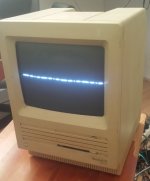 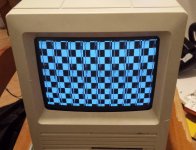 | |
| Posted by: IlikeTech on 2017-07-28 05:18:41 I would replace the solder on the yoke and logic board connectors on the analog board side. | |
| Posted by: BadGoldEagle on 2017-07-28 12:51:37 You need to remove the jumper altogether to fix the RAM problem. I know that's odd but that how things work. Maybe it'll fix the checkerboard issue too, as the latter is ROM related but can also happen with bad memory configurations... As IlikeTech pointed out earlier, it's a good idea to replace the aging solder on the logic board connector. Does the image come back when you hit the side of the unit? | |
| Posted by: BadGoldEagle on 2017-07-28 14:02:32 So apparently the image does come back... I should have paid more attention but in my defence, I was on my phone while writing this... 😛 Anyway, check the solder joints on the connector labeled P1 (yoke), they often go bad. Replace the solder and reapply some new one. Reflowing doesn't always work. Most of the time, the joints on P1 are the culprit. | |
| Posted by: techknight on 2017-07-28 16:45:24 there a tons of solder joints that go bad on the analog board. Not just P1, but a ton. Mostly at P1, Flyback, and all the connectors. You have to take care all of those. Then, you need to watch your 5V rail. if its low, and slowly rises its time to recap the power supply, and re-calibrate. | |
| Posted by: Jon183 on 2017-07-28 18:51:53 I did what everyone said and checked all the solder joints on the analog board, various cracks all over, yoke and logic board connectors on the analog board side too. Im replacing the caps, solder joints and pulling off ram jumper now. Ill give an update to how it runs after im done. Here are some photos of the cracks: Second photo shows crack of solder joint for the green wire of horizontal connector. 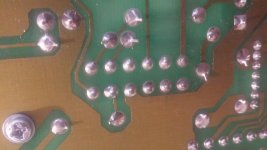 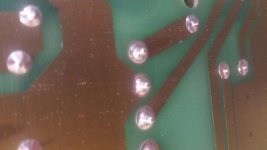 | |
| Posted by: Jon183 on 2017-07-28 20:28:30 I replaced the old solder joints with new solder in all the analog board to logic board and CRT connectors, molex on analog board and other places, replaced 3 caps and removed RAM jumper. I have to wait for it to boot normally as its in that checkerboard phase right now, hopefully it will boot again later. I notice the screen is now perfectly stable as it no longer wobbles at all or do anything else dodgy and is very sharp compared to before. Here are the new solder joints and caps. Ill check 5V next and logic board ROM connections. 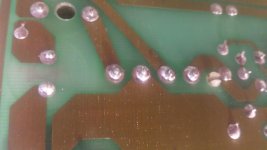 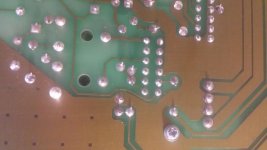 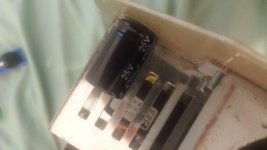 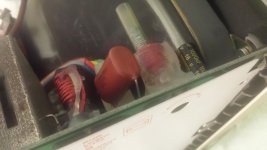 | |
| Posted by: Jon183 on 2017-07-30 08:27:15 Unfortunately the checkerboard hasn't gone away after 2 days. | |
| Posted by: techknight on 2017-07-30 14:27:18 The solder joints dont look new to me. Might wanna recheck those, add fresh solder. Always! Also, please monitor your 5V rail like I had mentioned previously. If its out of spec, you will get these issues. | |
| Posted by: Jon183 on 2017-07-31 01:28:27 I only did about 5 of the joints, Ill find some time to swap out all of the analog board caps and see if my university has anything to help me resolder every joint on it. Also the 5V was tested from off to on, quickly reached 5.12V and didnt move for the 30 secs tested. | |
| Posted by: DJComputerGuy on 2017-07-31 15:29:24 My SE had this similar issue when i first got it, i have the SuperDrive model just like yours, except the SCSI bus is out. When i first got mine, i would have to smack the side of it gently, then it would fire up, i probably need to resolder my analog board too, even though it seems fine now, it would be best to do it anyways. | |
| Posted by: techknight on 2017-07-31 15:31:50 Then if the 5V is stable, and you get checkerboard the likelihood that its the RAM is pretty high. I although rare, I have seen a case of a bad ROM on an SE. Swap out your RAM with known good RAM, 4MB worth and make sure the jumper is correct. Especially if the checkerboard has corruption/lines/garbage in it like your first pic, its RAM, the checkerboard is drawn from RAM via logic circuits whether the CPU fires or not. if it still checkerboards, the next thing would be ROM. Try heating up the ROM IC with a hair dryer or something, or chill it with an upside-down can of air to see if its gone into a thermal failure state as ROMs usually do. | |
| Posted by: Jon183 on 2017-07-31 17:58:15 I heated up the ROM hi, lo and the SWM chips on the board, still didn't chime but the checkerboard garble changed a bit, the lines were also in different spots and were flickering. Knocking the case doesn't do anything anymore, I guess the joints are stable now, ill still replace all of them. The original mixture of TI and NEC 2.5MB RAM was replaced with 4MB of Samsung that was sealed in an anti static bag, replacing the original was the first time the machine could actually boot to the desktop although rarely as garble mostly occurs on boot. Something else I noticed is that the machine chimed and showed an error only once with the old RAM, it never actually showed again, only garble. Here is a picture of the new RAM and the one time error with the old RAM. 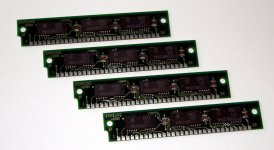 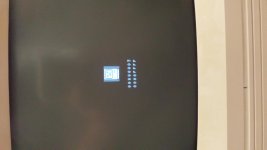 | |
| Posted by: IlikeTech on 2017-07-31 20:05:37 You want 8 chip, not 3 chips simms for a Mac SE. You may have a problem with those sims. | |
| Posted by: Jon183 on 2017-07-31 20:05:44 Well... I accidentally snapped that nipple bit of CRT, sounded like it released gas. | |
| Posted by: IlikeTech on 2017-07-31 20:11:27 RIP MAC SE 🙁 You can get new CRT's on eBay for around 30 dollars plus shipping. I wish you luck, IlikeTech | |
| Posted by: Jon183 on 2017-07-31 20:18:20 Cheapest one shipped to Adelaide is $86USD on ebay, ill probably have to look harder and on local sites or sell the machine. | |
| Posted by: Jon183 on 2017-07-31 21:12:28 Ok, I will replace it, but probably in a month time. Before then I will replace all the caps on the logic board with proper axial caps instead of the radial suntans on there (which are really badly soldered on), leave the PSU alone and finish the analog board recap, ill also try and find a good deal on the CRT and replace the RAM. | |
| Posted by: Jon183 on 2017-07-31 21:27:05 CRT started to fade and flicker just before I ruined it (Never turned it on after, never will). Here is some close up photos of the unit.  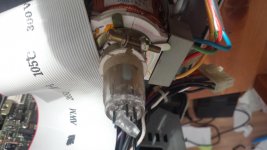 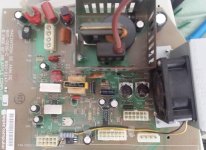 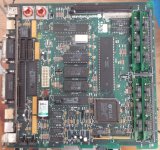 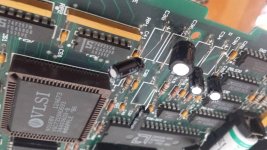 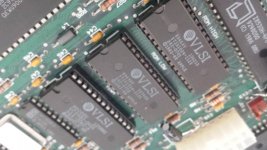 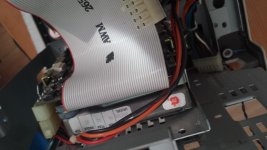 | |
| 1 |