68kMLA Classic Interface
This is a version of the 68kMLA forums for viewing on your favorite old mac. Visitors on modern platforms may prefer the main site.
| Click here to select a new forum. | |
| SE30 came with a Lapis PDS/30 Full Page card | |
| Posted by: Alex on 2017-07-03 02:48:12 Fellow Compact Mac Aficionados I recently purchase an SE30 and lo and behold, inside was a Lapis PDS/30 card but just the card alone. This looks like a TFT card, I think anyway. A 1 bit card perhaps. I checked my archives and I do have Lapis software but I don't believe for this card. By the way, I am happy to share the software drivers with anyone who wants it. Does any know know something about this card? Does it require any additional software and what about a dongle to attach it to a display, can I make my own or did it require something special. Kind of blank on this one. 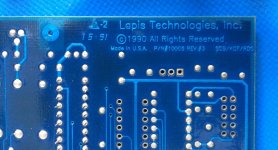 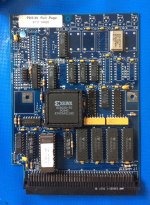 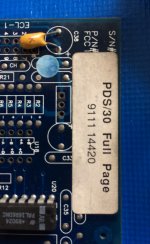 Thanks for any and all information. I appreciate it in advance. Kind Regards —Alex Santos | |
| Posted by: BadGoldEagle on 2017-07-03 04:03:06 Alex, I have the exact same card and IIRC the driver is called 19" Init. If you need it, let me know I'll send you a link. It came with my SE/30 too. I immediately replaced though it as I didn't have any compatible monitors, so I don't know for sure how it works but I'm sure it's at least a 4 bit greyscale. | |
| Posted by: Trash80toHP_Mini on 2017-07-03 06:28:32 Yep, needs a "dongle" for backplane output. Thankfully, every breakout "board" I've ever see for an 030 PDS VidCard has been a simple metal backplane plate punched for Mac Video output via IDC DA-15 connector bolted up to the cutout with matching IDC 16F plugged onto the VidCard's headers on that end of the ribbon cable. The only variation I've seen would be my SuperMac card that has a an IDC 16 connector soldered right onto the card. You'd have to cut the cable to lose that breakout connection. Modeling an 030 PDS backplane plate for 3D printing might be a worthwhile project. Modding the blank for customizing cutouts in whatever positions desired for any number of oddball connections would be duck soup. | |
Posted by: Alex on 2017-07-03 07:11:20Alex,Would you mind posting a pic of the backplane for the card and the software if you would be so kind please. | |
| Posted by: BadGoldEagle on 2017-07-03 10:20:10 Sure. I'll do that asap, but i don't have the parts with me, you'll have to wait a bit. Thankfully, I backed up my hard drive, so all I have to do is boot Basilisk and extract the software. ... and here it is: Lapis19.img.zip And, I'm 90% sure this card uses a 9 pin D-sub connector. | |
| Posted by: Alex on 2017-07-04 14:06:51 Wonderful, if you have any other documentation or info, please post back. Thanks! | |
| Posted by: BadGoldEagle on 2017-07-06 07:50:29 Ahem. My apologies, I don't have a full page card but a DPD one. It has the same layout and they share the same PCB but I noticed a couple of ICs are different. Not only that but the video out is not located at the same place. Mine's is located at board location ECL-1 (J5) and yours appears to be over at "SPD" (J3)... | |
| Posted by: Treebeard on 2020-03-22 18:29:55 I am working with the Mac SE version of Lapis DisplayServer and have the backplane and card installed. I saw a post that said it should run on 7.1 and I am able to get a control panel I got with the board to load and set my main screen / secondary. But on my secondary VGA it shows a valid VGA signal (wakes up and resolution is right) - but it is all black. Could anyone share the specific driver set for Lapis so I can rule that out ? I looked all over today and kept getting a bad archive. | |
| Posted by: elemenoh on 2022-04-09 19:04:26 @Treebeard can you post the driver you're using? I'm trying to get a similar card from a MicroMac SE. I have a couple versions of the Dual Screen 2.3 Control Panel. One shows a single option to drive the Ehman Full Page display. The other has a single option to drive a generic 15" Full Page Display. I'm trying to find something that outputs 640x480 but haven't had any luck withe the Lapis / Mobius Drivers I've been able to find online. My card as a Xilinx XC2018-100 PC84C FPGA. Does yours have the same FPGA? 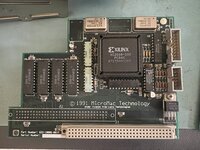 | |
| Posted by: elemenoh on 2022-04-09 19:37:01 I just tried the driver @BadGoldEagle posted here. On my SE with system 6.0.8 it hangs on a gray screen after Welcome to Macintosh. On system 7.1 it hangs at a black screen after Welcome to Macintosh. I have two of these cards. I tried with both and got the same results. | |
| 1 |