68kMLA Classic Interface
This is a version of the 68kMLA forums for viewing on your favorite old mac. Visitors on modern platforms may prefer the main site.
| Click here to select a new forum. | |
| Help with TCP/IP, OT and OS 7.6 | |
| Posted by: mraroid on 2017-05-10 09:05:31 Hello... I have 7.6 installed on my Color Classic. I have a Farallon network card plugged into the Color Classic. I have installed the Farallon software. I have installed TCP/IP V 1.1.1 I have Netscape 2. something installed. When I go to the TCP/IP control panel, I am set up for ethernet, and DHCP. However none of the other fields are filled in. Can I go to a windows box and do some kind of command to find out my gateway or other information? With a ethernet cable plugged into my router and the color classic, I can see a green light come on in my router when I boot the color classic. How ever the green light on the back of the ethernet card is not on (and I can not connect to the internet). I think I am close, but no cigar. Can an one give me some additional information? Thanks mraroid | |
| Posted by: mraroid on 2017-05-10 09:47:47 I guess I am not sure if I am to use DHCP or manual set up in TCP/IP. Right now, I am set up for DHCP and my subnet mask is 255.255.255.1. My router address (Linkysy) is 192.168.1.1 So far, no joy. When I launch Netscape (2.02) now, it locks up. I have read that if I update to a newer TCP/IP version, things are easier. But I have no access to the internet but for my 64 bit windows 10 box. So I have to go with what software I have on hand. If I can just get my Color classic on line, then I can down load additional software. It is sort of like the chicken or the egg.... Advice appreciated. Thanks folks. mraroid | |
| Posted by: Machead on 2017-05-10 10:29:33 The subnet mask is usually 255.255.255.0. To find your gateway in Windows, open a command prompt and enter ipconfig /all. It should be there. | |
| Posted by: mraroid on 2017-05-10 15:21:08 Thank you Machead. I will change the subnet mask. Using your windows command, I found my gateway. 192.168.1.1 I will give this a try. Woops! Locks up Netscape. I am not usre if I need to select DHCP or manual in TCP/IP Anyone know? Thanks mraroid | |
| Posted by: jefframsey on 2017-05-10 21:51:08 DHCP (dynamic host configuration protocol) means that your IP, netmask and gateway (and sometimes DNS) will all be assigned dynamically by the network router or the dhcp server. It should ignore what you have typed into the fields. Most modern home routers serve dhcp and it will work with most network devices. If you put all zeros in the IP, netmask and gateway fields and then set it for dhcp, you should be able to see it be assigned an address for each one of these. If you do not see the fields get assigned a value automatically, then you will need to set them manually. Set the subnet mask and gateway, like suggested above, to the same as the ipconfig /all shows on your windows PC. For an IP address, use the windows machine to find an unused IP address in the 192.168.1.0/24 subnet. Simple method: download Angry IP Scanner on the windows PC and scan that subnet. Manual method: open up command prompt and ping each address until you find one that is not used. Be careful that you do not use an address for your manual settings that is in your router's dhcp pool. You will get an IP address conflict in the future if you do. Because of this, I would try to get dhcp to work. It will be the method most likely to be trouble free in a modern home network environment. | |
| Posted by: mraroid on 2017-05-11 07:07:44 Thank you Jefframsey for the information. I removed all the things I had put in the fields and then put all zeros. I saved it, and rebooted. Nothing. I am using a modern Linksys router. I am set up for ethernet, and "Using DHCP server". Guess I had better change to manual. The problem I a having is that what apple's TCP/IP calls some things is different than what others call things. For example, I have a box to fill out and it is asking for my "router address". Is router address known by a different name? Also in TCP/IP it asks for: Name Server address - is this also known by another name? Is this also known as my default gateway? I can tell what a subnet mask is. But the other words are different. In TCP/IP it says : implicit search path starting domain name: ___________________________ and under it it says: Ending Domain name: _____________________ I think they do not want a name, but numbers. Maybe if you can translate in Apple name for more modern names I can populate my fields. I ran your application (Thanks!) and I ran ipconfig /all. But the names in TCP/IP and the names I see do not match up. Thank you for your help. mraroid | |
| Posted by: mraroid on 2017-05-11 08:01:55 Can use a newer version of TCP/IP that is on a apple OS 8 CD? Would that be better or easer? Thanks mraroid | |
| Posted by: mraroid on 2017-05-11 08:02:45 Can someone point me to a guide for setting up internet in OS 7.6? Thanks mraaroid | |
Posted by: jefframsey on 2017-05-11 08:57:47Thank you Jefframsey for the information. I removed all the things I had put in the fields and then put all zeros. I saved it, and rebooted. Nothing. I am using a modern Linksys router. I am set up for ethernet, and "Using DHCP server". 1. Router address will be your Gateway address 2. Name Server will be your DNS server. Either get this from the "ipconfig /all" on the windows PC or just use the public "8.8.8.8" 3. I would bet that you can leave the starting and ending domain names blank. I have never heard of TCP settings that are numeric only fields that ask for anything like this. Hope this helps... | |
| Posted by: GerrySch on 2017-05-11 12:23:46 Sounds like you MIGHT have a similar problem to the one I had with my LC475. Since I have a Apple IIe card in the internal slot, I connected an Asante EN/SC external ethernet box that sits in the SCSI chain. But I couldn't get it to work, very frustrating. Then I tried a null ethernet cable and it worked like a champ (and yes the other end is plugged into a router). There are plugs available the will flip the transmit and receive pairs on Amazon. That's what I used to fix my problem. I'm running 7.5.5 with OpenTransport 1.1.2. Good Luck, Gerry | |
| Posted by: mraroid on 2017-05-11 12:55:56 I have three DNS servers (using the windows command "ipconfig /all". I will list all three in the same big block. Could the router address also be called: Default Gateway DHCP Server IpV4 Address What is another name for the IP address? I searched the internet and said "What is my IP addreess". It gave me an address and entered that into the IP address field in TCP/IP. I will leave the starting and ending domain names blank. So I have IP addess entered.(the one the internet gave me) I have a subnet mask enrtered (255.255.255.1 I have a router address entered (192.168.1.1) And I have three name server address entered 186.101.109.18 186.5.11.18 192.168.1.1 when I try to sacve my tcp/ip settings I recieve an error message. See photos. Thank you for the help mraroid 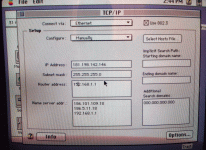 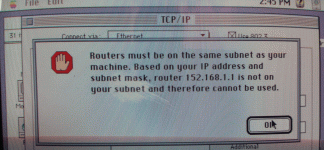 | |
| Posted by: Machead on 2017-05-11 13:58:30 If you are connected to a router, then the IP address that you enter into the computer will be a local one (usually 192.168.x.y or 10.0.x.y or some such thing). See your router's configuration for the correct format. It might be a variation on your router's IP address. If you must choose manual configuration (DHCP works fine on my 7200/75 with System 7.5.5), then pick an IP address that's outside of your router's DHCP pool. (Mine is 192.168.2.2 through 192.168.2.100; I have no idea what yours is. It should be in your router's configuration.) | |
| Posted by: mraroid on 2017-05-11 14:25:34 Thanks Machead... I pull up "ipconfig /all" in my windows 10 box. I can not find any IP addresses starting with 10 I can see the following: IPV4 -192.168.1.237 (perfered) Subnetmask - 255.255.255.0 Default Gatway -192.168.1.1 DHCP server - 192.168.1.1 DNS servers: 186.101.109.18 186.5.11.18 192.168.1.1 I do not have any other IP addresses in this ipconfig /all report Suggestions? I have a linksys router. Thanks in advance mraroid | |
| Posted by: jefframsey on 2017-05-11 14:25:46 Your router's IP address is going to be the same as the gateway address from your ipconfig /all that you ran on the windows machine. Your router has two IP addresses, one is public (on the Internet side of things) and one is private (on your network.) I think you said before that it was 192.168.1.1. The Name Server addr: entries you put in there should work just like you have them. Machead is correct on both accounts. The 'Router Address' field should contain your router's internal address, which is listed in the Windows machine as 'Gateway' and the IP address that you enter in the 'IP Address:' field needs to be one that is not inside your router's DHCP pool. This is why I was really hoping that DHCP would work on your Mac. It would simplify all of this. Maybe GerrySch is on to something. Usually, the router's ethernet ports will be auto sensing and will internally cross-over the cable for you if it needs the other cable, but it is not uncommon for older ethernet routers, switches and interface cards to not work with this - especially if they are adapted from AUI or 10b2 or if they are only 10bt and not 100bt or 1Gbt. Here is a link to the cable pin out for a crossed over ethernet cable - ethernet crossover | |
| Posted by: mraroid on 2017-05-12 02:14:44 I have a odd set up here. I have fiber to my house. The fiber was broken out to a ethernet port which plugged into a wireless router (with 4 ethernet ports). The wireless router plugs in to a Cisco WFiI and ethernet unit. I am running ethernet from a spare jack on the Cisco to my other room where I have a linksys non wireless hub. This 6 port hub is where the Coloor CLassic is plugged into. (as well as several other computers which are working fine). I toook a laptop and plugged it into the wireless router. I did a ipconfig /all I found this: Autoconfiguration IpV4 Address (prefered) - 196.254.254.127 Subnet mask-255.255.0.0 IPV4 Address (prefered) - 192.168.1.149 Subnet mask- 255.255.255.0 Default Gatwat: 192.168.1.1 DHCP Server-192.168.1.1 DNS serevers: 186.101.109.18 186.5.11.16 192.168.1.1 Any additional thoughts befoe I start searching for a cable? Thanks jack | |
| Posted by: mraroid on 2017-05-12 03:37:43 I noticd that I have another control panel called Apple Talk. In it, it says to connect via Apple Talk. But no zone is set up. This is OK right? I can launch Netscape and it makes the flashing stars go past the big "N" before giving me the error message. I think I am close, but not sure whart to do next. On the look out for a ethernet cable I can cut up. But my linksys router is new (2 years) and the othere computers oplugged into it work fine. But I am ready to try anything now. Looked on the web for a FAQ but did not find one that applied to OP, OS 7.6 and TCP/IP 1.1.1 If I can get one line, then I can update my TCP/IP Thanks everything for the help. I am so close*!!!! mraroid | |
| Posted by: mraroid on 2017-05-15 09:15:17 Jefframsey or anyone.... I had this Color Classic connected to the internet before and I did not use a cross over cable. I will try that if all else fails. I did a fresh install of OS 7.6. I installed the driver for my network card (Farallon). On my windows box, I ran: ipconfig /all I populated tcp/ip the best I could. I have enclosed two photos. One is what I see when I run ipconfig /all (in windows 10). The other photo is of tcp/ip on my Color Classic. I have a ethernet cable running from the back of my network card to my router When I boot the Color Classic a green light goes on in my router. I have a light that I think is suppose to be green on the back of my network card, but it has never lit up. I have installed Netscape 2.0.2. When I launch Netscape it seems like it is trying to work. I get the flashing stars across the big "N" logo like it is trying to connect. But after a while I get an error message that says: "Netscape is unable to locate the server.. The server dose not have a DNS entry. Check the server name and URL and try again". I get the same error message if I enter in, say http://www.google.comfor example. Also, if I go to google and type in "What is my IP address" I get 181.198.142.146 Do I have information correctly entered int the fields in tcp/ip? Thanks for all the help. mraroid 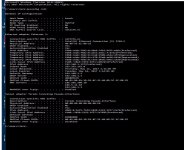 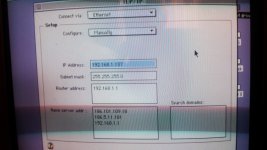 | |
| Posted by: jefframsey on 2017-05-15 09:38:34 You don't want to use 192.168.1.137 for your Mac if it is already in use by the Windows computer. That Windows computer was assigned that IP address by DHCP running on your router. I would use either a very high IP address in the 192.168.1.x subnet (like 192.168.1.254) or a very low one like (192.168.1.2). You can ping the potential IP addresses from the windows command prompt to see if they are already in use or not. You should really login to the router at 192.168.1.1 and check the DHCP range to make sure that you select an IP that is not included in the DHCP range. This will help to prevent any future IP address conflicts. | |
| Posted by: mraroid on 2017-05-15 09:52:20 Thank you Jefframsey.... When I bring up a command prompt in my windows box and try the two you suggested, it says "destination host unreachable". This means that they are not in use and I can use one of them? Thanks mraroid | |
| 1 > |