68kMLA Classic Interface
This is a version of the 68kMLA forums for viewing on your favorite old mac. Visitors on modern platforms may prefer the main site.
| Click here to select a new forum. | |
| TiBook - Metallic/Chemical Smell | |
| Posted by: Innes on 2017-05-09 13:50:52 Got my recently acquired TiBook running 9 with the help of you guys. I've since had an interesting development in regards to a very bad and immensely strong smell its now making whenever it gets a bit warm and the fan spins up. Difficult to pinpoint exactly what sort of smell it it, i guess it seems quite metallic/chemically. Other conversations online have mentioned that the glue in the keyboard can smell like sweat as it gets older but that doesn't seem to be the case here. Its very harsh on the nose and i'm pretty sure its not healthy to be breathing this aroma in so I'm definitely counting the machine as out of commission until this can be solved, especially if its a component failing. This smell hasn't come about instantly and has had maybe 4 or 5 hours of use under moderate strain before this happened. Can anyone advise what might be causing this? | |
| Posted by: unity on 2017-05-09 14:34:41 I would open her up and take a look. My thoughts are either battery or some sorta short against the titanium shell. Not a short strong enough to cause the laptop to die, but something arcing for just small moments. It could even be a cold solder joint arching, such as that as the DC in. | |
| Posted by: Byrd on 2017-05-09 18:47:27 What's the results on the sniff test - around fans/keyboard, any substances spilled on it? | |
| Posted by: Unknown_K on 2017-05-09 20:38:33 Probably came from a smoker and when the fan kicks in you smell it. | |
| Posted by: Innes on 2017-05-10 03:54:58 I've gotten a few bits and pieces from smoking households before, this smell is definitely different to that, here's hoping it is just a residual odor like that, but the way this smells, it literally makes my nose constrict. Whatever its expelling into the air, its thick and feels toxic. For this reason i haven't sniffed it much but for sure, its strongest around the keyboard and back fan vent. Visually, the machine looks like any other TiBook under the keyboard, nothing seems to be damaged visually. I'll take the back off this evening to see if I can see anything amiss from that side. My other thought was that maybe the thermal past has degraded, is that feasible and does it smell when it goes off? If I cant find anything wrong visually, i'll give it a good clean. I'm guessing isopropyl alcohol is generally what I should be using | |
| Posted by: Innes on 2017-05-11 01:48:12 Lifted the back off to have a look. Snapped some images too. Its pretty clean inside, nothing looks amiss. It has allowed me to trace the smell's origin, which is the power in and/or side fan, as mentioned earlier, its when this fan spins up that the smell really kicks in. Snapped a close up of this. Asides from a bit of fluff, there doesn't seem to be anything wrong here visually. I guess i'll give everything a bit of a clean but if anyone has any suggestions or comments I would appreciate hearing them very much. The cold solder joint arching idea referenced this area but i'm unsure what that is or why it would smell. 😛 \ Thanks! 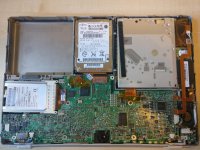 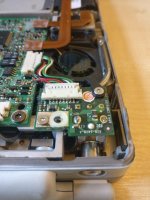 | |
| Posted by: galgot on 2017-05-11 02:44:18 Maybe something spilled on that PMU/fan area , and it smell with heat. Indeed PMU card looks dusty, it’s not too difficult to remove and see how it’s under there and clean it. remove the two torx screws, you should manage to lift the fan too, can remember if it’s fixed with another screw. | |
| Posted by: unity on 2017-05-13 17:42:43 I wonder if its the fan itself, burning up in some way. | |
| Posted by: Innes on 2017-08-29 13:50:26 Hi all no real developments here, so i've brought some new paste to apply to the CPU. It sems like a somewhat complicated dissassembly to get at this so I was wondering if anyone knows of any resourses of this being taken apart. iFixit does of course have a gallery but im hoping there might be a video floating around as I tend to get a better feel for how to do it from there. I've found a couple of repair vids but they don't go far enough (only HD and CD replacements). The machine still smells despite a thorough clean so this seems like the next appropriate thing to do Cheers! | |
| Posted by: AlpineRaven on 2017-08-29 15:31:03 Was there any discharge of liquid around the caps on the board specially PSU area? Cheers AP | |
| Posted by: Innes on 2017-09-06 11:43:29 Ho-kay, so dissassembly went ok, lifted the logic board out to find some sort of green strip over the CPU. Presumably this is what i'll need to clean off to replace with thermal compound. I've snapped a gallery of images of the machine and cant find anything barr possibly this that could be causing the smell (there is fluff which will be removed but it cant possibly be that) https://imgur.com/a/7HOHe <---- Gallery. Images repeted accedentally If anyone has any thorghts regarding what can be seen in these photos, i've appriciate hearing them. A bit of info regarding the green strip would be appriciated, as well as a wee blob of thermal compound is an appropriate replacement. Im not going to charge into doing this if theres a chance it might screw it up. If any other angles/shots are needed please let me know | |
| Posted by: TheWhiteFalcon on 2017-09-06 15:29:39 The green is just a thermal pad. They're used in place of paste for some applications. | |
| Posted by: Innes on 2017-09-07 05:54:07 Interesting, so it most certainly wont have been the pad making the smell. On the basis that it was probably used because the chip is an uneven shape, new paste is unlikely the best thing to apply so i'll scrap that idea and buy a new pad. Looks like i'm back to square one. I've taken a good look at the bower in board and the inverter and found nothing visually wrong with those. There are other power supply components too but no disassembly instructions on iFixit so i'll probably leave those alone, they don't smell at all anyway. | |
| Posted by: TheWhiteFalcon on 2017-09-07 07:15:26 Paste should be fine, honestly. It's possible the pad was just old and smelly. | |
| Posted by: Innes on 2017-11-01 07:35:47 Well, the machines been in bits for a while but I put it back together last night with K5-PRO paste in place of the pad, which actually I don't think is a pad. Upon scraping it off, it had the consistency and feel of play-doh. All in all, this doesn't seem to have solved the problem. The headache inducing smell is still there, and it also got to me while it was opened up while I put it back together. I might run it under load in a well ventilated area to see if that sorts anything out but i'm now pretty skeptical that i'll be able to figure out the cause. Also removed a small spider from where the optical drive was. | |
| Posted by: CC_333 on 2017-11-18 21:35:36 Very strange! What happens if you simply take the fan out? Where are you located? I will hopefully be getting an extra TiBook soon, so depending on what model yours is, I might be able to provide you with spare parts (the one I'm getting is a 1 GHz DVI). c | |
| Posted by: Innes on 2017-11-21 12:14:10 Based in the UK, so i won't hold my breath 😀 But very much appreciate the offer. I've tried running it under load a little bit with the keyboard off to find there has been no smell so far. I'll do some more extensive tests at a later date, but it does actually look like its some sort of degraded solvent in the keyboard after all... | |
| 1 |