68kMLA Classic Interface
This is a version of the 68kMLA forums for viewing on your favorite old mac. Visitors on modern platforms may prefer the main site.
| Click here to select a new forum. | |
| SE fdhd in need of screen adjustment | |
| Posted by: marcelv on 2017-04-17 08:46:32 Hi, I have a problem with a SE fdhd, the system is working ok, except for the screen. The top left corner seems to be lower than the right one. The overal picture is reasonably straight. In the second picture i have drawn a box around the screen so you can see the problem better. Can anyone tell me how to adjust the left top corner? 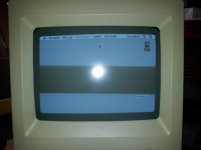 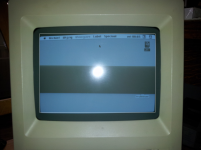 | |
| Posted by: SlateBlue on 2017-04-17 12:40:47 I believe the magnets attached around the yoke are used to adjust the corners/edges. If you look at the yoke from the rear of the Mac, you'll probably need to adjust the one at 1 'o clock. All it takes is a gentle twist one way or the other. Look at the screen as you twist to find out which way. Then you can use a dab of paint or hot glue to hold the magnet in place. | |
| Posted by: marcelv on 2017-04-17 13:26:28 Hi thanks for your answer. Just for the record, the one you talk about is this one? 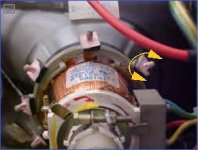 | |
| Posted by: SlateBlue on 2017-04-17 20:27:36 That is correct. Make note of it's current position before you make any adjustments. | |
| Posted by: Themk on 2017-04-18 12:36:00 A little adjustment goes a long way with the magnets, and once they are freed, can easily be shifted, so you will want to put something in there to stop them from moving later. | |
| 1 |