68kMLA Classic Interface
This is a version of the 68kMLA forums for viewing on your favorite old mac. Visitors on modern platforms may prefer the main site.
| Click here to select a new forum. | |
| Quadra 700 Recovery CD Major Issues... How can I get 7.6 on this thing? | |
| Posted by: Johnnya101 on 2017-04-04 16:56:42 Hi, I'm trying to install 7.6 to my Q700 using that apple recovery cd with all the OSs on it. I go to CPUs and go under Q700, open disk copy, make the img files and mount them, blah blah blah. Except disk 7 will have checksum errors, along with others. The entire cd image is also having checksum errors. What's the issue? Can anyone provide me with a good known 7.6 install for a Q700? Or at least a known working cd for this install recovery cd? How would I burn it on OS X? I've got a floppy emu but sadly a Quadra only has SCSI... | |
| Posted by: jhorvath911 on 2017-04-04 17:02:25 I've never had checksum errors but at the same time I'm using a real cd not burnt. For each os there should be a net install image that you double click and then it mounts the rest of the images and starts the install. | |
| Posted by: Johnnya101 on 2017-04-04 17:03:09 Let me check eBay for those CDs... I have a feeling I'm getting errors because i burnt it on windows. | |
| Posted by: MJ313 on 2017-04-04 17:04:28 If you've got the long-ass floppy cable, you could always run the Floppy Emu straight to the header on the logic board (at least to get you access to some disk images of 7.6, if you have them?) | |
| Posted by: Johnnya101 on 2017-04-04 17:06:48 Thats a good idea! Maybe Ill try that... But is there any way to burn the correct way in OS X with the correct image? The one I used was from the garden. I don't know if thats the issue, a corrupted upload, or the way I burned it. | |
| Posted by: MJ313 on 2017-04-04 17:08:17 You probably did it right, but if you have another disk, you might want to try burning at the slowest possible speed. You may also want to try the straight 7.6 install from the garden. I haven't used any of the those, but might be worth a gamble on a disk. And then go the disk image route on the FloppyEmu. | |
| Posted by: Johnnya101 on 2017-04-04 17:27:31 How can I burn a disk on OS X if you know how to? EDIT Like a bootable installer CD... | |
| Posted by: Johnnya101 on 2017-04-04 18:16:02 I think I found my issue! People have had this problem too and said to use shrink-wrap. I downloaded the sit file today and will put it on my floppy emu and make it a floppy on my SE/30 tomorrow and hopefully that will be able to mount the images. | |
| Posted by: MJ313 on 2017-04-04 18:28:09 Well, after reading the garden comments, it looks like the 7.6 CD image is bad so... yeah, don't use that. I downloaded the MacOS761CD.ZIP, used Archive Utility to unzip, and used Disk Utility in OSX to burn the toast image to a disk at 8x. It mounts on my G3 fine, but I don't have a machine that would be capable of booting from it to test for you. Maybe give it a go? | |
| Posted by: Johnnya101 on 2017-04-04 18:39:26 Ill try possibly after I try the shrink wrap. The 7.6 image was bad or the legacy recovery image was? Ive also seen that I should just install 7.5.5 vs 7.6. What do you recommend? Any differences? | |
| Posted by: Juror22 on 2017-04-04 19:03:42 I burned my CD, using toast titanium. I had the same issue once when installing from the CD to a PB145b. Since there are so many floppy disk images, there were always a few having issues, like you mentioned e.g. checksum, etc. I assumed the CD was fine and the CDROM had issues and swapped out the CDROM device with a known good one and had the same issues. I re-burned the installer CD and the newly burned one worked perfectly to install the OS. | |
| Posted by: MrGasS27 on 2017-04-04 23:43:24 Hi, in Macintosh Garden you can find a universal version of System 7.6 with all languages for all Macintosh. MG will give you an ISO, into this u will find a lot of img files. | |
| Posted by: Johnnya101 on 2017-04-05 03:42:31 Well burning a cd is fine and all... but I don't know how to burn an HFS cd on OS X without toast. I have toast on my Mac OS 9 VM on sheepshaver, but I would really doubt you can write CDs from there. Let me try. Nope | |
| Posted by: MJ313 on 2017-04-05 05:10:35 I'll send you this 7.6.1 cd i burned last night. I am pretty sure it's fine. You may have this all worked out by the time it shows up, but you will have it for backup. | |
| Posted by: Johnnya101 on 2017-04-05 05:24:31 No, its fine! Im trying the shrink-wrap first. Then maybe we can do that. Ill at least pay for the CD and shipping! | |
| Posted by: MJ313 on 2017-04-05 05:34:54 It's no problem, it's like a dollar something to ship it. I'll get it out tonight on my way home-- good luck! | |
| Posted by: 360alaska on 2017-04-05 10:14:23 To burn .toast files in windows use infrarecorder: http://infrarecorder.org/ | |
| Posted by: Johnnya101 on 2017-04-05 16:41:39 Thanks Alaska, Ill have to try that later. Of course out of everything, the OS 8 installer worked! But not 7! I need 7 because 8 is really slow. | |
Posted by: Alex on 2017-04-10 13:02:54Well, after reading the garden comments, it looks like the 7.6 CD image is bad so... yeah, don't use that.What I have did not come from the Macintosh Garden but I've not tested it. I can post it somewhere if you wish. I have 7.6.toast file if you wish. I also have .dsk images of each disk 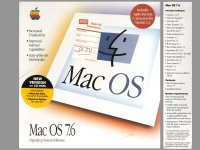 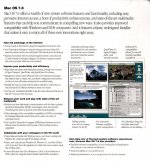 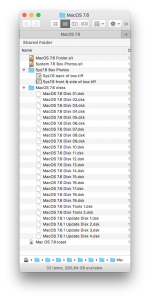 The contents of this directory listing can be downloaded by anyone using the following Google Drive link. It's a compressed DMG to save further time downloading. It's 210.5MB in size. https://drive.google.com/drive/folders/0B32C6NlrH1VXZlQ5dWdyQ1dsZzg?usp=sharing The contents of this directory listing can be downloaded by anyone using the following Google Drive link. It's a compressed DMG to save further time downloading. It's 210.5MB in size. https://drive.google.com/drive/folders/0B32C6NlrH1VXZlQ5dWdyQ1dsZzg?usp=sharing | |
| 1 |