68kMLA Classic Interface
This is a version of the 68kMLA forums for viewing on your favorite old mac. Visitors on modern platforms may prefer the main site.
| Click here to select a new forum. | |
| Titanium PowerBook Won't Close After Lid Replacement | |
| Posted by: teovall on 2017-03-15 22:07:06 I just got two Titanium PowerBook G4 laptops on Craigslist for $30. One is a 400MHz (Mercury) model with extensive water damage. The other is a 550MHz (Onyx) model with broken hinges but working otherwise. I moved the entire lid/display assembly from the 400MHz to the 550MHz. Everything works, except the lid won't close all the way. It starts to resist strongly at around 5 degrees from completely closed. This leaves about an inch of space between the latch and the screen. I'm afraid to put any more pressure on it for fear of breaking the hinges again. Opening it more than 5 degrees feels normal. I can't see anything that would block it and I triple checked everything as I put it back together. Everything seems to be seated properly. Is the 400MHz lid just not compatible with the 550MHz model or did I do something wrong? | |
| Posted by: Byrd on 2017-03-16 02:17:02 Compare the casings and hinges side by side, taking note of the latches. I suspect they will look similar but not quite compatible. | |
| Posted by: teovall on 2017-03-16 11:03:56 They're identical best I can tell unless there's some sub-millimeter difference somewhere. | |
| Posted by: beachycove on 2017-03-16 12:47:40 Is it possible that the hinges were put on back to front, i.e., reversed? | |
| Posted by: teovall on 2017-03-16 14:14:42 No, the hinges are part of the lid assembly and I definitely got the screen the right way around. | |
| Posted by: mrpippy on 2017-03-16 17:07:43 Not enough slack on a cable coming from the display through the hinge? That's the only thing I can think of if there's no obvious mechanical obstruction. Also I assume the displays are interchangeable but don't know it for a fact. | |
| Posted by: unity on 2017-03-16 18:02:33 The hinges are adjustable. They should be tightened ONLY in the closed position. Pop the hinge covers off, loosen them. Then put a pieces of card stock, something thicker. Or if you have something for, lets say, a box of crackers. Double up the thickness. Make two of these and places one on each side forward the hinge on the edges of the PowerBook. Now close and press gently down at the rear of the display as you tighten the hinges. | |
| Posted by: unity on 2017-03-16 18:06:42 Scroll down to last listing. You can see here they provide four "pads" to place around the PowerBook for adjustment. I actually am amazed these kits are still around. I bought one long ago for my TiBooks. http://www.udesigncorp.com/portfolio/datacal/Products/Glides.php 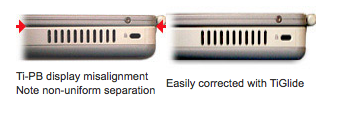 | |
| Posted by: teovall on 2017-03-16 21:21:45 Thanks for the info unity. Unfortunately that didn't work. For now, I've loosened the screws enough that I can close it. The screen's a bit wobbly now though. | |
| Posted by: unity on 2017-03-17 08:04:44 Did you try lubricating them? The physical dimensions are all the same. So its makes no sense that there would be an issue. | |
| Posted by: teovall on 2017-03-17 23:12:02 What kind of lubricant would I use? I don't really think that's it though. It's smooth and easy to move the rest of the way. I took another close look at the hinges and it looks like they're hitting the stops. They look the same as the original though so I don't understand why it doesn't close. The lid closed fine on the donor laptop. | |
| Posted by: unity on 2017-03-18 07:15:43 Any light oil will work, but use very little. It is strange, something is not right. I wonder if it is a cable issue as mentioned. | |
| Posted by: teovall on 2017-03-18 10:05:43 The cables aren't binding. I've checked with the hinge covers off and they still have slack at the point where it won't close further. | |
| Posted by: unity on 2017-03-18 10:21:44 So if you close it as far as willing, you can slip cardboard between the screen and body all the way, correct? Well, except the hinges. Meaning the screen and body is touching in no way, right? | |
| Posted by: teovall on 2017-03-18 14:08:07 Yeah, there's a gap all the way around. | |
| 1 |