68kMLA Classic Interface
This is a version of the 68kMLA forums for viewing on your favorite old mac. Visitors on modern platforms may prefer the main site.
| Click here to select a new forum. | |
| SE/30 networking almost working, help | |
| Posted by: hunter44102 on 2017-03-07 17:17:32 OK I bought some SE/30's and re-capped one. This one did not have a hard drive but I put in a 40GB quantum from another machine in the same lot. The machine booted straight up into 7.5.5 with no issues! yay. Looks like this 7.5.5 is all that is installed. This machine has the Asante network card. I am guessing the drivers are installed because the machine I grabbed the drive from had one. However I don't see anything in system folder. I enabled the newer open transport networking, and gave it an IP Address on my LAN and connected to 10/100 switch, then up-linked to router. I plugged in the network cable and the green light came on with brief network activity. Is there any tools/software on 7.5.5 that would allow me to ping or test the connection? What would be the simplest software I can try or install? (I do have a Floppy EMU and working 1.44 on this machine) | |
| Posted by: rickrob on 2017-03-07 17:29:45 You'll need a Ping Utility like AG Tools , MacTCP ping, or OTTool. If you have a PC on the network, just ping the Mac and see if it responds. | |
| Posted by: hunter44102 on 2017-03-07 17:36:33 Didn't respond. Will try installing Asante disk next | |
| Posted by: rickrob on 2017-03-07 17:48:15 I'm assuming it's a MacCon SE/30-- There's a switch on the back for AUI vs TP. Is that set correctly? | |
| Posted by: hunter44102 on 2017-03-07 18:07:09 TPL, TPN, TK It is set to TPL. Not sure what that is | |
| Posted by: Johnnya101 on 2017-03-07 18:14:37 Tp is twisted pair. That's where you want it switched to. EDIT oops got posts mixed up. Tpl would I assume mean twisted pair link? | |
| Posted by: rickrob on 2017-03-07 18:29:45 TPL= Twisted Pair, Link integrity enabled TPN= Twisted Pair, Link Integrity not enabled Tk=Thick Ethernet (10 Base 5) Tn=Thin Ethernet (10 Base 2) Link Integrity is used to determine if there's a connection to another device like a hub. | |
| Posted by: rickrob on 2017-03-07 18:43:59 What version of the Asante driver do you have? I'm not sure if it's the latest, but my version is 5.6.0 | |
| Posted by: joethezombie on 2017-03-07 18:46:52 I don't think the networking stack on the SE/30 initializes until you launch an application that uses it. So, it won't respond to ping requests until you start Fetch or MacTCP Ping or something to start the stack. Best to ping the PC from the SE/30 with MacTCP Ping. | |
Posted by: rickrob on 2017-03-07 18:59:30I don't think the networking stack on the SE/30 initializes until you launch an application that uses it. So, it won't respond to ping requests until you start Fetch or MacTCP Ping or something to start the stack. Best to ping the PC from the SE/30 with MacTCP Ping.I always forget this. I just tried my SE/30 and I had to start MacTCP ping before it would respond to a ping. I'm running OT 1.3 | |
| Posted by: Boctor on 2017-03-07 19:53:17 10/100 switches' auto-negotiation never worked in my experience. I needed to plug my SE/30 into a Leviton 10BaseT switch before I could assign it an IP on the router. OpenTransport 1.3 seemed to work fine. I also needed an AUI transceiver, though, since the PDS card only had TKN and TN for thicknet and thinnet, | |
Posted by: bobo68 on 2017-03-11 14:01:28What version of the Asante driver do you have? I'm not sure if it's the latest, but my version is 5.6.0Up until recently Asante offered the old drivers and manuals for download. Seems to be gone. I think 5.6.1 is the latest version of Asante EtherTalk. | |
| Posted by: hunter44102 on 2017-03-19 07:13:32 OK I managed to unstuff the Asante5_6_1.sea.hqx into a folder 'Asante Ethernet Installer', However, that gave me Asante Ethertalk Installer.imag When I open this file, it wants to write it to a Floppy disk. Do I have to do this or is there a program that can mount this? I don't see any way to mount it. Thanks! | |
| Posted by: hunter44102 on 2017-03-19 08:18:03 OK I have successful pings finally (with MacTCP Ping utility)! Now to installing FTP and Telnet 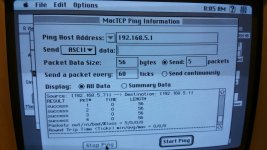 | |
| Posted by: joethezombie on 2017-03-19 08:19:24 Nice! Excellent job, hunter! | |
| Posted by: hunter44102 on 2017-03-19 09:34:57 Thanks Joe I have Fetch FTP working great to my desktop PC! I transferred iCAB2.9.9 68K version to the SE/30 and installed it. iCAB issues: iCAB launches, but I just get a menu bar. When I click Navigate->HomePage nothing happens. When I click New Window, nothing happens. I try messing with windows and still nothing. I only see the toolbar and the desktop! One time Open URL popped open but there was no where to enter an address. I don't plan on web surfing on this machine but it would be nice to see it work.. | |
| Posted by: !Beaker on 2018-01-23 07:57:40 I noticed that iCab needs a certain amount of RAM. Same behavior as mentioned by hunter44102, I've seen on a small Performa with just a few Megs of RAM installed. In addition, web sites became quite large, I'd suggest opening a slim site to prevent the system from freezing. | |
Posted by: CC_333 on 2018-05-10 11:37:55In addition, web sites became quite large, I'd suggest opening a slim site to prevent the system from freezing.Even so-called "slim" sites are much more bloated and complex than anything those older browsers were ever designed for, but many mobile sites are light enough that they can work somewhat (Classilla is a good case in point here). I remember being able to effortlessly browse on Windows 3.1 running IE 5, connected to dial up, but that was back in 2005 or so. Things have changed, and I doubt that setup would work at all anymore; maybe I should try?). c | |
| 1 |