68kMLA Classic Interface
This is a version of the 68kMLA forums for viewing on your favorite old mac. Visitors on modern platforms may prefer the main site.
| Click here to select a new forum. | |
| Back to the 3400c | |
| Posted by: just.in.time on 2017-02-06 16:52:19 Finally reacquired a PowerBook 3400c 😀 Middle of the road 200mhz processor, and stock 2gb hard drive, BUT it does have the RAM maxed at 144mb. It needs a little bit of work on the hinges, has some display ghosting/shadowing, and is missing the rear and ADB port doors, but otherwise looks to be a solid 9/10 cosmetically. Also, a complete shock that the battery appears to be taking a charge 🙂 No idea what its capacity will be like, but a pleasant surprise non-the-less when you get into the habit of seeing the control strip just showing the power cord since the battery is so gone it doesn't even show up. I used to have one from ~2003 to 2007, with it being my main laptop up to 2006. It also had the RAM maxed out, however it sported the 240mhz processor. It's a special model to me in that it was the last "main" machine that I would ever use and run primarily classic Mac OS on as my day-to-day operating system On the flip side of the coin, it was also the first time I owned a laptop that was "capable" of running Mac OS X on via Xpostfacto. I kept a minimum sized partition on it for 10.2 at the time for occasional usage and got familiar with Terminal on it. However, it was definitely pokey on performance when doing nothing, and painfully slow once you pushed it to anything harder than playing around with Terminal. It's been a long time 😀 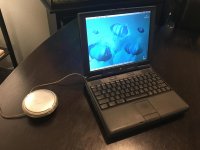 | |
| Posted by: MJ313 on 2017-02-06 16:54:42 Remove that PRAM battery! (says everyone who has had a 3400 killed by a leaking pram battery) | |
| Posted by: just.in.time on 2017-02-06 17:03:33 I will go hunting for that PRAM battery tonight }🙂 Is it just located under the keyboard on the 3400 series? It's literally been about 10 years since I opened one. | |
| Posted by: MJ313 on 2017-02-06 17:45:30 Yes, it's pretty easy to find... right under the keyboard... back, left corner. I think you have to remove the speaker panel. I think it's taped to that. I can't recall exactly, as it's been awhile. Since your machine is working, you are lucky... get it out quick. You can see a tiny bit of it right here by the guy's left index finger, in its green wrapper. https://www.ifixit.com/Guide/PowerBook+3400+M3553+Speaker+Panel+Replacement/5572 | |
| Posted by: just.in.time on 2017-02-06 17:52:45 Oh okay, it's all coming back now 😀 Looking over the iFixit helped bring back some memories of the inner working of this thing. I should have some time to get it out tonight. It just needs to hang on for another 6 hours. | |
| Posted by: just.in.time on 2017-02-07 03:53:58 PRAM battery is removed 😀 It is one of the Varta branded Ni-MH. The label lists it at 7.2v, however I was only getting 2.66 volts off it. This is after being hooked to a well powered unit (between wall and main battery) for the better part of 7 hours. I don't think it was going to ever charge back up beyond that. I'm impressed that the main Li-ion battery still works so well, providing ~2 hours of run time. Do they still make replacement PRAM batteries for this PowerBook? | |
| 1 |