68kMLA Classic Interface
This is a version of the 68kMLA forums for viewing on your favorite old mac. Visitors on modern platforms may prefer the main site.
| Click here to select a new forum. | |
| Installing a Fan in a iBook G3 Clamshell | |
| Posted by: belgaonkar on 2017-01-26 17:04:53 My iBook G4 Clamshell seemed to be running very hot and during OS installs it would freeze up. I looked online but couldn't find anyone who had actually installed a fan in a clamshell. The built-in heatsink seems to cool the G3 fine, but with a G4 its not cutting it. So I went online and bought a 25mm x 25mm x 5mm fan to stuff in place of the speaker. I then grabbed power off the motherboard and she seems to be working fine! 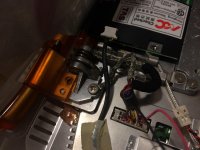 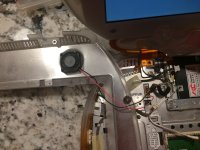 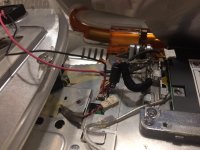 | |
| Posted by: Carboy7 on 2017-01-26 17:29:44 Cool! (ba-dum pish) Is the fan being powered by the laptop itself? | |
| Posted by: belgaonkar on 2017-01-26 17:31:48 Yes! Don't think its the safest way, but i'm pulling power from the display connector. | |
| Posted by: Byrd on 2017-01-26 19:27:05 Another thought: could you remove the modem card and install a slimline fan in it's place? A thicker replacement heatsink might also do. | |
| Posted by: Macdrone on 2017-01-27 09:00:02 You turned it into a G4? what speed? how? can you do it for me? | |
| Posted by: Compgeke on 2017-01-27 09:20:47 See: https://68kmla.org/forums/index.php?/topic/28556-imac-g3-rev-a-c-g4-cpu-upgrade/ | |
Posted by: belgaonkar on 2017-01-27 11:47:35could you remove the modem card and install a slimline fan in it's place?The modem is encapsulated and so adding a fan would just move around the current airflow. This fan kicks out 2.2CFM and seems to just do the trick. | |
| Posted by: belgaonkar on 2017-01-28 08:44:48 The heatsink on the right is for a 533MHZ G4 Digital Audio (same chip that's in my clamshell) and the one on the left is the factory heatsink. The factory heatsink doesn't even use thermal paste, its just one of those pads. I used one of those laser temperature measures and it shows the factory heatsink can get up to 120F. Even though you loose the onboard speaker while installing a fan, the clamshell has a 3.5mm headphone jack, so audio isn't completely lost. Even if you don't have a CPU upgrade in your clamshell, I think this is worthwhile to extend the longevity of your clamshell. 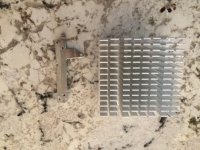 | |
| Posted by: belgaonkar on 2017-01-30 13:53:36 Turns out you can't mount a fan in the speaker location. The fan will hit and intervene with the display connector. I mounted it right beside the CPU (where the modem goes) and that seems to help. Still a fan that is at max 4mm tall. | |
| 1 |