68kMLA Classic Interface
This is a version of the 68kMLA forums for viewing on your favorite old mac. Visitors on modern platforms may prefer the main site.
| Click here to select a new forum. | |
| GCC UltraDrive 20 & Macintosh | |
| Posted by: yamaha94 on 2017-01-25 13:43:50 Hi Everyone - I was snooping around my local electronics Recycling shop and found a Vintage Macintosh External Hardrive. I can't find anything about these units. Made by GCC Technologies "Ultra Drive 20". Did a great clean up - filled with so much dust and debris. I should of taken a before and after picture. Still Powers up. Still have to test with a Serial/SCSI cable to my Macintosh SE to see if it still 100% works. Total price = $10 dollars. Does anyone have any manuals or information on these units? All I know its a third party peripheral similar to the Macintosh Branded ones. Much thanks (Picture Attached) 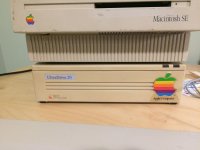 | |
| Posted by: finkmac on 2017-01-26 07:39:10 If it's SCSI, then it's probably just a generic enclosure, many companies made their own during the late 80s and 90s. | |
| Posted by: IlikeTech on 2017-01-26 10:02:50 That is an awesome deal, even if it was stuck. | |
| Posted by: yamaha94 on 2017-01-26 14:13:08 Yeah its SCSI. On the back there is this number that is currently set to "0" with two buttons. Any idea what it does? its hooked up directly to the hard drive. I can provide a picture if you like | |
| Posted by: Gorgonops on 2017-01-26 14:50:48 It's the SCSI device selector. It plugs into the jumper area on the drive so you can change the ID without opening the case, and they're relatively common on better quality enclosures. | |
| Posted by: yamaha94 on 2017-01-30 15:29:46 Cool stuff. I set it to "0". It turns on but freezes my Macintosh SE desktop until I turn it off. Any ideas why It is functioning this way? Do I have to assign it a different number like "1"? Much thanks | |
| Posted by: jsarchibald on 2017-01-30 15:41:53 I think 0 is the default of the Mac, so you would need to set it differently. I see the drives set on all sorts of numbers, 4 seems to be common for some reason? Never really looked too much into SCSI to get my head around it. | |
| Posted by: yamaha94 on 2017-01-31 11:55:15 Yeah I have no idea. I will play around with it and see what works. I might try Lido and see if it can see the drive. Do you think I need special software to see an external SCSI drive? I don't think so but I may be wrong. | |
| Posted by: bibilit on 2017-01-31 12:56:31 You should avoid 0 and 7, 0 will be conflicting with the internal drive, 7 is reserved to CPU IIRC. 4 or 5 should be fine. | |
| Posted by: Gorgonops on 2017-02-01 10:09:34 Zero would be the apropos setting if you were using it with a Plus but, yeah, it's going to conflict with the internal drive on an SE. | |
| 1 |