68kMLA Classic Interface
This is a version of the 68kMLA forums for viewing on your favorite old mac. Visitors on modern platforms may prefer the main site.
| Click here to select a new forum. | |
| Macintosh Classic Question and request | |
| Posted by: Pablooski on 2017-01-22 21:22:30 Hi guys! A few days ago I bought my first Macintosh Classic (and I suspect the only one in my country). The machine works very well, with only issue of the dead PRAM battery and needed to recap. I'm new to this so I have a question. Very occasionally, when I turn on the mac, an SAD MAC error appears with code 00000003 00004000. This is fixed by restarting the computer. I suspect it is the RAM on the motherboard but I wanted to confirm it with you guys. What would be the solution to stop this error for good? I also have a request. The Mac came with its original System 6.0.7 disks. The main disk works fine, and thanks to this I was able to install the operating system on the hard drive. However the other two are dead. I have tried to get an image of the discs on internet but it is impossible (and buying it on ebay is not a option because of the expensive shipping prices to my country, and because no one insures that they really work). If any of you have the System Adition disk of System 6.0.7 and Macintosh Basic disk for the Macintosh Classic I ask you to upload an image to this post. I attached them some photos of the records that I looking for. Thank you very much to all! 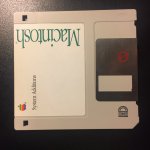 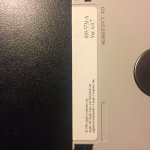 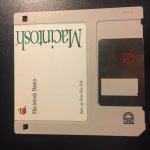 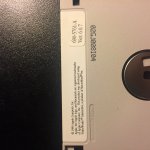 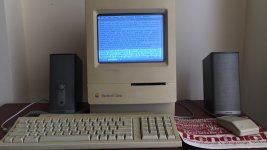 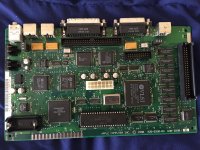 | |
| Posted by: just.in.time on 2017-01-22 22:53:21 Honestly, why not go for the 6.0.8 disks? There are images of them all over the internet. It offered a few fixes and some updates in regards to the chooser/printing if I recall correctly and didn't take up much more RAM or hard drive space. Also, I've never tried posting a disk image file to 68kmla, but given that it can't handle MP4 video files (they get rejected when you try to upload), I doubt it will like disk images. As for your occasional boot issue, i'd guess it being related to a failing capacitor. Without looking up the codes, but if it was a problem with an actual RAM chip I would imagine the error would happen every time the computer went to address it (at boot time during the ram check). Since the Classic is known for its need of new capacitors on the logic board I'd start there first, then PSU, and finally Analog board (mostly just because it probably needs it as well, not that it is causing your problem). If the problem still persists then that is another discussion. Side question, do you have those Bose speakers hooked up to the Classic? | |
| Posted by: bibilit on 2017-01-22 23:19:38 Yes i agree with Just.in.time remove the capacitors and clean the board first, then replace capacitots with new ones. The Classic Board is pretty easy to work at. | |
| Posted by: james_w on 2017-01-23 04:26:44 My Classic's caps were all leaking and starting to corrode the motherboard when I opened it up a few weeks ago to do the recapping. As is often the case, you couldn't see the damage until the caps had been removed. You definitely need to recap/get it recapped now unfortunately, otherwise you'll have a total failed motherboard soon 🙁 | |
| Posted by: james_w on 2017-01-23 04:27:16 The good news is that now my Classic is up and happily running 🙂 | |
| Posted by: BadGoldEagle on 2017-01-23 05:59:40 You can download 6.0.8L US (for Mac Classic) and 6.0.7 in Spanish here on my dropbox link -> https://www.dropbox.com/s/6e11iwa46nel6tg/System%206%20for%20%20Pablooski.zip?dl=0 Can't find 6.0.7 (US, 1.44meg) anywhere though... And you can download the Macintosh Basics floppy here Do you know how to make floppies for a classic Mac? Head this way -> http://www.hardwaresecrets.com/how-to-generate-floppy-disks-for-old-macintosh-computers/ A Mac Classic can handle HD floppies so you don't need to read the stuff for 800k (DD) ones. You should be able to re-use the two "dead" floppies... BUT be careful, sometimes disks get damaged and if you hear a hissing kind of sound, it means the disk is toast. | |
| Posted by: Pablooski on 2017-01-23 17:01:40 Thanks everyone with the help. Just.In.Time i like the idea to have a copy of the original disk, that's why im searching that images. And no, i don't have Bose speakers hooked up to the Classic, but i tried and sounds very well. BadGoldEagle, thank you very much for the disk images, specially the Basic! For everyone, my poor Macintosh Classic have a new issue today, the machine waked up today with well know chessboard screen... so its time to recap. I found the capacitors list in maccaps.com so i gonna do it on saturday. But.. this kind of issue are common on this machines? Its normal that in one day to another this things happen with withs old Macs? 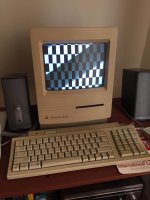 | |
| Posted by: just.in.time on 2017-01-23 17:43:24 Yeah that can be decently common as a part is failing. Luckily, you are literally getting to see day 1 of the failure occurring so I'd hazard a guess that the traces haven't yet corodded away and you will be able to get away with just a remove caps, wash, and recap 🙂 I had an SE/30 that I had shipped to me. Turned it on, ran for 5 minutes, turned it off, turned it back on an hour later and it ran for another minute and a half or so before hard locking. And that was it. After a recap job and washing it was good to go again 🙂 So to answer your question, I've literally had a machine working just fine one second and then gone another. But seriously, time to recap ASAP. I wouldn't shelve this project for a later date. How's your soldering skills? Edited to Add: Just saw where you said you are recapping this coming Saturday. Good luck! | |
| Posted by: Pablooski on 2017-01-23 18:18:35 Well... its fun to learn all of this. My soldering skills are pretty bad i think, the only thing I have soldered has been the base of the battery of a laptop with windows xp. I managed to do it fairly well however I would not risk doing it on this Mac. Without overdoing it may be the first and only macintosh I've ever seen. From what I know, in Ecuador there was very little culture on apple computers, people here never liked the Macintosh for cost reasons, and still today. The soldering work its gonna do it a profesional friend of mine, that's why I will wait to Saturday. Its gonna be a very interesting day 😉 One more thing, Few minutes ago I opened my mac one more time to inspect the analog board but i does't saw nothing out of common. BUT, i found that the the video board was little disconnected from the screen conector (i dont know the name of that part, sorry) so I pushed that part with this care to placed in the right place. Later, when i turn on the Macintosh, like magic, the machine worked again like nothing was happends. What a strange thing... i need to learn more about the monitor of this machine if i whant to have it in good shape for many years. | |
| Posted by: james_w on 2017-01-24 02:45:47 Good luck with the recap - it'll be great for you to have a happy Mac again 😀 | |
| Posted by: bibilit on 2017-01-24 23:42:14 The Checkerboard pattern can be a sign of low voltage, remove the Analog board capacitors also. | |
| Posted by: Pablooski on 2017-01-28 14:10:22 Hi everyone! Good news, the recap of the Macintosh Classic was a succes and now works like new. No more sad mac and chessboard screen. With the technician we realized that the analog card was in excellent condition, which is a relief. The only remaining step is to remove the yellow from the plastic with retrobright, but that will be a project for a couple of weeks. I am very happy with the result, this machine will be operational 27 years more.  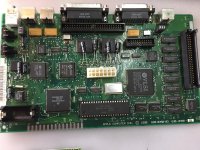 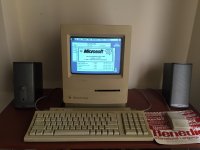 | |
| Posted by: Scott Squires on 2017-01-28 14:21:06 Feels great to bring it back from the dead, doesn't it? 🙂 | |
| Posted by: just.in.time on 2017-01-28 19:59:12 Congrats! That's good that no traces got wrecked. | |
| Posted by: james_w on 2017-02-01 08:14:38 Woo! \o/ | |
| 1 |