68kMLA Classic Interface
This is a version of the 68kMLA forums for viewing on your favorite old mac. Visitors on modern platforms may prefer the main site.
| Click here to select a new forum. | |
| How to best clean a Mac SE case? | |
| Posted by: brlawyer on 2017-01-16 13:25:58 Folks, just my second post here; so apologies if this is dealt with elsewhere. Where I currently work I have just found (buried somewhere in the organization's archives) a really nice Mac SE, most probably with one floppy + HD, plus original keyboard/mouse and a Apple CD drive - I was able to get the whole package for free (the place used to be a Mac-only outfit until 1996) and will try to turn it on tomorrow, once I am able to take it home. However, people at the time used some sort of velcro to attach a monitor filter to the SE's display, which has led to some stain/discoloration compared to the original case color. What is the best way to clean the case/remove any adhesive stains without damaging the outside of this Mac? Tks a lot for your help. | |
| Posted by: Johnnya101 on 2017-01-16 14:01:46 Probably try warm water first... then move on to something else. I'm going to try this soon, but if the case is yellowed you can always retr0brite it... Also, REMOVE THAT CLOCK BATTERY! It will explode sooner or later! And probably best to get the capacitors all recapped soon too if they haven't already leaked. EDIT Do NOT turn it on without checking the inside first for leaking caps. You will only hurt it more. If you get inside and find nothing leaking your good to go. | |
| Posted by: jsarchibald on 2017-01-16 14:14:52 If it's just an SE, not an SE/30, then caps shouldn't be a big deal. The SE seems to be very tough, especially compared to the SE/30. Still, it would be a good idea to crack it open, clean out any dust and bugs, check that everything is connected, and possibly even service the floppy drive (check the wiki on this site, helped me get my head around it and I'm no tech). As for cleaning, I always start with paper towel that is slightly damp to get rid of any external marks, don't be afraid to get stuck in. If this doesn't work, I then move onto some wipes, as they seem good at getting rid of any gunk. However, if we are talking discoloration here, cleaning won't fix it. The computer has been subjected to UV at some point, but the areas covered by the screen won't have been, hence the difference. This will require retrobrite, or as I found over the weekend, under the Australian sun for a few hours (lol). Let us know how you go, if the above doesn't work, there are other methods that can be used, but we are talking worst-case scenario for those. Good luck! | |
| Posted by: Johnnya101 on 2017-01-16 14:35:36 I only put check the caps because you never know... | |
Posted by: jsarchibald on 2017-01-16 14:44:43I only put check the caps because you never know...Exactly right. The AB may have leaky caps, and it's always good to check, but I rarely find an issue with them. That said, never assume and always check everything just to be sure. Only cap issues I have seen have been the PSU's on the SE, so that's good news. | |
| Posted by: BadGoldEagle on 2017-01-16 15:09:39 Yep. 1st thing you should do is remove all the plastic parts. Be sure to take out the programmer's switch (if present) before attempting to remove the rear case! I broke too many of these things already that way. (okay I only broke one, but that's one too many!) Remove the logic board, the hard drive/floppy disk drive support thing (4 screws), then the analog board+CRT (if you don't want to discharge the CRT that's okay, take it out along with the Analog board). That's about 4 screws for the analog bord (YMMV) and 4 more for the CRT. After that, remove the Chassis (again 5 more screws) You just need soap, a sponge (preferably one with a scrubber, but a soft one of those), hot water, and a sink or bath tub. I cleaned my SE yesterday. And here are the before and after shots (forgot to take a picture of the bucket before I cleaned it up! Damn.) BEFORE AFTER 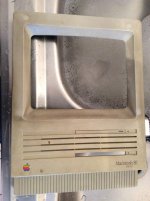 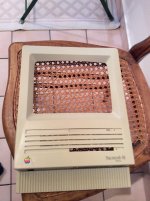 Quite a change innit?? 🙂 If some stains refuse to come off, simply heat up the plastic a little bit with some really hot water for like 5 seconds. Then scrub scrub scrub and the stain should fade away in seconds. Now it sits happily with its brothers in my bedroom. Macs are like dogs in a way: they can't come inside until they've been thoroughly cleaned. 😛 This SE was one filthy animal, I'll tell you that! | |
| Posted by: Compgeke on 2017-01-16 16:14:02 I've personally had good luck with plain simple green and a soft sponge to get dirt off compacts (and other plastic things). Don't have to disassemble the system at the very least. Here's a Plus I did with it: http://imgur.com/a/ihYT3 . Could've done a better job with a little more work but I just wanted the front to be picture ready. | |
Posted by: joethezombie on 2017-01-16 16:20:50Macs are like dogs in a way: they can't come inside until they've been thoroughly cleaned. 😛Ha ha ha! :lol: So true! Especially the keyboards! The worst part of any new addition. | |
| Posted by: unity on 2017-01-16 16:31:33 Non-bleach Scrubbing Bubbles. I go through LOTS of this stuff every year for multiple things. But cleaning Mac is what I use it most on. Spray on dry surface. Soak. Spray more to keep wet. Rinse. Reapply as needed and use a cloth if needed. Love this stuff. | |
| Posted by: Unknown_K on 2017-01-16 16:47:22 I stripped a few SE and SE30's in my time. For cleaning I suggest liquid dish soap (with oxy if available) and a soft scrubber with warm water. Any sticker residue will come off with GOO GONE, and there are other products for sharpies. Quite a bit of yellowing is just dirt, smoke, and damaged surface plastics that come off with soap and water. Magic Eraser pads with water or Windex work well for small imperfections (you can make an old iBook look new with those). | |
| Posted by: peafour on 2017-01-17 09:03:56 Seconded, I've had great success cleaning off old Macs using a Mr Clean Magic Eraser and water. I stripped a few SE and SE30's in my time. For cleaning I suggest liquid dish soap (with oxy if available) and a soft scrubber with warm water. Any sticker residue will come off with GOO GONE, and there are other products for sharpies. | |
| Posted by: Johnnya101 on 2017-01-17 11:50:48 Be careful f you use magic eraser, scrubbing too hard will remove texture!! | |
| Posted by: brlawyer on 2017-01-17 12:08:02 Guys, I just wanted to sincerely thank you for the very useful replies - I finally had the time to take the Mac with me tonight; here are a couple of first pics 😉   By the way, does anyone whether it is still necessary to do a CRT discharge if the machine hasn't been turned on for more than 15 years? | |
| Posted by: brlawyer on 2017-01-17 13:32:38 [deleted and moved to another thread] | |
| Posted by: Johnnya101 on 2017-01-17 14:04:04 Probably best to discharge just to be sure (I know for a fact there is nothing left to zap you) BUT you never know... See the other discharge thread(s) for help! | |
| Posted by: unity on 2017-01-17 16:01:16 No, 15 years there will be no charge. | |
| Posted by: Johnnya101 on 2017-01-17 16:05:53 Well now in your other thread you just said you turned it on, so now your gonna have too!! 😀 I'm making a guide now. Celgen has a great one in the other thread too. | |
| 1 |