68kMLA Classic Interface
This is a version of the 68kMLA forums for viewing on your favorite old mac. Visitors on modern platforms may prefer the main site.
| Click here to select a new forum. | |
| 1.67 GHZ Flickering Screen | |
| Posted by: kb3wmh on 2016-12-26 17:11:36 Hi. I have a 1.67 GHz PowerBook G4 (the low res one) and the screen keeps flickering. I think the graphics card is shot. Can I fix it without replacing the logic board? Can I reflow it? | |
| Posted by: Cory5412 on 2016-12-27 15:30:46 When you say "flickering" do you mean that the screen turns on or off or changes brightness? I wonder if it's the backlight or display inverter instead of the GPU or another component. | |
| Posted by: kb3wmh on 2016-12-27 15:32:53 No, it's not backlight related. The screen stays lit, but is filled with lines and other artifacts. | |
| Posted by: TheWhiteFalcon on 2016-12-27 15:33:58 It's possible it's the LCD itself; that series was known for panel issues (along with a lot of 17" laptops and desktops) | |
| Posted by: kb3wmh on 2016-12-27 15:41:23 Oh really? When I get access to a monitor I'll try one | |
| Posted by: asaggynoodle on 2016-12-27 16:05:45 My first thought is to check the LCD cable, especially the connector. When the machine is on, try and put some pressure in different positions on the Flat-Flex connector on the Motherboard. My reasoning for it being the cable is it's the easiest thing that can go bad unless the display itself got damaged. Does the machine display output work fine if you connect it to an external monitor via DVI? That should tell you exactly where to start looking. | |
| Posted by: kb3wmh on 2016-12-28 07:14:48 This is what it looks like 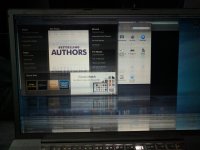 | |
| Posted by: TheWhiteFalcon on 2016-12-28 08:26:11 That seems more like failing LCD panel to me. How's the external output? | |
| Posted by: techknight on 2016-12-28 17:17:15 I have seen the LVDS cable do this as well, but usually it makes the whole screen jump. | |
| Posted by: kb3wmh on 2016-12-29 17:12:45 External output works perfectly! So, the next step is, how do I tell if the LVDS cable is bad, or if the entire screen is bad? Then, once I find out what I need to get, where is the best place to get the part? Are the low-res screens interchangeable? Also, how much would the repair be? The keyboard and trackpad are gross and finicky, but I found replacements at powerbookmedic for a few dollars. I would like to fix this laptop. Although it isn't a hi res model, USB 2 and the scrolling trackpad are both very nice things to have, and for PowerPC programs, the CPU is a beast! Ten-Four fox runs really well on it... | |
| Posted by: TheWhiteFalcon on 2016-12-29 17:16:32 PowerBook medic is a good source, they also sell on eBay. Screens really just depend on what you can find. Might be easier to source a whole new screen + bezel + cable than the parts individually. May ask here or LEMSwap for parts machines. | |
| Posted by: kb3wmh on 2016-12-29 17:57:29 But are the screens compatible across all the low res models | |
| 1 |