68kMLA Classic Interface
This is a version of the 68kMLA forums for viewing on your favorite old mac. Visitors on modern platforms may prefer the main site.
| Click here to select a new forum. | |
| 2400C-Does Anyone Recognize this Password Protection? | |
| Posted by: bunnspecial on 2016-12-23 15:41:43 I just picked up a "non working" 2400c from a recycler on Ebay that booted right up as soon as I powered it on. Unfortunately, it looks like the OS is password protected. Does anyone recognize the password protection program, and if so how to defeat it? I'm a bit "stuck" on this one, since I don't have one of the PB SCSI adapters(I REALLY need to get one) so can't connect a CD-ROM drive or use SCSI disk mode-I'm going to have to pull the drive to do anything. 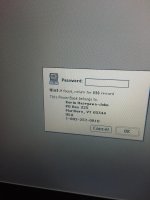 | |
| Posted by: beachycove on 2016-12-23 15:43:51 Startup isn't possible either with Extensions off? | |
| Posted by: bunnspecial on 2016-12-23 15:57:02 No luck with extensions off. The password window comes up before the splash screen. In fact, if I hit "cancel" the Happy Mac flashes briefly before the computer shuts off. | |
| Posted by: Reasons. on 2016-12-23 15:59:40 I see to recall this same splash screen showing up on a thread from a couple of months ago? Maybe? | |
| Posted by: Compgeke on 2016-12-23 16:15:08 Best bet is pulling the drive. It's IDE so hooking it to something else shouldn't be much of an issue. | |
Posted by: bunnspecial on 2016-12-23 16:35:48Best bet is pulling the drive. It's IDE so hooking it to something else shouldn't be much of an issue.That's the current plan. Hopefully I can dig up a 44-pin to 40 pin so that I can look at it in a desktop since that's a lot easier than putting it in a laptop 🙂 Granted I have a couple of USB bridges, but I think they're all bus powered and sometimes don't have enough juice to spin up a full height drive(or a 7200rpm). Hopefully there's SOMETHING I can delete. Otherwise, I'll dump a fresh 8.1 install on it. | |
| Posted by: 360alaska on 2016-12-23 16:40:45 Here's the password: "s7AL4#hk" I just called the number, told the man on the phone I had bought the laptop and he gave it to me. | |
| Posted by: joethezombie on 2016-12-23 17:07:22 Seriously? LOL! | |
| Posted by: bunnspecial on 2016-12-23 17:18:32 Thanks for doing that-I should have tried it! In any case, apparently he doesn't remember correctly-that doesn't work! | |
| Posted by: mrpippy on 2016-12-23 17:58:23 Oh yeah, this is PowerBook Password Security. I also ran into it on a 2400c and made a walk through on how to bypass it using Norton Disk Editor: http://bslabs.net/2016/01/30/disabling-powerbook-password-security/ You'll need to be able to boot from another disk though: either use a CF card in the PC Card slot, pull the drive and attach it to another Mac, external SCSI CD, or maybe SCSI target disk mode to another Mac. | |
| Posted by: bunnspecial on 2016-12-23 18:05:31 Thanks! I though it did look familiar. Unfortunately, like I said pulling the disk is my only real option now as I don't have a PowerBook SCSI adapter. I've gone a bit nuts on OWR and 68K PBs lately, so that's something I REALLY need to fix. A CF adapter also seems like it would be a good investment. | |
| Posted by: bunnspecial on 2016-12-23 23:05:20 Alright, I pulled the drive which actually surprised me in that it was half height rather than full height. I'm use to working on 3400Cs and Kangas, but then the 2400C is a LOT smaller. It's also not the easiest hard drive I've ever pulled, but it does beat the heck out of an iBook(any version) and 12" G4. In any case, once I got it out I was able to run it through my USB bridge fine. I attempted to modify the password file as described above, but in the end just nuked it. Fortunately, the computer booted right up. I also got the pleasant surprise of finding a 64mb memory module for a total of 80mb. It's running OS 9.1, which is not my choice for something with 80mb of RAM, but it does seem to run it well. | |
| Posted by: MattB on 2017-01-06 20:06:56 That name looks really familiar for some reason. I feel like I know someone by that name but I can't remember from where. | |
| Posted by: bunnspecial on 2017-01-07 22:41:59 Interestingly enough, I had a PDQ that I'd lost/forgotten about and when I booted it up, I was greeted with a very similar screen. Fortunately, I had bought this computer from its original owner. He was kind enough to provide me with the password when I had bought the computer, and I was able to dig through my old PMs on MacRumors and find it. The password is simple and easy to remember, although just in case I forget it again I've put a mailing label on the bottom of the keyboard. I don't want to nuke this one entirely as it's nice to see a classic OS 3rd party security system intact. 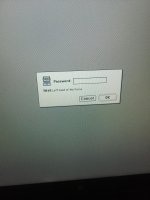 | |
| Posted by: Elfen on 2017-01-20 09:50:14 That's the standard Apple Protection for the powerbooks on System 7 & 8 (which is rarely used). I have set up on my 5300 and G3 Wallstreet. The password is in an invisible file in the System (I think System Prefs). Delete it and the extension preferences and it will boot up without a password. | |
| 1 |