68kMLA Classic Interface
This is a version of the 68kMLA forums for viewing on your favorite old mac. Visitors on modern platforms may prefer the main site.
| Click here to select a new forum. | |
| Macintosh 128k issue | |
| Posted by: macfan2350 on 2016-12-21 18:22:00 Hi all! I have a Macintosh 128k, and when I go to turn it on, I get no startup bong, but I get a fine vertical line in the middle of the screen. Any help is welcome | |
| Posted by: unity on 2016-12-21 18:35:27 It could be any number of issues, but one thing that MUST be done to any 128k/512k/Plus is a reflow (with a touch of fresh solder) to the the areas with connections on the analog/sweep board as well at the logic board. This is a pic I made to help. Its for a Plus, but its nearly the same. Typically though a line top to bottom is a deflection issue. This can be the result of a bad solder joint to the deflector at the red or green wire (I forget which). So I would say to start with solder joints while looking for any damage. If you can pull voltage readings, I would do that as well. If it still fails, then individual components need to be looked at. | |
| Posted by: bibilit on 2016-12-22 01:10:33 I agree, remove the white protection of the Analog board and look at the four pins where the white connector is plugged in. usually, the top one is the first to go (the connector is usually burned also) I will recommend to remove old solder first, then put new one. | |
Posted by: giolicious on 2016-12-22 03:31:53Hi all!Read Larry Pina's Macintosh Repair & Upgrade Secrets on page 83. | |
| Posted by: macfan2350 on 2016-12-22 05:46:01 Thank you for all the responces, I looked at all of them, and I will try them this afternoon. | |
| Posted by: macfan2350 on 2016-12-22 07:30:07 I tried everything you guys told me to do but nothing worked. I still get this: 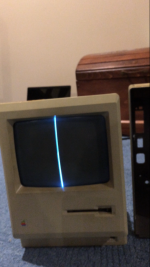 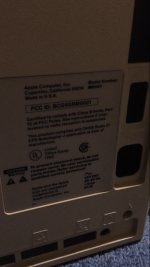 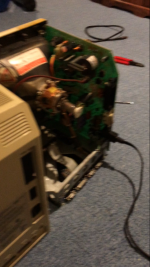 | |
| Posted by: bibilit on 2016-12-22 07:45:32 can i have a better picture of the last one ? | |
| Posted by: Compgeke on 2016-12-22 11:35:05 This is going to seem odd (and it's not a good long term idea) but does giving it a slight whack on the side make it come back to life, even momentarily? Something like http://i.imgur.com/N93c9Qf.gifv . | |
| Posted by: macfan2350 on 2016-12-22 12:42:19 Here you go: Hitting it on the side did not do anything.... But thank you for the responce! 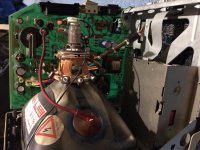 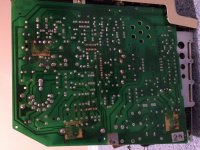 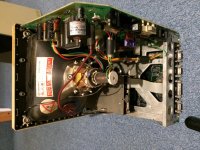 | |
| Posted by: bibilit on 2016-12-22 23:42:31 Sorry to say so, but did you removed old solder before putting fresh one ? also next to the double side tape, one element seems to be missing solder at all... ( a three leg element) | |
| Posted by: macfan2350 on 2016-12-23 06:53:11 Thank you very much for the response, I did reflow the motherboard and put on new solder on, but where do you see the 3 legged part that has no solder? If you could provide to me more detail on where that connection Is, It would be much appreciated. Thanks again for your response. | |
| Posted by: Compgeke on 2016-12-23 09:01:27 Going based on your image, I'd check out these red highlighted joints and check for any cracks and\or resolder them. They're looking a bit iffy to me in the pic, often times a straight up pin in a shallow pool of solder like the 2nd from the bottom left will be one of the first joints to crack. Using a bit of flux can help with that. http://i.imgur.com/mH2TE6l.jpg | |
| Posted by: macfan2350 on 2016-12-23 12:10:01 Thank you very much for the detailed response. Really appreciate it. I will try this in the coming days and report the results. Thank you again. | |
| Posted by: mitchW on 2016-12-26 19:44:52 I usually reflow all of the solder joints on these 128k/512k/SE analog boards with fresh solder. Takes about half an hour, and then you can be sure it will not happen again. I began shotgunning them after I spent few hours on a 512k board that worked for half an hour then the CRT started acting up and cleared up when twisted the analog board. There is usually no need to remove old solder, just add new. Use some flux if the solder is not flowing like it should. I would resolder and check the J1/L2 area first. Also check the R1 (220 ohm). I would also replace the C1, as it is the old 25/35V electrolytic type and these go bad and cause similar problems. The proper replacement is 3.9uF 100V Non Polarised HF Film capacitor. | |
| Posted by: bibilit on 2016-12-27 05:46:36 Sometimes, the solder is dull and grey, sort of carbon like, and not making a good contact anymore, that is the reason i remove old solder first... and trying to reflow it doesn't work anyway. But, i agree, most of the times reflowing works great also. | |
| Posted by: macfan2350 on 2016-12-28 07:42:12 Thanks so much, like I said, I will try it in the coming days. | |
| 1 |