68kMLA Classic Interface
This is a version of the 68kMLA forums for viewing on your favorite old mac. Visitors on modern platforms may prefer the main site.
| Click here to select a new forum. | |
| My first Powerbook 210 Duo | |
| Posted by: galgot on 2014-11-03 07:24:44 Just got this baby this morning 🙂 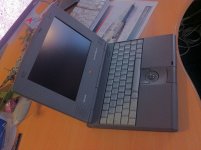 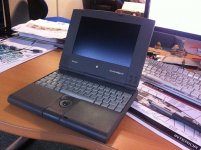 Very cute and in good shape. German Keyboard. It started on the first try, VERY noisy Hd, and a rectangle of dead pixels on the bottom left of the screen ( which is more convenient than the usual PB150 screens upper right dead pixels rectangle 😉 … Otherwise Ok. Then after two boots , stopped booting again and after the chime i get a 4 tones "Dah dee Da da" …?! Looked around a bit and it seems it's = " 4 beeps = Bad checksum for the remainder of the boot ROM" . is it fixable ? Happy anyway, first time i see a Duo, pretty machine 🙂 | |
| Posted by: techknight on 2014-11-03 07:56:31 Recap time. Plus remove the keyboard and reseat your cards. | |
| Posted by: Trash80toHP_Mini on 2014-11-03 08:12:41 Grats, galgot. The light gray KBDs rock, I need to get one of those some day. I love my Duos! If you haven't yet, pull the battery out and give 'er another rip. . | |
| Posted by: Elfen on 2014-11-03 08:16:43 Sounds to me that the memory expansion board inside got loose. Give it a while to rest and then try to turn on again. Opening the Duo (any Duo as they all share the same case) is a lot of trouble. You can just remove the keyboard with the 4 screws at the bottom of the case that lines up horizontally and the keyboard lifts up. There are two ribbon connectors holding the keyboard ribbon cable on the middle left by the palm rest. The memory card is at the middle right of the board if you have one, the modem card is above that on the upper right if you have one, if not there will be a blank card for the reset button. Just push the memory card back into the connector slot. This is a link for the service manual. http://tim.id.au/laptops/apple/powerbook/powerbook_200_series.pdf | |
| Posted by: galgot on 2014-11-03 08:23:13 Many thanks all for the tips. Will try all that at home this evening. Recap time. Plus remove the keyboard and reseat your cards.:O Recap ! That's something i'll have to learn ... | |
| Posted by: Trash80toHP_Mini on 2014-11-03 08:34:29 Join the club, it looks like I've been forced to do my very first very soon. :-/ | |
| Posted by: bibilit on 2014-11-03 10:48:24 Congrats Gael, Let us know, concerning keyboard, can you re-arrange keys to the usual AZERTY french style ? | |
| Posted by: galgot on 2014-11-03 11:47:12 Well, i tried : - reset the PMU( holding back power for at least 30sec), - booting without the battery, - opening and booting with HD disconnected, - booting with the memory expansion card removed (it was well seated when i opened the thing) , all this no joy. Still these 4 tones "Dah dee Da da"... In the service manual (thanks Elfen) , at the symptom charts , it says : "Hardware failure occurs (four-tone error chord sequence sounds after startup chord) : 1 Disconnect hard drive data cable and reboot system. If startup sequence is normal, reseat cable and retest. [SIZE=10pt]2 [/SIZE]Replace hard drive. 3 If the system is connected to an external floppy drive, disconnect drive and reboot system. If startup sequence is normal, reseat cable and retest. " Given i've tried booting without HD, and it was still Dahdeedada-ing, i think there is indeed a problem with the board :-/ when i have time i'll try swapping the HD with a good working one ( i have only one…), we'll see. Can't try with a floppy, no adapter nor extern floppy drive. Here a pict of the inside : 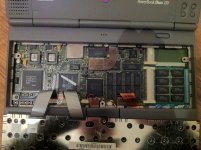 @ Bibilit, Thanks Mate, don't know if i can remove individual keys and change places on these keyboards… Will check, but i don't want to break anything 😉 indeed german keyboards are strange , no "@", how do they type mail addresses 😀 And the ¨ are only for Ü Ö and Ä … Can't type my name correctly 😀 But i like the light grey color. [SIZE=10pt] [/SIZE] | |
| Posted by: techknight on 2014-11-03 12:20:12 Remove RAM. Try again. If all else fails, I MAY have a board... | |
| Posted by: galgot on 2014-11-03 23:25:09 Hi techknight, i've tried that yesterday evening... no success. Funny it booted 2-3 times after i got it, then stopped. The HD was doing an awfull noise anyway, really loud , couldn't work with it more than 10 mn... so i thought that could be the problem. But, will get a 270C soon 🙂 | |
| Posted by: Elfen on 2014-11-04 06:17:29 If you are just turning on the Duo with just the board, then it just needs a recap from the sounds of it. Have you tried either freezing or heating up the motherboard with a hair dryer before turning it on? If it boot after this then it definitely needs a recap. | |
| Posted by: Trash80toHP_Mini on 2014-11-04 06:30:30 What the heck is that H shaped blob of solder and wire next to the the LCD connector? | |
| Posted by: galgot on 2014-11-04 06:37:07 Aah you find that strange too ! Never seen another PB200 board before, so wondered if that was normal... Look at the upper left , there is another metal wire soldered to two of the board connections, above the upper screw hole. #Elfen, nope never tried that, will do. | |
Posted by: Trash80toHP_Mini on 2014-11-04 07:07:20@ Bibilit, Thanks Mate, don't know if i can remove individual keys and change places on these keyboards… Will check, but i don't want to break anything 😉There's a howto somewhere on fixing the rubber rings(?) in key cap mechanism somewhere nnline, so they must be switchable. You could also go the down and dirty method using stickers and a couple of KCHR resource hacks in Resedit. https://68kmla.org/forums/index.php?/topic/11915-simple-resedit-pb-keyboard-hack/ The gray is killer, but they munged up the enter key. Do those boards have an extra key or is the vertical enter key a convention in Europe? I've studiously avoided that implementation since my first VT-101 layout KBD purchase, a MAC-101. | |
| Posted by: TheWhiteFalcon on 2014-11-04 07:09:24 European keyboards seem to all have that vertical enter/return key. | |
| Posted by: Elfen on 2014-11-04 07:15:02 I opened my Duo 210 and compared it with your pic, Galgot. There is a large ceramic "coil" L1 where you have that H-blob by the LCD connector and on the upper left where you have 4 pairs of solder pads and one set is connected I have a blank board. No solder pads, nothing there on my Duo 210. | |
Posted by: Trash80toHP_Mini on 2014-11-04 07:24:54Aah you find that strange too ! Never seen another PB200 board before, so wondered if that was normal...Absolutely, if you weren't in France, I'd say something is rotten in the state of Denmark. | |
| Posted by: Trash80toHP_Mini on 2014-11-04 07:33:27 Is there a resistor on the pads in the upper left corner of the Duo 230? I'd say omething smells of an indescribably fugly overclocking of a 25MHz 210 board to 33MHz 230 spec. A missing coil next to the LCD connector might explain some video problems as well. . | |
Posted by: galgot on 2014-11-05 00:52:10Absolutely, if you weren't in France, I'd say something is rotten in the state of Denmark.To be in France , or not to be… it seems rotten anyway 😀 Will ask the seller about that strange "customized" board. | |
| 1 > |