68kMLA Classic Interface
This is a version of the 68kMLA forums for viewing on your favorite old mac. Visitors on modern platforms may prefer the main site.
| Click here to select a new forum. | |
| IIfx Garbled Graphics/Artifacting After Zapping PRAM? | |
| Posted by: Concorde1993 on 2026-07-08 20:34:36 Ran into a weird issue with my IIfx tonight. It would hang at the desktop when my Apple external drive was connected through SCSI. I figured zapping the PRAM would return everything to normal (and it did, for the most part anyway, as my external devices are communicating once again with the IIfx). But now I get this graphics issue: 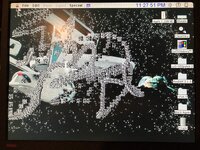 Is this the sign of a failing PRAM battery or am I looking into something bigger, like my 8.24GC card heading into retirement? | |
| Posted by: PappaDF on 2026-07-09 10:22:52 If you toggle bit/pixel-depth under the Monitors control panel and restart, does the problem persist? (I assume the answer is "yes" - but just want to double check) | |
Posted by: Concorde1993 on 2026-07-09 12:45:56Does the problem persist?Yes | |
| Posted by: jmacz on 2026-07-09 18:49:10 I once had a scsi issue which I also resolved via a PRAM reset. But didn’t get the graphics issues you are seeing. Looks like you have a desktop wallpaper extension running. Do you see the issue with it disabled? There is also a known issue with the 8*24 GC card and System 7 with drag and drop enabled. I wrote a fix extension for that particular issue. But your screenshot doesn’t look like the patterns I saw with this particular issue. Which system version are you using? It would be interesting to see what happens with all extensions disabled. | |
Posted by: Concorde1993 on 2026-07-09 19:49:12Looks like you have a desktop wallpaper extension running.Yes, it’s Star Trek Movie Posters (from the same guys that made After Dark). Do you see the issue with it disabled?Yes. But it was fine before I zapped the PRAM (and both batteries are still very healthy, reading 3.5 volts on my multimeter). Which system version are you using?7.1 | |
| Posted by: Concorde1993 on 2026-07-09 22:43:37 Running 7.5.1 on my Apple external SCSI drive. Getting this junk after 30 minutes of use: 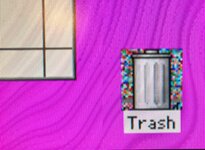 I checked the 8.24 GC card. Pins are good and it’s firmly secure in its designated NuBus slot. | |
| Posted by: jmacz on 2026-07-09 23:09:22 That’s odd. Have you tried ruling out the video card by using another? | |
| Posted by: David Cook on 2026-07-09 23:42:23 In both cases (the cursor and the trash can), the issue seems to be reading the existing bits. That is, for the cursor, the bits are saved before drawing the cursor and then restored when the cursor moves (no update event). For the trash can, it is being drawn in a mode where quickdraw needs to read existing background bits to draw over them with the partially opaque icon. It looks like quickdraw is occasionally having difficulty reading the card's memory. Check for damaged traces or loose chip pins. Any onboard GWorld RAM? | |
| Posted by: nathall on 2026-07-10 01:22:50 Does it happen if you disable all QuickTime extensions and reboot? | |
Posted by: Concorde1993 on 2026-07-10 06:37:42Have you tried ruling out the video card by using another?Unfortunately, I just have the one 8.24 GC card. I might have the more mundane 4.8 card lying around somewhere. Any onboard GWorld RAM?No RAM installed on the 8.24 Does it happen if you disable all QuickTime extensions and reboot?Will have to try. | |
| 1 |