68kMLA Classic Interface
This is a version of the 68kMLA forums for viewing on your favorite old mac. Visitors on modern platforms may prefer the main site.
| Click here to select a new forum. | |
| Macintosh II Repair Advice. | |
| Posted by: RegenKonig on 2026-07-02 20:47:02 Hello everyone! This is my first post here, so please excuse me if I trip and stumble, I'm not the type to social-media. However, I am proud to be given the opportunity to add a Macintosh II to my vintage Mac family. Repair and upgrade started immediately. The Mac II would turn on, PSU would click, and turn off. A common occurrence it seems. - 1. Capacitors have been replaced with tantalum caps of equal value. (embarrassing solder job, don't look!) 2. Some more tricky axial capacitors that I thought would be culprit have been replaced. (Still no dice.) 3. PSU measurements have been taken, all outputs seem as they should, caps looked okay, too. - Things that have changed since I replaced the capacitors, is that now the speaker clicks when powered on! Before the re-cap, it wouldn't. I've taken my multimeter to many different caps, chips, traces. I've begun to pull my own hair out, is there anything obvious I'm missing? Incredibly nervous, asking for help here. But I suppose that's how desperate I've become as for wanting to get this thing singing and dancing again. Any advice is greatly appreciated. Thank you. | |
| Posted by: Iesca on 2026-07-02 21:17:25 What are the RAM capacities currently installed? There are some arcane rules and limitations when it comes to the Mac II depending on the specific configuration. | |
| Posted by: Iesca on 2026-07-02 21:18:23 Also, just to clarify, did you only recap the board, or did you also recap the PSU? These PSUs all need recapping. | |
Posted by: RegenKonig on 2026-07-03 05:50:44Also, just to clarify, did you only recap the board, or did you also recap the PSU? These PSUs all need recapping.Just the board, I had inspected the PSU and it looked fine. Voltages out also measured as expected, I had figured I should focus on the board. As for RAM, what it has was how it came to me. It looks like it has four sticks of factory-installed RAM, and then four sticks of taller most likely aftermarket. Unsure of amounts. | |
| Posted by: Juror22 on 2026-07-03 07:52:29 Check this link available on the IA. The link mentions well known Mac II startup failures that can be examined for this issue. 2 different pictures of the bodge. 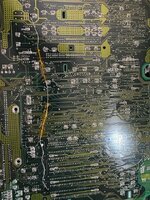 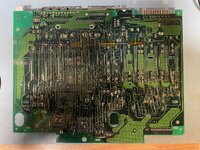 You don't mention cleaning the board afterwards. Be sure you did a thorough job of that - there are differing opinions on how to do it best, with all of them already mentioned in the forum. It looks like you have some partially eaten traces in the area I've indicated, so check those next. 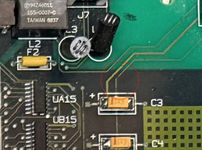 Quick question of my own, does anyone know what to order as a replacement for L3? I have a board that is missing one (leads broken off). | |
| Posted by: Juror22 on 2026-07-03 08:41:23 There is this Youtube video about jumpstarting the II - I would also suggest using that as a troubleshooting method. | |
Posted by: RegenKonig on 2026-07-03 10:01:18Check this link available on the IA. The link mentions well known Mac II startup failures that can be examined for this issue.Thank you for the insight! I cleaned up the board a bit more, and those traces near the power button are still making continuity, I had also tried that bodge wire you had sent a photo of to my own, and power still doesn't latch. I also tried the video you had shared about jumpstarting. Still no dice. This thing is really racking my mind. | |
Posted by: RegenKonig on 2026-07-03 14:22:31Check this link available on the IA. The link mentions well known Mac II startup failures that can be examined for this issue.News! I actually bodged a wire from the power switch, to the capacitor related to the trace you had shown. Now the Mac II will stay powered as long as I hold the button down. Whereas before it would still shut itself off as I held it down. I hope this isn't progress in the wrong direction. | |
| Posted by: Iesca on 2026-07-03 16:08:59 It could be that there's a short somewhere and the PSU is detecting it and shutting down. I did the same thing as you holding in the power button and ended up burning a RAM module and the socket it was in on a iifx (same PSU) because it turns out it wasn't seated correctly... | |
| 1 |