68kMLA Classic Interface
This is a version of the 68kMLA forums for viewing on your favorite old mac. Visitors on modern platforms may prefer the main site.
| Click here to select a new forum. | |
| Hard disks and activity LED Macintosh SE | |
| Posted by: MacPlus2300 on 2026-06-30 15:27:33 I’m working on restoring yet another Macintosh SE, and I found that the system had been upgraded with the maximum ram amount, as well as a quantum prodrive LPS. The drive was put in without an activity light, and the original is not present in the case. I am wondering if there is any way to make my own or get a replacement activity light. | |
Posted by: Phipli on 2026-06-30 15:40:15I’m working on restoring yet another Macintosh SE, and I found that the system had been upgraded with the maximum ram amount, as well as a quantum prodrive LPS. The drive was put in without an activity light, and the original is not present in the case. I am wondering if there is any way to make my own or get a replacement activity light.Yeah, you can make your own. It was missing from mine too, but I had a hard disk and a SCSI2SD in mine so I did this : For a single colour one, just buy an LED, and solder a... say a 2.2k Ohm resistor in line with the +ve pin. Buy a Dupont style cable with either 2.54 or 2mm ends depending on your disk's connection, then cut it to length and solder it to the resistor and the other side of the LED using heat shrink tubing individually on each side to avoid shorts with other components. Use a standard LED panel mount collar to fit it into the hard disk bracket. | |
| Posted by: Phipli on 2026-06-30 15:46:34 Basically this, but with Dupont connectors: It says 12v, but would probably be fine because you don't want it too bright (I've made that mistake and the activity LED lit a circle on the far wall 😆 ) Panel mounts could be alternatively like this : | |
Posted by: MacPlus2300 on 2026-06-30 16:14:29Basically this, but with Dupont connectors:well i have a ton of these LED's pulled from 486 and pentium systems that used activity LED's that were connected to drives directly, so i should be able to adapt one of those, and just solder directly to J2 on my drive. from there i could either superglue or tape to the original light pipe. | |
Posted by: Phipli on 2026-06-30 16:23:35well i have a ton of these LED's pulled from 486 and pentium systems that used activity LED's that were connected to drives directly, so i should be able to adapt one of those, and just solder directly to J2 on my drive. from there i could either superglue or tape to the original light pipe.If I remember correctly... I don't think it directly connects to a light pipe on these. It mounts on the drive bracket and just points at it? It's a couple of years since I looked. If you have one from another computer it should just work except for needing a panel mount collar thing. Assuming it is a round 5mm LED. | |
| Posted by: Phipli on 2026-06-30 16:27:34 Yeah, this is what the stock setup looks like (from here) : 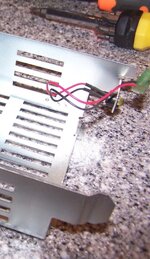 The green bit is the connection to the disk (bent to the wrong place). | |
Posted by: MacPlus2300 on 2026-07-03 23:56:59Yeah, this is what the stock setup looks like (from here) :Interesting. Someone must have been in this Mac, as the drive was replaced with a quantum LPS (low profile, SCSI edition) and the tray was discarded as well. My tray doesn’t look like that, and there’s no led either. I plan to use a bluescsi instead as the heads are damaged in the LPS, so I’ll have to manufacture my own solution. | |
Posted by: Phipli on 2026-07-04 01:09:01Interesting. Someone must have been in this Mac, as the drive was replaced with a quantum LPS (low profile, SCSI edition) and the tray was discarded as well. My tray doesn’t look like that, and there’s no led either. I plan to use a bluescsi instead as the heads are damaged in the LPS, so I’ll have to manufacture my own solution.Some aftermarket drives came with a replacement bracket. The original ones... The mounting holes are wrong for newer disks. Ask how many people with SEs have their disk upsidedown and only held by two screws 🤣 | |
Posted by: MacPlus2300 on 2026-07-04 12:31:39Some aftermarket drives came with a replacement bracket. The original ones... The mounting holes are wrong for newer disks.At least mine has four. I’m probably going to 3d model a non destructive way of holding the led to the faceplate specifically and not the drive cage. | |
Posted by: Phipli on 2026-07-04 12:39:45At least mine has four. I’m probably going to 3d model a non destructive way of holding the led to the faceplate specifically and not the drive cage.Sometimes for simple things I use stainless welding filler rod to make little brackets. Might work for this. Make a little loop at one end to hold the screw and a paperclip type "m" clip at the other end, then a little dab of glue for extra security at both ends. Sounds like you have a better drive bracket than most of us! | |
Posted by: adespoton on 2026-07-04 15:17:46Some aftermarket drives came with a replacement bracket. The original ones... The mounting holes are wrong for newer disks.Back in the 90s, I spent some time working in the repair shop of a retail store. I spent a bunch of my time making custom brackets and rails so we could install newer drives in older hardware. We used them all up, too! | |
Posted by: Phipli on 2026-07-04 15:21:06Back in the 90s, I spent some time working in the repair shop of a retail store. I spent a bunch of my time making custom brackets and rails so we could install newer drives in older hardware. We used them all up, too!How come you didn't just drill two new holes? | |
Posted by: ESM-NL on 2026-07-06 03:20:26Interesting. Someone must have been in this Mac, as the drive was replaced with a quantum LPS (low profile, SCSI edition) and the tray was discarded as well. My tray doesn’t look like that, and there’s no led either. I plan to use a bluescsi instead as the heads are damaged in the LPS, so I’ll have to manufacture my own solution.The BlueSCSI has a connection point on the board for LEDs. The online manual discribes even how to lighten up the LED if it is not bright enough. If you want to find the right drive tray, partnumber is 805-5066-B. The original LED+cable on this tray is not very long. In one of my SEs, I extended the cable about 20 cm. The original connector fits on the connecting point on the BlueSCSI. | |
Posted by: volvo242gt on 2026-07-06 11:56:47Interesting. Someone must have been in this Mac, as the drive was replaced with a quantum LPS (low profile, SCSI edition) and the tray was discarded as well. My tray doesn’t look like that, and there’s no led either. I plan to use a bluescsi instead as the heads are damaged in the LPS, so I’ll have to manufacture my own solution.Since your hard drive has been damaged, I'd be tempted to get the parts to add a second floppy, then mount an LED to the second drive, so it'll light up the slot when the SE is accessing the BlueSCSI. That way, you'll have two floppy drives and an SSD. | |
Posted by: ESM-NL on 2026-07-07 01:46:08Since your hard drive has been damaged, I'd be tempted to get the parts to add a second floppy, then mount an LED to the second drive, so it'll light up the slot when the SE is accessing the BlueSCSI. That way, you'll have two floppy drives and an SSD.That won't work when it comes to use the disk light. When a second floppy drive is added, you have to take out the slot to be able to access the floppy drive. And in that second drive slot is the little screen for the disk light. The disk tray needed is the Apple 805-5066-B. You can find them on eBay cheap. Be sure the disk light is not gone. | |
| Posted by: volvo242gt on 2026-07-07 17:12:47 It actually would, since the LED would be shining through the floppy opening. Since the OP is planning to get rid of the broken hard drive, I suspect they will use one of the 3D printed brackets that go in place of the expansion slot cover, which nullifies the need for the hard drive bracket altogether. | |
| 1 |