68kMLA Classic Interface
This is a version of the 68kMLA forums for viewing on your favorite old mac. Visitors on modern platforms may prefer the main site.
| Click here to select a new forum. | |
| Macintosh Portable error code | |
| Posted by: bibilit on 2016-11-01 11:29:11 After repairing a screen cable (see other post) and recapping the logic board, i tried to boot another Portable. With a good battery, the Portable chimes endlessly, using the reset switch i have got an error code and the Sad Mac. 03001500 00001FFA Any idea ? | |
| Posted by: techknight on 2016-11-01 13:11:31 RAM. | |
| Posted by: bibilit on 2016-11-01 23:57:19 Thanks for replying TechKnight. Is there any way to discover the bad one (piggybacking maybe) and are those ram still available (pseudo static RAM if i remember clearly) ? | |
| Posted by: bibilit on 2016-11-02 02:28:27 Non-backlit, so SRAM.... | |
| Posted by: techknight on 2016-11-02 15:58:41 Not entirely. it isnt easy at all, and its very painstaking swapping one chip out at a time. However.... Sometimes the traces get broken going to the RAM ICs, so i would grab a magnifier and check all the connections going to the RAM. I will dig up the schematics and post the sheet on the RAM section which may help. if an IC itself is bad, only fix is to swap them one at a time until you find them, or replace them all.... it sucks. Been there, done that. | |
| Posted by: techknight on 2016-11-02 16:09:06 Lower/Upper RAM. Lower_Upper RAM.pdf | |
| Posted by: bibilit on 2016-11-03 06:53:40 Great, thanks TechKnight. | |
| Posted by: flecom on 2016-11-06 19:31:45 have you recapped it? my portable was giving me similar issues and sad macs until I recapped it | |
| Posted by: aplmak on 2016-11-06 20:04:35 I had a RAM issue on one board.. check legs particularly where there was leaky caps... they sometimes ruin the traces there... make sure you rinse and clean the ram with 90% alcohol and a toothbrush to get all the electrolytic goo out from under the chips.. give it a wash in the tub and a scrub with the toothbrush and the 90% rubbing alcohol... then dry well with a hairdryer.. | |
| Posted by: bibilit on 2016-11-06 22:59:52 Yes board washed and recapped. Will look at the legs. | |
| Posted by: bibilit on 2016-12-20 06:37:19 SOLVED Thanks to TechKnight for pointing at the right direction, and with the help of the schematics he supplied to me, i spent a whole morning checking continuity... until almost the last chip, where i lost continuity on one of the legs. Removed the chip, and Sometimes the traces get broken going to the RAM ICs, so i would grab a magnifier and check all the connections going to the RAM. I will dig up the schematics and post the sheet on the RAM section which may help.a broken trace ! 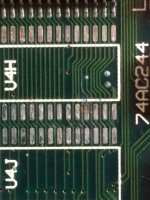 removed the last chip also, cleaned the area, put them back again and soldered a bridge where the trace was gone. 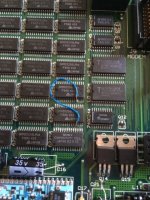 Not my better job, but anyway, put all back together 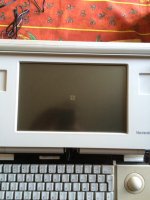 Up and running again. | |
| Posted by: galgot on 2016-12-20 08:04:08 Magic 🙂 Bravo . | |
| Posted by: bibilit on 2016-12-20 08:22:58 Thanks mate... | |
| Posted by: techknight on 2016-12-20 12:15:27 Yep, i have repaired a few like that. I think the 9V battery leaks and causes this. | |
| 1 |