68kMLA Classic Interface
This is a version of the 68kMLA forums for viewing on your favorite old mac. Visitors on modern platforms may prefer the main site.
| Click here to select a new forum. | |
| 6x00 SCSI Zip Drives - What SCSI ID did Apple assign them? | |
| Posted by: Trash80toHP_Mini on 2026-05-04 01:18:09 Internal SCSI CDs were customarily SCSI ID3, the Mac/Boot Drive was ID0. Was there an Apple convention for internal SCSI Zip Drives? | |
| Posted by: aladds on 2026-05-04 01:22:22 In Beige G3s they used ID 5. | |
| Posted by: mikes-macs on 2026-05-04 02:33:27 Agreed, typically Apple used SCSI ID 3 for internal CD ROM Drives. | |
Posted by: Trash80toHP_Mini on 2026-05-04 09:05:19In Beige G3s they used ID 5.I thought they'd switched to IDE Zips in the Beige Boxen? | |
Posted by: Phipli on 2026-05-04 09:14:06I thought they'd switched to IDE Zips in the Beige Boxen?Beige G3s came with both at various times for some reason. Edit - duh me, because the IDE was screwed up on early Beige G3s. Two busses, but each would only take one device, so that's hard disk, and CD-ROM. Later versions of the Beige G3 had better IDE that could work with two devices on one bus, so they might have switched over then. | |
| Posted by: Trash80toHP_Mini on 2026-05-04 09:17:57 THX! MY External Zip Drives are well and truly buried. IIRC, they had a binary SCSI ID select switch? What were the 2 IDs? edit: internal drives addressed almost the full range of available IDs on the Mac 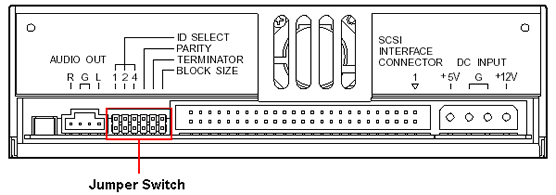
SCSI Internal ConfigurationBefore mounting the device, you’ll need to configure it via the jumper switch located on the rear of the drive. SCSI ID setting: The three leftmost jumpers are used to configure the drive’s SCSI ID number. This can be assigned a value of 0 through 7. Usually, 7 is reserved for the SCSI host...
 www.pctechguide.com
| |
| Posted by: Phipli on 2026-05-04 09:22:03 You could Google a photo? | |
| Posted by: Trash80toHP_Mini on 2026-05-04 10:21:32 Tried that already, searched both pics and hits, futile waste of time as IDE and Internals muddy the mix. I've started asking general questions of the gang here. Thinking would be that whatever something doesn't pop up in on site search quickly, it's info to be circulated? ISTR it was ID5 & ID6? | |
Posted by: Phipli on 2026-05-04 10:23:48Tried that already, searched both pics and hits, futile waste of time as IDE and Internals muddy the mix. I've started asking general questions of the gang here. Thinking would be that whatever something doesn't pop up in on site search quickly, it's info to be circulated?4 seconds on Google : 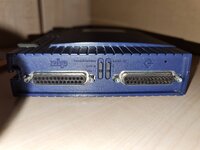 Please don't ask questions you can Google in less time. | |
| Posted by: Trash80toHP_Mini on 2026-05-04 10:45:05 Thanks much! Sorry, I'm half asleep and the ultimate point of my topic would be building a table of ID availability anyway. Mac only has 8 SCSI IDs available of the 16 in the spec. SCSI ID 00 - Boot Drive - Unavailable SCSI ID 01 - SCSI ID 02- SCSI ID 03 - Internal Opticals - Apple convention SCSI ID 04 - SCSI ID 05 - External Zip Drive - Conflicts with Apple Convention for Internal Zips SCSI ID 06 - External Zip Drive SCSI ID 07 - The Mac itself - Unavailable Looks like I've got ID01 and ID02 available for a Zip inspired binary selector switch? Can anyone thing of any conflicts with that pair? | |
Posted by: Phipli on 2026-05-04 10:50:42Thanks much! Sorry, I'm half asleep and the ultimate point of my topic would be building a table of ID availability anyway. Mac only has 8 SCSI IDs available of the 16 in the spec.16 is only for later types of SCSI. It's 8 for SCSI 1 as was. 01 is usually second hard disk if fitted from factory and I'd call the first disk "primary disk" as there isn't anything saying you need to boot from that one specifically 🙂 | |
| Posted by: Trash80toHP_Mini on 2026-05-04 11:02:11 ISTR UNIX workstations using all 16 IDs in the SCSI 1 era, no? SCSI ID 00 - Primary Disk (Macintosh Boot Drive) - Unavailable SCSI ID 01 - Second Disk: Factory installed HDD- Apple convention SCSI ID 02- SCSI ID 03 - Internal Opticals - Apple convention SCSI ID 04 - SCSI ID 05 - External Zip Drive - Conflicts with Apple Convention for Internal Zips SCSI ID 06 - External Zip Drive SCSI ID 07 - The Mac itself - Unavailable OK, that'd be a 2/4 binary switch select choice then? | |
Posted by: Phipli on 2026-05-04 11:08:10ISTR UNIX workstations using all 16 IDs in the SCSI 1 era, no?Then it probably wasn't narrow SCSI like the Mac was, had two busses, or was weird. Narrow SCSI is usually 8 IDs. Hence all the disks having 3 jumpers. | |
| Posted by: Windoze on 2026-05-04 12:07:30 SCSI uses the data lines to select the device. Narrow SCSI -> 8bit -> 8 devices. Wide SCSI -> 16bit -> 16 devices. | |
Posted by: aladds on 2026-05-04 15:13:05Beige G3s came with both at various times for some reason.Yep my Beige is a Rev A. Doesn't even have IDE cabling for a second device on each bus. | |
| Posted by: joevt on 2026-05-04 16:29:41 When scanning for boot devices, the ROM usually starts with the higher SCSI ID? I think that's what I see when looking at the logging in DingusPPC. | |
| Posted by: gsteemso on 2026-05-04 19:55:59 It starts with higher IDs because that's how SCSI is defined – barring a reason to think otherwise, higher IDs get priority. | |
| Posted by: Trash80toHP_Mini on 2026-05-04 21:44:25 So the Mac at ID7 has priority, but the boot drive is at the bottom of the pile at ID0? I guess it makes sense if you're gonna boot from an Optical at ID3, but CD-ROM tech didn't really rear its head at all until 1985 and the Plus came out in January 1986 with no Optical Drives for micros in sight. | |
| Posted by: chelseayr on 2026-05-05 05:20:00 I'm somewhat not sure (but I could be wrong given I have very limited experience with this) because I still have to hold down the c key to get the system to start from the performa disc instead of the hdd. or perhaps the ide&scsi mismashed logic boards are somewhat excluded from a singular boot scan list? | |
Posted by: Phipli on 2026-05-05 05:30:01I'm somewhat not sure (but I could be wrong given I have very limited experience with this) because I still have to hold down the c key to get the system to start from the performa disc instead of the hdd. or perhaps the ide&scsi mismashed logic boards are somewhat excluded from a singular boot scan list?Some of the IDE boards are so confused that even "c" doesn't work and you have to use CMD+opt+shift+delete or whatever it is. But regardless, Startup Disk usually overrides the default boot priority, otherwise you wouldn't be able to pick your startup disk if you had more than one bootable hard disk. | |
| 1 |