68kMLA Classic Interface
This is a version of the 68kMLA forums for viewing on your favorite old mac. Visitors on modern platforms may prefer the main site.
| Click here to select a new forum. | |
| UMAX S900 AKA Pulsar - First boot chime, then no chime | |
| Posted by: minimum on 2026-04-28 13:14:23 Trying to revive this machine. The way I ruined this machine was by attempting an xPostFacto install about 18 years ago. Since then, it always behaves the same. It always boots the first time after being disconnected from power for a long time, then it never boots the second time. From what I can gather I need to do a clean install from the original Install discs, so that it can re-flash the ROM (?). Another thing is that I have this DIP switch that has always been used with this machine + an Acer P791 monitor. Going through this table here, so far the monitor just keeps blinking the no signal sign, as if trying to obtain a signal, but not succeeding. 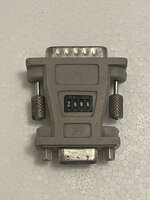 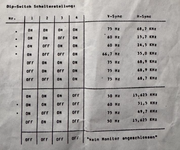 Any help would be greatly appreciated. | |
| Posted by: joevt on 2026-04-28 14:06:46 Could be bad RAM? The memory test doesn't happen if NVRAM is invalid, then next boot the NVRAM is valid so it tries a memory test? Do you hear a boot chime? Command-Option-P-R to zap the PRAM? Keep the keys held down until you hear the boot chime a couple times? This thread talks about the startup tests: https://68kmla.org/bb/threads/skipping-the-startup-memory-test.50699/ Might be interesting to try the system extension that @jmacz created. Try my DumpNameRegistry app to capture your NVRAM. We can try examining that. Connect to another computer with a serial printer cable connected to the modem port, then enter Open Firmware with Command Option-O-F. https://forums.macrumors.com/thread...l-work-in-a-beige-power-macintosh-g3.2303689/ Open the graphics device in Open Firmware and output some text. dev / ls to get a list of devices." pci1/@D" select-dev to open the graphics card with device-id @D. Your graphics device may have a different device number or be connected to a different pci host..properties to list the properties of the graphics device." hello world!" write drop to output text to the display.I think you can repeat those commands with different DIP switches each time to see which DIP switches work. | |
Posted by: minimum on 2026-04-28 14:32:31Could be bad RAM? The memory test doesn't happen if NVRAM is invalid, then next boot the NVRAM is valid so it tries a memory test?Each time I dig up this machine from storage for another attempt at reviving it, I notice the same pattern: it boots and chimes the first time, after pushing power button right after plugging it in, but fails (no chime) the second time and then it mostly fails, but sometime succeeds. I will try your recommendations. EDIT: Just so there's a face to the story, here's a pic of what's happening. Trouble finding a cable to connect the keyboard, just have a mouse plugged in right now. | |
| Posted by: joevt on 2026-04-28 15:32:31 An s-video cable will work for the keyboard. | |
| Posted by: finkmac on 2026-04-28 17:32:15 beware, some of those will wire the ground pins together. fine for svideo, but on ADB that shorts +5v to data. not good! | |
| 1 |