68kMLA Classic Interface
This is a version of the 68kMLA forums for viewing on your favorite old mac. Visitors on modern platforms may prefer the main site.
| Click here to select a new forum. | |
| Macintosh Plus analog board issue | |
| Posted by: ijnfuso on 2026-01-21 13:15:51 Hello everyone. I recently bought a Macintosh Plus 1MB with an analog board problem. The computer initially had a strange issue where it would boot-chime loop for some minutes (sometimes multiple restarts per second), then when it warmed up it worked normally. Initially I simply thought it was some soldering problem, and in fact there was a couple of cracked joints, that I fixed and it worked for some hours. Then the issue reappeared; except this time it rebooted just a few times, and, total silence and nothing... completely dead. I checked all the capacitors and found some that had some measurements off... including one that had a corroded leg (C18). I carefully replaced them (C18, C27, C28, C24), and, unsurprisingly the computer still wouldn't do any kind of noise or sign of life. So I spent some hours checking every connection and voltage; at first I noticed that the logic board was not getting any voltage, apart from a pin that was very low (0,3V or so)... Left the computer off for some minutes, came back to test again voltages, and when I flipped the switch the fuse and my main power popped... and now I'm here writing this post. Maybe this is an incredibly stupid thing, but it's my first time operating such an old computer... the oldest thing I've ever put hands on is an iMac G3... I checked the Dead Mac Scrolls for help, and looking through there I noticed that CR21 has all blackened legs with some corrosion on it, almost like it was burnt. I also checked CR5 and noticed that the Ohms for it were much lower the expected value.... which points at a flyback failure... (still unsure)... Something else I noticed, was that transformer T3 looked kind of damaged (?), almost like some pins of it were burnt, and the coil on top has some oxidation... I don't know if it's bad, but it is worth mentioning. Another thing, the seller told me that his father had repaired it back in the day, 20 years or so, I don't know what kind of repairs he did but I did notice a weird junction on Q6... maybe it's normal, maybe not, I don't know. This is an european Macintosh Plus (model M0001AP), 220V - 240V rated, the fuse was a 1.6A 250V... Any kind of help is welcome... this has been frying me for the past weeks.... | |
| Posted by: Builder68 on 2026-01-21 14:43:44 Hi there, Since the AC fuse is now popping, you likely have a direct short on the primary (AC) side of the power supply. You mentioned CR21 looks blackened. According to The Dead Mac Scrolls, CR21 is a Schottky Barrier rectifier. If it’s reading low resistance, it needs to be replaced. CR5 is part of the feedback/protection loop; if it's reading low, it can prevent the board from starting or cause the 'chirping' sound of a power supply attempting to start into a short. If the fuse is blowing instantly, check the Bridge Rectifier (CR22, CR23, CR24, CR25) and the Switching Transistor (Q11). If those are shorted, they will blow the fuse every time. Check for RIFA capacitors. On European models, these often crack and short out. You can temporarily remove all RIFA caps and operate the board without them, provided you are taking the AC from a UPS or a surge protector. T3 is the power supply chopper transformer; these rarely fail. That 0.3V you saw earlier suggests the power supply was shutting itself down to protect the logic board or that the startup circuit was failing. | |
Posted by: cheesestraws on 2026-01-21 14:51:40If the fuse is blowing instantly, check the Bridge Rectifier and the Switching Transistor (Q11). If those are shorted, they will blow the fuse every time. There is precedent here. I had a Plus where a couple of the diodes in the bridge rectifier suddenly decided to become resistors quite sudenly one day. Certainly check the diodes. | |
Posted by: ijnfuso on 2026-01-22 07:35:13If the fuse is blowing instantly, check the Bridge Rectifier (CR22, CR23, CR24, CR25) and the Switching Transistor (Q11). If those are shorted, they will blow the fuse every time.I checked the bridge, and it seems that CR25 reads 0,001V in both directions... certainly have to change that. Check for RIFA capacitors. On European models, these often crack and short out.Good to know this, because the two smaller 4700 pico farad ones seemed really cracked up. I will also change the 0,47uF one just in case. CR5 is part of the feedback/protection loop; if it's reading low, it can prevent the board from starting or cause the 'chirping' sound of a power supply attempting to start into a short.I have re-checked it, and now it reads around 0,6MΩ in the normal direction and 3,3MΩ in the other, I don't want to assume wrong, but, could this mean that the flyback transformer is bad? On a side note, I checked other many diodes and some either read a lower voltage than expected or they are shorted and read both ways... Should I try to repair this board or should I just get another board/sell the Macintosh as non-working...? | |
Posted by: Builder68 on 2026-01-22 08:37:33I checked the bridge, and it seems that CR25 reads 0,001V in both directions... certainly have to change that. Highly recommended to change all the bridge rectifier diodes at once! Good to know this, because the two smaller 4700 pico farad ones seemed really cracked up. I will also change the 0,47uF one just in case. I have re-checked it, and now it reads around 0,6MΩ in the normal direction and 3,3MΩ in the other, I don't want to assume wrong, but, could this mean that the flyback transformer is bad?Flyback failure in compact Macs usually involves shorted windings, so those resistance readings might not tell the whole story. I would focus on fixing the AC section first before worrying about the flyback. I would also change Q11, the optocoupler, and CR5. There is a very good chance the flyback may not be the issue. On a side note, I checked other many diodes and some either read a lower voltage than expected or they are shorted and read both ways...In my opinion, selling it is like trading one 40-year-old car for another—you'll likely run into the same old parts failing anyway. If you aren't comfortable doing the work, it's worth finding someone nearby to help. Since these boards are so well-documented now, there is a very high success rate for bringing them back to life. | |
Posted by: ijnfuso on 2026-01-22 10:05:02I would focus on fixing the AC section first before worrying about the flyback.Thank you for all the advice. By fixing the AC section which parts do you suggest me to concentrate more? | |
Posted by: Builder68 on 2026-01-22 10:37:53Thank you for all the advice. By fixing the AC section which parts do you suggest me to concentrate more?Check this thread. The AC section are these ones: 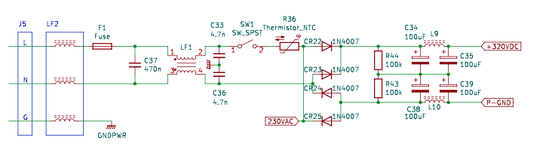 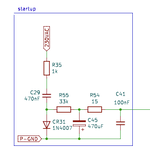 I had to replace those four big caps (C34, C35, C38, and C39) in my INTERNATIONAL AB because they were bulged. I recommend checking everything (resistors included) and replacing the four diodes of the bridge rectifier without hesitation; I would also check if CR31 is okay. With a little patience and luck, you should find one or more faulty components in this section. | |
| Posted by: ijnfuso on 2026-01-22 12:03:44 Thank you for the schematics. Really needed those!! With a little patience and luck, you should find one or more faulty components in this section.I did indeed spend some time testing everything in the AC section. CR31 is indeed faulty, and also is CR30... with all these faulty components I'm starting to be amazed this thing even turned on a couple of times! I will also change the capacitors, for good measure. I will keep you updated when I'll eventually do the repairs... | |
| Posted by: ijnfuso on 2026-01-29 10:32:34 Well, I’ve replaced what is essentially everything on the AC part… And, it doesnt work. Same issue, no power to mainboard, no noises whatsoever, just complete death. | |
| Posted by: Builder68 on 2026-01-29 12:56:36 Man, complete silence is the worst. If you're up for it, grab your tester and let's check the AC voltages. See if you’re getting 220-230V AC before and after the thermistor. Please stay safe and use extra caution while probing—or even better, check the continuity of the power switch and the thermistor with the power off before you try testing for live voltages. | |
Posted by: ijnfuso on 2026-01-29 13:50:36Man, complete silence is the worst. If you're up for it, grab your tester and let's check the AC voltages. See if you’re getting 220-230V AC before and after the thermistor. Please stay safe and use extra caution while probing—or even better, check the continuity of the power switch and the thermistor with the power off before you try testing for live voltages.Right- I am getting around 230V after the thermistor with switch on.... what else could I test | |
| Posted by: Fred1212 on 2026-01-29 23:47:50 Maybe a silly idea but make sure that the connections on the interconnecting cable from the analogue to Digital board are all clean and have enough spring in them to make good contact. You can remove each one and check it by depressing a small raised piece of metal on one side of the connector and they will pull out of the plastic housing. I've just repaired an analogue board and replaced all the larger diodes and capacitors and had the same result and all seemed dead. Turned out to be a number of poor connections on this cable. Don't give up they can be frustrating | |
Posted by: ijnfuso on 2026-01-30 02:47:03Maybe a silly idea but make sure that the connections on the interconnecting cable from the analogue to Digital board are all clean and have enough spring in them to make good contact. You can remove each one and check it by depressing a small raised piece of metal on one side of the connector and they will pull out of the plastic housing. I've just repaired an analogue board and replaced all the larger diodes and capacitors and had the same result and all seemed dead. Turned out to be a number of poor connections on this cable. Don't give up they can be frustratingUnfortunately, I have already tested every cable… the analog board is not even getting 12v or 5v to the power rail, and no high voltage as well… | |
Posted by: Builder68 on 2026-01-30 09:44:57Right-Since you've got AC voltage past the thermistor, start moving downstream. Check for roughly 320VDC across the positive pin of C35 and the negative pin of C39. If it's there, keep tracing the DC rail until you find where the voltage drops off. Did you check Q10 and Q11?. Your symptom sounds like either the DC stage is not starting up or you still having problems with the diodes CR21 / CR20. First check DC voltages at the inputs of T3 (Mainly the primary coil, the one with inputs P11, P12). The problem for sure is this section: 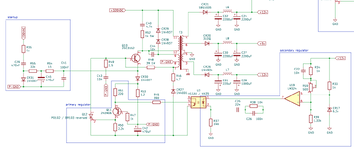 | |
| Posted by: ijnfuso on 2026-01-30 10:49:58 Well, I was checking voltages between C35 and C39, I am getting around 300/301DC.... while I was doing that I heard a bang, and, it was Q12 that said goodbye (it exploded, popping the fuse too). And also seemed to burn R53 too.... Since you've got AC voltage past the thermistor, start moving downstream. Check for roughly 320VDC across the positive pin of C35 and the negative pin of C39. If it's there, keep tracing the DC rail until you find where the voltage drops off. Did you check Q10 and Q11?. Your symptom sounds like either the DC stage is not starting up or you still having problems with the diodes CR21 / CR20. First check DC voltages at the inputs of T3 (Mainly the primary coil, the one with inputs P11, P12). The problem for sure is this section: | |
| Posted by: Fred1212 on 2026-01-30 14:36:19 At least something happened. Swap them out and hope that is the problem. Probably change Q10 and Q11 and check all the resistors | |
Posted by: ijnfuso on 2026-01-31 13:52:51At least something happened. Swap them out and hope that is the problem. Probably change Q10 and Q11 and check all the resistorsSearching online I read that Q12 doesn't have a direct replacement as it has been discontinued, and, can't find anything else... what can I do? Also It's almost like Q10 is glued to the metal bracket, how would I remove it? | |
| Posted by: Fred1212 on 2026-01-31 17:38:45 Q10 is 2SC3152 a transister NPN 6A 100W should be able to find an equivalent and Q12 is an SCR couldn't find this one though. Q10 won't be glued just the thermal paste will have gone really hard, undo the screw and force a thin blade between it and the heat sink should do it. I'll see if the SCR on my parts board is any good. | |
Posted by: ijnfuso on 2026-02-01 13:30:53Q12 is an SCR couldn't find this one though.I checked online and found at This github page that Q12 can be a "BR103 reversed" (?) Now I don't know if that's possible or how to reverse a transistor, so, not really sure... | |
| Posted by: bibilit on 2026-02-01 13:46:40 By reversed read flipped a 180 degrees from the original one. | |
| 1 > |