68kMLA Classic Interface
This is a version of the 68kMLA forums for viewing on your favorite old mac. Visitors on modern platforms may prefer the main site.
| Click here to select a new forum. | |
| 000000E 0000FFFF, Broken hinge, scratched screen Portable | |
| Posted by: mst3k on 2026-01-15 10:21:13 Greetings, Recently I received a Macintosh Portable 5126, with backlit screen. Problem One: I get the SAD MAC error 0000000E 0000FFFF when I power it on. I've recapped the motherboard and tested it with and without the RAM card installed. No improvement, but same error. Recapping went fine. I lifted one pad and had to do a fix near the left keyboard connector, but it checks out OK (aside from the small marks made in the plastic of the connector with my soldering iron. Yikes! that was a ridiculously narrow working area). AI tells me RAM problems, data bus problems, broken traces, etc. can cause the error code, but I'm looking for a bit more focus. Should the computer boot without the RAM card installed? I'd like to leave it uninstalled if it doesn't need it, because I have no idea if it is good. Any ideas? Problem Two: The right hinge support is broken. The only fix I see for the hinge is to find a new frame, or epoxy. I'm moving forward with epoxy. Problem Three: Screen is scratched and then scratched some more. Does anyone have experience trying to buff out scratches on these screens? I have some very gently plastic polishes used on acrylic and plastic watch crystals , but was curious about any success stories. Problem Four: Is my backlight working? I don't see it come on. The screen brightens before it goes black with the error message, but it sure seems dark. Does the backlight come one with power on or at some point later in the boot cycle? Thanks for reading this and any suggestions would be appreciated. 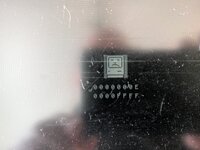 | |
| Posted by: Byrd on 2026-01-15 12:04:16 Hi, P1: You know, you need to go back in and have another look at your work 🙂. Deep clean around the replacement caps, and very close look around the Hybrid IC that is often taken out from corrosion. It has 1MB onboard so you can remove the RAM card for now. P2: Portables are pretty rock solid structurally so suspect it was dropped on this hinge to damage it; quality epoxy/JB Weld if not visible or 3D print replacement P3: Very fragile LCD that is easy to damage; I wouldn't be buffing too scratches out vigorously maybe try PlastX for this. The top layer of that LCD is a polariser film/glass protector which is adhesive and replaceable but again good change of damage taking it off P4: Backlight comes on at startup, if not working it's a failed CCFL tube | |
| Posted by: mst3k on 2026-01-15 13:50:27 Thanks for the help! P1: You know, you need to go back in and have another look at your work 🙂. Deep clean around the replacement caps, and very close look around the Hybrid IC that is often taken out from corrosion. It has 1MB onboard so you can remove the RAM card for now. I'll get the jewelers loupe out and take another good look. P3: Very fragile LCD that is easy to damage; I wouldn't be buffing too scratches out vigorously maybe try PlastX for this. The top layer of that LCD is a polariser film/glass protector which is adhesive and replaceable but again good change of damage taking it offDidn't realize that 'film' is removable, but I'm extremely dubious of my ability to take it off. I'll try a small bit of the lowest level polisher in a corner and see what happens. I see lots of 'petroleum jelly' and 'oil' fixes that involve rubbing one or the other on the screen, but that seems temporary at best. P4: Backlight comes on at startup, if not working it's a failed CCFL tubeIs there a source for the CCFL tube that you would recommend? Also, from what I have read, this seems like another 'fix' that can go south pretty quick. Thanks again for the insights. Stay tuned. | |
| Posted by: Juror22 on 2026-01-15 14:25:49 Here are the error codes - my apologies if you already stopped off there... Here is a thread where I got help sorting out my error codes on my non-backlit model. | |
Posted by: mst3k on 2026-01-15 15:01:27Here are the error codes - my apologies if you already stopped off there... Thanks! Hadn't found those yet. | |
| Posted by: mst3k on 2026-04-22 07:52:49 Just thought I would put this thread to bed with the results of the repair. After abandoning the idea of fixing it myself, I contacted Will at CayMac Vintage who agreed to take a look. He found (and fixed!) the following issues: The first issue, and main problem, Will found was under one of the ram chips. There were 2 broken traces. Will pointed to pin 13/14. One is an address line and the other is data line, hence the memory error. The second issue was the cable for the screen was broken so he replaced it. Additionally, two of the recapped pads near the keyboard connector were not properly connected and needed to be repaired. RE the hinge, epoxy to the rescue. Not pretty, but it is working and out of sight with the portable assembled. I'm keeping my eye out for an intact replacement part. As far as the screen scratches go, I haven't tried the watch crystal polish yet and am looking for a damaged or broken powerbook/portable screen to test before irreversibly damaging mine. Lastly the backlight works fine. Once the repairs were completed and the machine booted, the backlight worked. I'm not too proud to admit my limitations and am grateful that those with the skills and mindset to keep these machines working are available to help. Thank you Will! | |
| Posted by: finkmac on 2026-04-22 08:40:54 the scratches are likely in the plastic polarizer... which is replaceable. but not for the faint of heart... | |
| 1 |