68kMLA Classic Interface
This is a version of the 68kMLA forums for viewing on your favorite old mac. Visitors on modern platforms may prefer the main site.
| Click here to select a new forum. | |
| PowerBook...from Canada? | |
| Posted by: EvieSigma on 2016-10-15 17:59:21 So I got my PB180 today...It's an old PowerBook that currently doesn't work, nothing exciting about that...but I noticed this interesting sticker on the rear door. I've never bought a computer from Canada before! This is interesting. I mean...I'm assuming that sticker means it's from Canada. 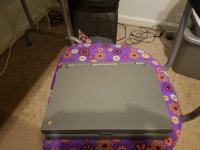 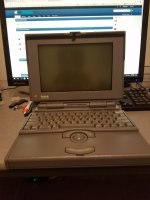 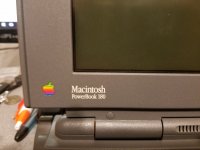 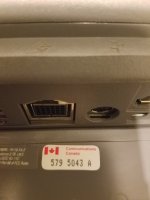 | |
| Posted by: rsolberg on 2016-10-15 18:54:10 I haven't seen one of those in a long time. "Communications Canada" was rolled into "Industry Canada" at some point in the early 90s. The Industry Canada sticker is very similar though. It's typically only seen on devices that contain a modem or cellular radio. On quite a lot of Macs, it's on the modem board, telephone jack, or adjacent to it. | |
| Posted by: EvieSigma on 2016-10-15 18:57:50 I knew it had to be for the modem, but since I've never seen or owned a Canadian computer before this is the first time I've seen one. | |
| Posted by: sstaylor on 2016-10-15 19:24:27 I'm pretty sure I've seen those stickers on US machines. | |
| Posted by: Juror22 on 2016-10-15 19:30:40 I wonder why they would be on US machines, NAFTA??? I think that I have this on one of my laptops - now I have to go look and see which one... | |
| Posted by: rsolberg on 2016-10-15 19:56:34 My guess is that they typically end up on most North American market machines to avoid having separate SKUs of that model for each country. They're not always visible without opening the computer though. Almost every modem I saw at Seattle RePC had a sticker. | |
| Posted by: unity on 2016-10-15 20:12:01 See that sticker many times on models sold in US also. Probably not a Canadian machine really. | |
| Posted by: EvieSigma on 2016-10-15 20:18:28 I guess this is just a rare case of a label most people don't see being in plain view rather than stuck to a board inside the machine. | |
| Posted by: TheWhiteFalcon on 2016-10-15 20:45:18 That one was likely made in Colorado. | |
| Posted by: EvieSigma on 2016-10-15 20:50:00 It does say "Assembled in USA" on the label so you're probably right! | |
| Posted by: EvieSigma on 2016-10-18 14:03:09 I got my AC adapter in today, plugged in the PowerBook, waited a few minutes, and to my shock...IT'S ALIVE! It chimed and everything! Miracles do come true. 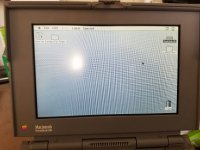 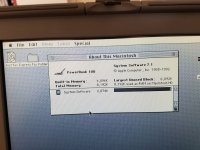 | |
| Posted by: TheWhiteFalcon on 2016-10-18 14:50:15 The question is, how long can it stay on before the LCD starts tunneling (edges turn black)? | |
| Posted by: techknight on 2016-10-18 15:56:29 The part that concerns me is "waited a few minutes"... Why?? Soon as you plug it in, and press the button it should fire right up. Unless your AC adapter is failing, OR you left the crap original battery installed. | |
| Posted by: EvieSigma on 2016-10-18 16:57:13 I did...I didn't think to pull it out first. You'd think someone would make a battery compartment cover for these old PBs so you don't have to have a gaping hole or an old dead battery... Also, this thing hasn't been used in a very long time! I found documents from 1998 on it. | |
| Posted by: TheWhiteFalcon on 2016-10-18 17:00:24 Slide the cover off the old battery. 😉 | |
| Posted by: EvieSigma on 2016-10-18 17:12:28 Thanks, I didn't even know I could do that! I've had it running for about 10 minutes and no tunneling yet. Been playing Super Munchers, as it's my floppy drive tester of choice (and it's fun!). | |
| Posted by: techknight on 2016-10-18 17:33:26 Welp, as long as its fun 😉 | |
| Posted by: EvieSigma on 2016-10-18 17:40:43 Oh! Before I forget...is there a PRAM battery in these 180s that needs removal to avoid explosion? | |
| 1 |