68kMLA Classic Interface
This is a version of the 68kMLA forums for viewing on your favorite old mac. Visitors on modern platforms may prefer the main site.
| Click here to select a new forum. | |
| USB-C powered 8"display for the Apple IIc with STL files and build plan | |
Posted by: ArjenCNX on 2025-10-27 20:15:18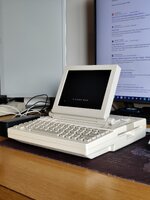 Hi there everyone, Recently i have spend some time to make a 3D printable display for the Apple IIc, and today is the day to share the design as all is finished, assembled, tested and so on. I am sharing the STL files so you can print the design yourself (or send it to a printing company) and a simple guide on how to assemble it. The Display used is a 8" Eyoyo screen with an IPS panel that performs well, is bright and has lots of contrast. its also very cheap, so affordable for most people. Provided are: - STL files for all parts - assembly guide - parts list Parts used:
If you need any guidance, or you want to share improvements, please ask/add/create! I hope someone will enjoy this design, it was fun to make! This will allow, in combination with a USB-C power adapter for the IIc to run the whole set off a single power bank (provided it supports USB-C PD) power consumption is around 4W for the display, and 8.5W for the computer (+7W when the disk drive runs) | |
| Posted by: Aeroform on 2025-10-28 03:21:39 Nice! Did you happen to note what actual lcd panel the Eyoyo display uses? I've been eyeing that one too for a color SE/30 project as the HJ080IA-01E I bought is a bit too dim for my taste. | |
| Posted by: ArjenCNX on 2025-10-28 19:01:55 Let me check, Unfortunately there are no markings on the screen, but in my experience its quite bright, i don't have the tools to measure it but by looking at it i would estimate it to be about 350 nits or so. If you don't like the brightness of your current panel, there are some things you can do, you could check the LED driver and replace the current sense resistor with a slightly lower value to increase output (consult the LED driver datasheet to select the correct value/resistor) and i have done upgrades in the past with generic backlight LED strips, this works wonders for laptop displays that still rock the old CCFL tubes, you can double the brightness without too much fuss and lower power consumption. | |
Posted by: Aeroform on 2025-10-30 13:35:21Let me check, Unfortunately there are no markings on the screen, but in my experience its quite bright, i don't have the tools to measure it but by looking at it i would estimate it to be about 350 nits or so. If you don't like the brightness of your current panel, there are some things you can do, you could check the LED driver and replace the current sense resistor with a slightly lower value to increase output (consult the LED driver datasheet to select the correct value/resistor) and i have done upgrades in the past with generic backlight LED strips, this works wonders for laptop displays that still rock the old CCFL tubes, you can double the brightness without too much fuss and lower power consumption.I actually looked into replacing the resistor, but I couldn’t even manage to figure out which on to change on the driver board (pcb800099) 😅. I got ahold of the panel spec sheets so know what the backlight wants for full light. It should be 300 nits, but juding how dim it is I really don’t think it’s driven right. | |
| Posted by: colinmcmillen on 2025-11-03 04:26:13 This is neat. Is the rotating part attaching to the base compatible with the IIc Monitor Stand? That would be even better 🙂 | |
| Posted by: akator70 on 2025-11-03 19:34:59 This is a very nice design and nicely executed. Well done! | |
Posted by: ArjenCNX on 2025-11-04 23:24:45This is neat. Is the rotating part attaching to the base compatible with the IIc Monitor Stand? That would be even better 🙂the stand snaps in place with the grooves on the top of the Apple IIc, so it cannot slide around but is also not fully clamped by it, making sure i don't damage the sometimes fragile plastics of the casing. (but im not 100% sure if that answered your question) i never had the LCD display for this unit. | |
Posted by: ArjenCNX on 2025-11-04 23:25:18This is a very nice design and nicely executed. Well done!Thank you Sir! | |
Posted by: colinmcmillen on 2025-11-05 00:01:36the stand snaps in place with the grooves on the top of the Apple IIc, so it cannot slide around but is also not fully clamped by it, making sure i don't damage the sometimes fragile plastics of the casing. (but im not 100% sure if that answered your question) i never had the LCD display for this unit. No, my question was whether it's mountable on this original stand for the original CRT 🙂 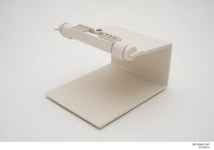 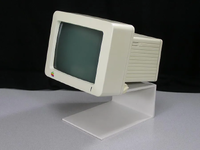 | |
| Posted by: ArjenCNX on 2025-11-06 01:19:26 Ah, that's right!~ i forgot about that one 🙂 i didn't make it for this, i doubt it will fit, the mid-section of the LCD bevel hinge is 140mm wide, i suspect this is wider then the CRT hinge. potentially quite easy to adapt though (if someone wants to do this, just let me know) | |
Posted by: mg.man on 2026-04-21 15:50:22whether it's mountable on this original stand for the original CRTFollowing up on this... I do think it would be possible without too much hassle. Here are some pictures of the original stand components... First, the part that mounts onto the bottom of the CRT : 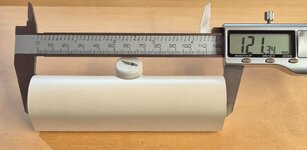 As you can see, its just over 121mm wide. Looking at your front bezel, that equivalent part of your model appears to be 140mm. Could you alter this to be 121mm? Here are some pics of the Eyoyo LCD with the original stand part next to it and with it sitting 'in position' as a mockup. 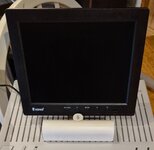 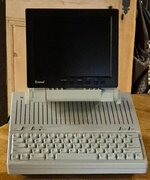 | |
| Posted by: mg.man on 2026-04-21 15:52:56 Ohh... I'll be happy to provide more pics and measurements. And I have a 3D printer to help with the prototyping. 🙂 | |
| Posted by: Forrest on 2026-04-21 16:27:09 Looks like Amazon still sells the same LCD monitor for $79.99 Eyoyo 8" Security Camera Monitor, 1024×768 4:3 Mini LCD Screen CCTV Monitors Display with HDMI VGA BNC AV USB | |
| Posted by: mg.man on 2026-04-22 08:33:26 So I decided to do a little hacking about on the bezel... sorry @ArjenCNX, hope you won't mind! First I cut off most of the bezel in my slicer, and then removed about 9.5mm from both ends of the 'mount'. Here's what it came to before slicing. 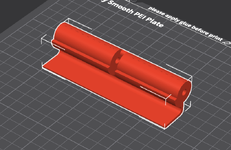 ...then printed... 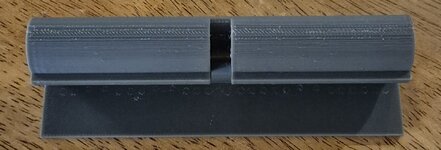 ...then a test fit... 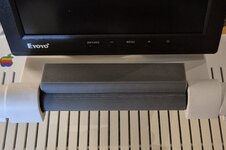 Now... I did have to drill out the hole to 1/4" so the threaded rod would go through (and since that's a drill bit I had to hand). As you can see the 'barrel' is much smaller than the original CRT mount, but I think with only a few minor tweaks, this would work well! Here's a pic of the hacked mount end-on... 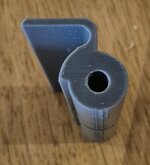 If it's not too much effort, could you increase the 'barrel' diameter to 30mm, the hole size to 7mm and reduce the length(width) to 122mm? With those adjustments, it should be a good fit both physically and aesthetically... and you'll probably only need the front bezel and back to mount the LCD on the //c CRT stand. 🙂 Thanks!! | |
| Posted by: mg.man on 2026-04-24 02:36:08 Update... thanks to an inspiring link to a //c iPad mount sent to me by @wottle... I've been able to blend - well, hack in my slicer! - the two together and make a test print of the //c CRT stand mount I had in my head. Since I've not disassembled the LCD yet, I used a handy 5 1/4" diskette box to give the 'blue screen' effect... 😊 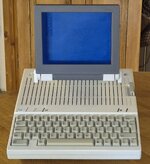 Final print will be in Retro Platinum or a 'Snow White' filament if I can source one... | |
Posted by: wottle on 2026-04-24 10:54:20Update... thanks to an inspiring link to a //c iPad mount sent to me by @wottle... I've been able to blend - well, hack in my slicer! - the two together and make a test print of the //c CRT stand mount I had in my head. Since I've not disassembled the LCD yet, I used a handy 5 1/4" diskette box to give the 'blue screen' effect... 😊Looks great! Any clearance issue with the knobs used to tighten it down? I actually had some conversations with someone about a larger version that could fit a 10” iPad display and control board. I think it would more closely match the width of the IIc. I’ll have to go back through the threads and see if they ever completed that work. I will likely try to print it in retro platinum filament because the bright white of the resin I used on my 8” enclosure is jarring against the aged snow white of the IIC. | |
| Posted by: mg.man on 2026-04-25 03:32:11 Thanks! Any clearance issue with the knobs used to tighten it down?Yes, hence the slight gap either side. But since the LCD is much lighter than the CRT, there's enough friction even with the knobs not fully tightened. the bright white of the resin ... is jarring against the aged snow white of the IIC.Yeah... as you can see in the pic, even the original CRT stand color is not a match for this //c. My end goal is to use this with my //c+, which is platinum - that said, I'm not sure whether to match the platinum or the original stand... 🤔 | |
| Posted by: micheledipaola on 2026-04-26 09:38:56 Very nice. I wish I had a 3d printer myself, to try and adapt the same design to this other LCD HDMI 10.1" as @wottle was mentioning I think I like this better: https://it.aliexpress.com/item/1005008286371680.html and it surely fits better the IIc width... it's also white! | |
Posted by: wottle on 2026-04-26 11:23:06Very nice.I'd stick with the iPad 1 or 2 screen if you want to go closer to 10". They're cheap, readily available with controllers, and most importantly, they're 4:3 aspect ration. The 10" screen you linked would look cool, but in use you're either going to be left with an image that's stretched too wide, or black bars on either side of the image which will result in a picture probably being smaller than that 8" 4:3 LCD. As for the lack of 3d printer - I was able to get the parts for the 8" version ordered from JLC3DP for about $50. About half of that was the cost of shipping. And the resin is a professional level of finish. It is a very bright white, so it may look best with a painted coating for match the almond of the Apple IIc. FYI, @phunguss has his 10" version posted here: https://tinkerdifferent.com/threads...guide-draft-work-in-progress.4938/#post-43303 I'm working on a modified version that can house the same display with a controller that is different (it has composite video, which is nice because my IIc and IIc Plus don't have HDMI or VGA output). Just got it assembled and I need to tackle cable management and probably incorporating a 12v usb-C trigger board to power the screen. 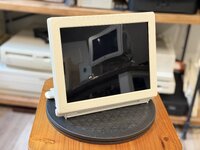 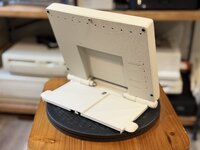 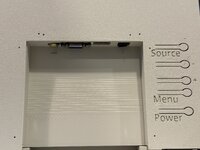 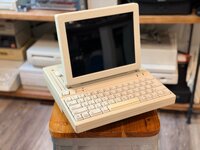 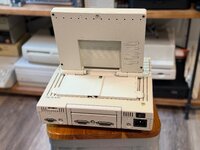 | |
Posted by: micheledipaola on 2026-04-26 14:04:24Looks great! Any clearance issue with the knobs used to tighten it down? I'd stick with the iPad 1 or 2 screen if you want to go closer to 10". They're cheap, readily available with controllers, and most importantly, they're 4:3 aspect ration. The 10" screen you linked would look cool, but in use you're either going to be left with an image that's stretched too wide, or black bars on either side of the image which will result in a picture probably being smaller than that 8" 4:3 LCD. this is great! So many great projects to follow... 😀 | |
| 1 |