68kMLA Classic Interface
This is a version of the 68kMLA forums for viewing on your favorite old mac. Visitors on modern platforms may prefer the main site.
| Click here to select a new forum. | |
| Spot the difference - PowerBook G3 292mhz & 350mhz cpus. | |
| Posted by: AlpineRaven on 2025-10-18 01:50:48 Spot the difference! I recently bought this PowerBook G3 Wallstreet - very specific purchase because I had Sonnet 500mhz G3 card to go for it, it does not work in PowerBook G3 PDQ. This is PowerBook G3 Wallstreet CPU, one is stock 292mhz and other one is 350mhz appears to be overclocked (overclocked from 292mhz to 350mhz), I thought I'd benchmark it - but it one came up very small amount difference. Could you look in photos carefully and see what was changed/overclocked as I cannot work it out - both cards appears to be the same. As you can see the multipliers on bottom left - R112 to R120 - those will be to multiply. On both CPU is the same. also; bus speed multiply is R77 to R84 - one is for 83mhz and 66mhz - both CPUs are the same as both is 83mhz.. Screenshot of the benchmark results. Cheers AP | |
| Posted by: AlpineRaven on 2025-10-18 02:36:43 edit; What I found about this 350mhz - it will not accept more than 256mb RAM as it will throw up memory error at boot up - Those memory cards are good working order as they're working in other CPUs. | |
| Posted by: herd on 2025-10-18 07:54:00 If it is really running at 350MHz, then the bus would have to be 50 or 100MHz. It sounds like 83 vs 100MHz (x3.5) to get 292/350. This thread has info about changing the bus speed on similar hardware: 68kmla.org/bb/index.php?threads/imac-g3-rev-a-d-fsb-bus-overclock.49318/ | |
| Posted by: croissantking on 2025-10-18 11:30:58 I don’t think the 2nd one is really running at 350MHz, based on: - examining both the bus speed and CPU multiplier PLL resistors in your photos, which are the same on both cards; - your benchmarks being almost the same; - having seen this quirk before on a Wallstreet. Is the 350MHz speed being reported by Apple System Profiler? If so, try Newer Tech Gauge Pro. | |
| Posted by: croissantking on 2025-10-18 11:49:34 I had a detailed look at your two CPU card photos, layering one on top of the other in Photoshop and lining them up carefully; then, turning the top layer on and off repeatedly and looking for differences. There are none. I did this for both sides of the card. One of the cards has this sticker overlapping the edge of one of the ROM chips, so I can't see if the two resistors (R33 & R34) that should be populated are actually under there. 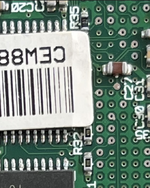 | |
Posted by: AlpineRaven on 2025-10-18 15:46:49I had a detailed look at your two CPU card photos, layering one on top of the other in Photoshop and lining them up carefully; then, turning the top layer on and off repeatedly and looking for differences. There are none. I did this for both sides of the card.Yes there are resisters under that sticker - its R33 and R34. It is showing 350mhz in Guage Pro and Norton's System Info as well - so across 3 programs (incl Apple's System Info) it is showing 350mhz. Weird! Cheers AP | |
Posted by: croissantking on 2025-10-18 15:51:22Yes there are resisters under that sticker - its R33 and R34. Could you post a screenshot of Gauge Pro, with extra details turned on (Command-D)? I’m interested to see what bus speed and multiplier it’s reporting. | |
| 1 |