68kMLA Classic Interface
This is a version of the 68kMLA forums for viewing on your favorite old mac. Visitors on modern platforms may prefer the main site.
| Click here to select a new forum. | |
| Powerbook 100 - Recapped LCD and Logic board but screen is"blobby" | |
| Posted by: Kevinlenane on 2025-10-13 05:23:01 Any idea what might cause this after recapping both the LCD and the logic board? | |
| Posted by: finkmac on 2025-10-13 06:11:56 looks like moisture or oil on the backlight | |
| Posted by: Kevinlenane on 2025-10-13 06:14:44 So do I need to bake this thing? There don't appear to be any bad pixels so I'd like to salvage if possible | |
| Posted by: finkmac on 2025-10-13 08:31:12 why would you bake it? it looks like moisture or oil on the BACKLIGHT 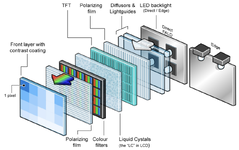 see image. behind the LCD is a diffusing film and then an acrylic lightguide. these two parts are sensitive to oils and solvents. you likely got some kind of liquid in between the diffusing film and lightguide. ask me how i know. you have a few options here.
| |
| Posted by: 3lectr1cPPC on 2025-10-13 11:26:47 I agree, looks more like the backlight diffuser got liquid contamination somehow rather than vinegar syndrome. Should be plenty of supply of dead panels to swap those parts from. | |
Posted by: Kevinlenane on 2025-10-13 18:02:39I agree, looks more like the backlight diffuser got liquid contamination somehow rather than vinegar syndrome. Should be plenty of supply of dead panels to swap those parts from.Fortunately I actually have one but I'm not certain that screen is toast bc I haven't recapped it yet. It has some pinstripes but in my experience that's not typically damage... Anyway, my first move will be to attempt to clean it and then dry it - this kind of screen repair is a first for me. I'm fairly sure I'm going to screw this up 🙂 | |
| Posted by: 3lectr1cPPC on 2025-10-13 18:05:14 I’ve had this same problem (to a much more minor degree) on my PowerBook 540. I found the acrylic sheet was permanently stained and could not be fixed. Maybe your case is different, but I wouldn’t count on it. Worth a shot in trying though. | |
Posted by: Kevinlenane on 2025-10-13 18:20:58I’ve had this same problem (to a much more minor degree) on my PowerBook 540. I found the acrylic sheet was permanently stained and could not be fixed. Maybe your case is different, but I wouldn’t count on it. Worth a shot in trying though.Bummer ok - next step is clearly baking 🙂 | |
| Posted by: finkmac on 2025-10-13 19:07:20 how the heck did you arrive at that conclusion? when did anyone here say bake? this repair might be beyond your ability. i recommend passing it on to someone else. | |
| Posted by: Kevinlenane on 2025-10-13 19:11:52 It was me trying to be funny (and failing) hence the 🙂 face. People bake the 180 LCD at super low temp to fix the tunneling issue. I'm certainly not going to cook the film - im about 50/50 right now that I screw this up anyway - just not that way. | |
| Posted by: finkmac on 2025-10-13 19:14:06 just be careful and be patient. wear nitrile gloves if you're not comfortable. you already have half a working display, you just need half of a broken display. | |
| Posted by: Byrd on 2025-10-14 01:06:06 There are lots PB100s with degraded displays (pink bloom around where the trackball rests under the LCD causing small fractures in LCD over time. As yours is a good display without this, I'd look for a junk PB100 and retain all the polarizer films etc. and transfer over | |
| Posted by: Kevinlenane on 2025-10-14 15:35:11 Thanks all for the help - love this hobby | |
Posted by: imactheknife on 2025-10-17 14:56:00Any idea what might cause this after recapping both the LCD and the logic board?Looks like isopropyl got into the display or something. Had something similar happen on a powerbook 100 myself but not to that extent | |
| 1 |