68kMLA Classic Interface
This is a version of the 68kMLA forums for viewing on your favorite old mac. Visitors on modern platforms may prefer the main site.
| Click here to select a new forum. | |
| Changing the default window size in SimpleText | |
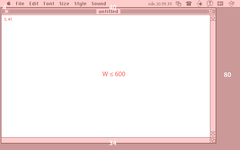
| Posted by: PB170 on 2025-10-10 06:43:18 Anyone up for some reverse engineering? 🙂 As some of you may know, I'm using my PowerBook 170 more or less daily (last time I checked, my usage clocked in at 4 h 18 min / day over the past year and a half which probably is more than I spend on my MacBook and phone combined 😀) Anyway, being the standard text editor on classic Mac OS, I often open smaller text documents in SimpleText (version 1.4). However, since all documents open to the default window size, which covers most of the screen, and I usually work with multiple documents, I constantly find myself resizing windows on open. It has now come to a point where I *really* wish I could modify the default window size with ResEdit 🙂 Unfortunately, I'm not really up to the task myself. So, anyone who would be interested in helping me out? 🙂 As a starting point, the code appears to work like this (tested on multiple systems and monitor resolutions):
 | |
| Posted by: David Cook on 2025-10-10 08:01:47 What size would you like it to open to instead? | |
Posted by: PB170 on 2025-10-26 13:31:24What size would you like it to open to instead?If it could determined where in the program code the window size is defined, any size should be possible. But in general smaller 🙂 Would have to try out and tweak the ultimate size for my needs 🙂 | |
| Posted by: PB170 on 2025-10-26 13:34:16 By the way, Mac OS 8/9 could also benefit from a slight adjustment: 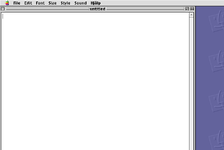 (Although the total lack of spacing doesn't stick out all that much among all the other things that broke visually post-System 7… 🤪) | |
Posted by: nathall on 2025-10-27 21:04:26By the way, Mac OS 8/9 could also benefit from a slight adjustment: I’m actually so irritated by this that I manually reposition the window under OS 8/9 to more closely match the spacing under 7 every time I open a SimpleText document. I’ve been doing it for so many years that it’s become a muscle memory thing. | |
| Posted by: adespoton on 2025-10-29 08:59:33 I thought that spacing had been an intentional thing under OS 8/9? I seem to recall reading a tech note on it at the time -- it covers Letter and 24 character layout, and leaves a column down the right for easy access to desktop icons in their default locations? | |
Posted by: David Cook on 2025-10-31 10:23:41I thought that spacing had been an intentional thing under OS 8/9? I seem to recall reading a tech note on it at the time -- it covers Letter and 24 character layout, and leaves a column down the right for easy access to desktop icons in their default locations? I believe they are referring to the left side of the window appearing to get cut off, because the boarders are now wider. I've analyzed the code, and made progress with a patch, but it is complicated. SimpleText has one routine for creating the window, but then calls out to other routines (and looks at some booleans) depending on the type of content ('TEXT', 'PICT', QuickDraw 3D, QuickTime, etc). If they had made separate routines for different types of content, each routine would be much simpler to modify. At present, I can position the window anywhere and make it smaller, but I can't yet make it larger. There is a call towards the end that adjusts the width and height based on the content. I need to patch that. | |
Posted by: nathall on 2025-10-31 18:22:47I believe they are referring to the left side of the window appearing to get cut off, because the boarders are now wider. Correct. The top also seems slightly cut off. | |
Posted by: PB170 on 2025-11-01 13:54:43I’m actually so irritated by this that I manually reposition the window under OS 8/9 to more closely match the spacing under 7 every time I open a SimpleText document. I’ve been doing it for so many years that it’s become a muscle memory thing.Haha, sorry to hear that! 😂 Glad to know I'm not the only one who notices it though 🙂 | |
Posted by: PB170 on 2025-11-01 14:03:11I've analyzed the code, and made progress with a patch, but it is complicated. SimpleText has one routine for creating the window, but then calls out to other routines (and looks at some booleans) depending on the type of content ('TEXT', 'PICT', QuickDraw 3D, QuickTime, etc). If they had made separate routines for different types of content, each routine would be much simpler to modify.Oh that's wonderful 🙌✨ Thanks a lot for having a look at it! 🙂 Have you been able to identify the routine that gets called when a TEXT document is opened? TEXT should be different from all the others in that it doesn't have a predefined size (and it's the only one I'm interested in changing). This should also apply for all new documents (since they're always text documents). Were you able to find any values in the routines that correspond to the default values I identified above? I'm mainly interested in increasing the bottom value (34) and decreasing the default width (600), although tweaking the position could be nice as well. Will a wide patch be required, or is it something that could be changed in Resedit by finding the right offsets in the code resource? Many questions 😊 Anyway, big thanks again! | |
| Posted by: David Cook on 2025-11-03 21:32:41 Attached is the beta version of SimpleText that allows users to define window sizes. 1. First expand the attached .hqx file into the application using Tiny Transfer, BinHex, or StuffIt. 2. Using ResEdit, open the application 3. You'll see a resource called WSzT (for Window Size Text). Double click on it. 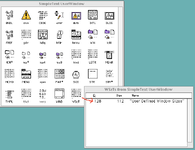 Here you'll see a list of screen sizes (such as 512x384) followed by a rectangle (top, left, bottom, right). To override the default text window size for a particular screen size, make sure that screen size is enabled and then edit the rectangle that you desire. You can add your own screen sizes if I missed any. You can even add duplicates and the first enabled will be used. 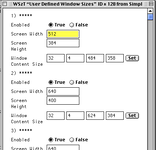 Caveats: 1. The "Window Content Size" rectangle represents the content area, not including the window borders. This is just how the Macintosh toolbox was programmed. So, if you make the rectangle match the screen dimensions, you wouldn't see any window borders or drag bars, because they'd be off the screen. Just play with the numbers until you like the results. 2. Don't use the Set button. It is some weird thing ResEdit includes so you can drag to create a rectangle. 3. Because the patched code now ignores all the corrections that SimpleText makes, it means it no longer overrides the window size for thick menu bars or to provide a row of icons on the right side. You can create a window completely offscreen now. If you don't like that, change the values. 4. You can add additional screen dimensions if I missed any. Click on any ***** thing and choose Insert New Fields(s) from the Resource menu. 5. I have had ResEdit corrupt the file a couple of times. I think ResEdit might have a bug with templates. So, make a backup copy as soon as you get a nice layout the way you like it. Let me know what you discover. David | |
| Posted by: David Cook on 2025-11-04 12:02:00 I wrote up the technical details over here: 
Assembly - Patching 68K software - SimpleTextSomeone asked to have SimpleText open a smaller text window at startup. Initially, I assumed this would be a fairly easy fix by just overwriting a few constant values in SimpleText code. It turned out to be a pain -- but I learned a lot along the way. You need to have the code editor (from one...
 tinkerdifferent.com
| |
Posted by: PB170 on 2025-11-04 14:21:45Attached is the beta version of SimpleText that allows users to define window sizes.Oh, wow! I'm not sure how you accomplished this, but this is far more than I had imagined or wished for! I'm using the Swedish version of SimpleText (just used the default version above for clarity), but I copied over CODE resource #1 ("Main") along with the TMPL and WSzT resources, and it works like a charm! (Just out of curiosity, I tried to copy over only the CODE resource and expected the app to crash, but it gracefully just reverted back to the original behavior – very neat!) Thank you so much for this! Finally no more constant window resizing. Love it! 🙌 Like I said, I'm using my PowerBook and SimpleText daily, so this will see instant use! Would you mind elaborating a bit on how this works under the hood and what modifications you did? Did you implement new routines altogether, and redirect the present code? Seriously impressive in that case! | |
Posted by: PB170 on 2025-11-04 14:23:00I wrote up the technical details over here:Oh, I didn't see your update before I posed my reply. Wonderful! 😀 I considered maybe giving it a try myself, so I'll definitely give it thorough read. Thanks for sharing the process! | |
| Posted by: PB170 on 2025-11-04 14:44:06 As a (highly irrelevant) aside, and to properly answer your first question 😉🙂 — during the past weeks, in anticipation for a possible solution, I've taken screenshots of the windows I've resized, and overlapped the outlines to find the golden average 🙂  Turns out that my very personal preference is a nice and even 450 by 290 pixels 🙂  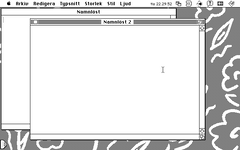 I also took the opportunity to nudge the top down one pixel which I think look more balanced. Such a novel feeling to suddenly see SimpleText open windows just like I've set all my other apps to do. Again, amazing work! | |
Posted by: David Cook on 2025-11-05 07:27:55Such a novel feeling to suddenly see SimpleText open windows just like I've set all my other apps to do. I am so glad this works for you. Definitely makes it worth the hack. (Just out of curiosity, I tried to copy over only the CODE resource and expected the app to crash, but it gracefully just reverted back to the original behavior – very neat!) Yup. I always go to the trouble of checking return values and nil pointers. Thank you for appreciating my work. : ) - David | |
| 1 |