68kMLA Classic Interface
This is a version of the 68kMLA forums for viewing on your favorite old mac. Visitors on modern platforms may prefer the main site.
| Click here to select a new forum. | |
| Top half of PowerBook passive matrix LCD gone dark after recap | |
| Posted by: luRaichu on 2025-09-26 11:57:07 I just recapped a Sharp passive matrix display from a PowerBook 160, it worked fine for the first hour but then the top half of the screen started flickering and went dark. If I crank the contrast I can see the top half flickering in darkness. I think it could be a bad connection with one of the display ribbons (as highlighted). But before taking the whole display panel apart again I want to know if someone has fixed this before. (Second video shows display flickering, please don't watch if you're photosensitive. Thanks) | |
| Posted by: croissantking on 2025-09-26 13:21:45 FREE KEVIN | |
| Posted by: croissantking on 2025-09-26 13:29:31 Also I don’t think it’s an issue with the display connector highlighted, as this would cause a more localised issue whereas you’ve lost half the screen. More likely to be a bad trace or via caused by cap leakage. | |
Posted by: luRaichu on 2025-09-26 14:10:32More likely to be a bad trace or via caused by cap leakage.Where? Why would the problem progress, instead of being apparent right away? | |
| Posted by: luRaichu on 2025-09-26 15:36:22 I have the panel stripped apart on the bench right now, the top half of the picture is coming in and out intermittently. Often it'll start out dark, flicker back to normal, then flicker to dark again. You don't know how upset I am | |
Posted by: 3lectr1cPPC on 2025-09-26 16:22:12I have the panel stripped apart on the bench right now, the top half of the picture is coming in and out intermittently. Often it'll start out dark, flicker back to normal, then flicker to dark again. You don't know how upset I am2 things to check. First, the display cable is pretty tricky to fully reinsert into the connector and easily comes loose. Make sure you aren’t chasing the wrong problem. Second, shine a flashlight up to the ribbons around the screen with the integrated driver ICs. Check for any dark spots (corrosion). If you see dark spots in any of the ribbons near those caps, and if the display cable isn’t loose, then unfortunately that’s pretty much the end for one of these LCDs. | |
Posted by: croissantking on 2025-09-27 03:40:01Where? Why would the problem progress, instead of being apparent right away? What I meant was that it seems like it’s something other than the ribbon cable you highlighted, because a localised failure there wouldn’t cause half the screen to cut out. This is what I would expect to see: 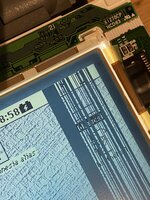 I feel your pain because I’ve had to go through exactly 4 of these panels in order to get a non-faulty one. | |
Posted by: 3lectr1cPPC on 2025-09-27 06:43:21What I meant was that it seems like it’s something other than the ribbon cable you highlighted, because a localised failure there wouldn’t cause half the screen to cut out.That's what you get if one of the vertical ribbons is bad, but the horizontal ones can absolutely take out half the screen. You see this all the time on the PowerBook 100. Could also be a bad trace though. | |
Posted by: croissantking on 2025-09-27 06:45:46That's what you get if one of the vertical ribbons is bad, but the horizontal ones can absolutely take out half the screen. You see this all the time on the PowerBook 100. Yes, but OP had highlighted one of the vertical ribbons, so I was just responding to that hypothesis. I didn't know the horizontal ribbons could take out half the screen - interesting. | |
Posted by: 3lectr1cPPC on 2025-09-27 06:47:22Yes, but OP had highlighted one of the vertical ribbons, so I was just responding to that hypothesis.Yeah, if the top two aren’t working then about half the screen will go out. I’m thinking in this case though that it’s probably more likely a loose or damaged display cable, or an intermittent trace perhaps. | |
| Posted by: luRaichu on 2025-09-27 06:53:56 I tried reseating the display cable from both ends with no effect. If there's a tear it's not in any portion I can see, I'd have to pull the entire thing out | |
| Posted by: luRaichu on 2025-10-07 07:39:19 I have my next display panel... What's the best way to desolder the tantalum caps from the first panel so they can be soldered to the new panel | |
| Posted by: finkmac on 2025-10-07 07:55:07 the best way is to buy new caps second best way is to use desoldering braid. or you could do what i do. heat up both sides repeatedly and slowly use iron to angle the cap upwards until one side isn't soldered down.. then finish the job with the iron on the other side. ymmv. | |
Posted by: croissantking on 2025-10-07 08:12:41or you could do what i do. heat up both sides repeatedly and slowly use iron to angle the cap upwards until one side isn't soldered down.. then finish the job with the iron on the other side. ymmv. Yeah I do this and it’s fine if the PCB isn’t being re-used. I also use two soldering irons sometimes. | |
Posted by: finkmac on 2025-10-07 08:14:56I also use two soldering irons sometimes.like chopsticks 😆 | |
| Posted by: luRaichu on 2025-10-10 19:07:02 I recapped a second display with tantalum caps taken back from the first. It's not an improvement. (this display somehow has a chip in its glass, on the southwest corner) I tested this display in two 160s with the same result. Please, let me know if you have a tested, working passive matrix display panel for sale. I'm done playing games | |
| 1 |