68kMLA Classic Interface
This is a version of the 68kMLA forums for viewing on your favorite old mac. Visitors on modern platforms may prefer the main site.
| Click here to select a new forum. | |
| Superdisk repair? | |
| Posted by: PotoMac on 2025-09-04 05:19:11 My Imation SuperDisk now gives me the initialize disk prompt for every disk I try in it (1.4M floppy or 120MB) but used to work fine. Is there anything that can be done to repair these now or is it just the laser dying out and that's the end of it? | |
| Posted by: olePigeon on 2025-09-04 09:01:15 The problem is that the Imation Dry Cleaning Disk you need to clean the head is pretty rare and hard to find. Unfortunately you can't use a regular floppy cleaning disk, it'll damage the drive. You could try contact this seller and see if they'll part with just the cleaning disk: 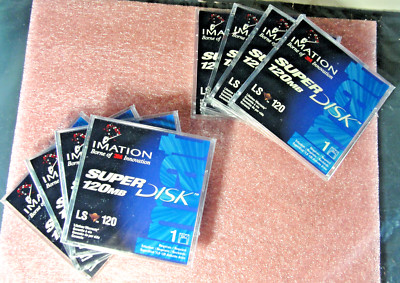
8x Genuine Imation LS-120 SuperDisk 120MB Blank Media Sealed & 1x CleanDisk | eBayIt is a 3½-in. floppy drive that is compatible with long-run storage. The model is LS 120 and it is manufactured in the United States. This product is not part of a bundle and has not been used before.
www.ebay.com
| |
| Posted by: PotoMac on 2025-09-04 10:39:19 Can you clean it with iso and a q-tip? | |
| Posted by: finkmac on 2025-09-04 11:00:14 sounds like a good way to damage the head 😆 | |
Posted by: olePigeon on 2025-09-04 12:44:46Can you clean it with iso and a q-tip?I don't know, but I would think not, considering it requires a dry cleaning disk versus the traditional cleaning disk with a wet solution. Maybe gently with just a q-tip, but no IPA? | |
| Posted by: eharmon on 2025-09-04 14:23:14 I wonder what the dry disk is made of, I imagine it's a pretty common mild abrasive that could be done by hand with the drive open. Mine died awhile back too but I suspect it's an alignment problem. Nonetheless I'm also interested in giving cleaning a try if anyone figures it out. | |
Posted by: shirsch on 2025-09-04 17:03:03Can you clean it with iso and a q-tip?Not a good idea unless you want to overstretch the head tensioning springs. With the drive out of the enclosure trigger the loading mechanism to bring the heads together, then slide a narrow piece of card stock soaked in IPA between them and wipe it around in a circle. | |
| 1 |