68kMLA Classic Interface
This is a version of the 68kMLA forums for viewing on your favorite old mac. Visitors on modern platforms may prefer the main site.
| Click here to select a new forum. | |
| The Zigintosh SE/47 lives! | |
| Posted by: Huxley on 2025-08-24 03:54:58 Hey all! It's now past 3:30am local time and I'm basically a zombie at this point, but I had to take a moment to share that after several hours of painstaking work, my Macintosh SE/30 has been almost hilariously upgraded: a new 4XDC power supply from @tt powering a tower of @zigzagjoe's upgrades: a 47MHz Booster 2.0 + NuCF storage card + 30Video greyscale rig, all stacked like some sort of retro-computing Turducken. There were a few fiddly moments along the way and some odd glitches I haven't quite figured out yet (i.e., when I boot Mac OS 7.5.5, the menu bar colors are inverted and all the pull-down menus are grey, but none of this happens under 7.1), but overall I'm astonished by how smoothly it all came together. As you can see in this short video, I'm partway through the process of copying everything from my SCSI2SD boot volume over to the NuCF - once that's done, I'll be retiring the SCSI2SD altogether, and probably replacing it with a ZuluSCSI just for the WiFi capability. I did initially experiment with trying to find a way to also preserve my MacCon ethernet card in the machine, but there's just no realistic way I could find to do it. This is the culmination of literally decades of daydreaming, going back to when I was a kid in the '90s. Thanks to Joe and TT for making these remarkable upgrades available to someone like me! Huxley View attachment IMG_2522.jpeg | |
| Posted by: naruse on 2025-08-24 07:11:52 pretty pretty nice🙂 | |
| Posted by: s_pupp on 2025-08-24 09:38:18 Great machine! In the late ‘80’s, I marvelled at the speed and performance of the SE/30 I was using in the lab for programming purposes (and to play Test Drive during lunch). To go home and work on the software using my Mac Plus was always a let-down. An SE/30 with a 47MHz Booster and other upgrades you have would have blown my socks off! Test Drive with a grayscale card would have been so much more fun than it was in 1bit B&W. | |
| Posted by: zigzagjoe on 2025-08-24 09:43:36 Glad you're enjoying my stuff 🙂 Regarding the inverted colors, I seem to recall that happening when the card PRAM values didn't match system 7.5's stored monitor resource. On reboot, it'd synchronize and be fine on all subsequent boots. Do you have a PRAM battery? | |
Posted by: Huxley on 2025-08-24 09:49:24pretty pretty nice🙂How I'm feeling right now Great machine!Good call! Once I finish tinkering with the hardware I'll give Test Drive a try 😎 Glad you're enjoying my stuff 🙂I do have a fresh/modern PRAM battery installed and the odd inverted-colors thing persisted after a few PRAM reset cycles. I'll keep playing with it but if anyone else has a suggestion, I'd be grateful for tips! I'm totally open to doing a fresh 7.5.5 install if that would help. As of now I've only done a "brute force" / drag-and-drop migration of my SCSI2SD System 7.5.5 System Folder and other files to the NuCF - all my attempts to use Norton Utilities or FWB Toolkit to do a more elegant backup of files failed, as they can't seem to make sense of the NuCF storage. Is it a SCSI device? Is it a volume? Who knows! 😅 | |
| Posted by: jmacz on 2025-08-24 10:53:15 +1 point for both the use of Zigintosh as well as Turducken (one of these days I will find the time to attempt to prepare one of these for Thanksgiving). | |
Posted by: zigzagjoe on 2025-08-24 11:33:03How I'm feeling right nowIf it doesn't sort itself out, you can try is open the monitors control panel and toggle color depth. Opening the options dialog and closing without changes may also force it. (I can't recall, it's been a moment) | |
Posted by: Huxley on 2025-08-29 10:42:48If it doesn't sort itself out, you can try is open the monitors control panel and toggle color depth. Opening the options dialog and closing without changes may also force it. (I can't recall, it's been a moment)I'm at the point where I think I've tried everything I can think of and/or what you've suggested:
Anyone else have any ideas on how I can get back to normal? Maybe some old shareware app for tinkering with display settings beyond what Apple's allowed (and perhaps thus resetting the 'hidden' attribute that seems to be borked)? 🙂 | |
Posted by: zigzagjoe on 2025-08-29 11:34:29I'm at the point where I think I've tried everything I can think of and/or what you've suggested:Mind posting some pictures? Also of the extensions loading screen, as that is the one I remember also having inverted colors on the window. There was some discussion around the screen resource in the system file in another thread, it could be possible it's unable to be updated for some reason. Might need to manually remove that. Also, can't hurt to run a disk check. | |
Posted by: nathall on 2025-08-29 17:59:15Anyone else have any ideas on how I can get back to normal? Maybe some old shareware app for tinkering with display settings beyond what Apple's allowed (and perhaps thus resetting the 'hidden' attribute that seems to be borked)? “ClickChange” is a control panel I use under System 6 to modify the look of the UI on my IIsi. It allows for all kinds of customizations, including UI controls and menu bar/menu color. I tend to create new “themes” for myself every season. I have no idea if it works under System 7, but you could try it. ”Summer 2025”: 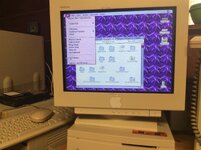 | |
Posted by: Huxley on 2025-08-29 18:04:07Mind posting some pictures? Also of the extensions loading screen, as that is the one I remember also having inverted colors on the window.Good tips - I'll see what I can do... “ClickChange” is a control panel I use under System 6 to modify the look of the UI on my IIsi. It allows for all kinds of customizations, including UI controls and menu bar/menu color. I tend to create new “themes” for myself every season. I have no idea if it works under System 7, but you could try it. ”Summer 2025”:Great suggestion - I'll give this a shot! | |
| Posted by: Huxley on 2025-08-29 21:37:42 Update: I’m very pleased to report that the suggestion from @nathall worked - installing ClickChange let me set the menu colors to their proper values! I haven’t tried it with ClickChange uninstalled yet (I quite like this app!) but it’s a perfectly good solution for me. Hooray! 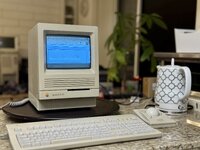 | |
| Posted by: zigzagjoe on 2025-08-29 21:55:49 Oh, I see now in that first post you did have a picture of the loading screen and it was normal. I guess something else was afoot after all. Interesting? | |
Posted by: Huxley on 2025-08-29 22:42:21Oh, I see now in that first post you did have a picture of the loading screen and it was normal. I guess something else was afoot after all. Interesting?Yeah, whatever the glitch is, it really does seem to only impact the menu bar and drop-down menus - everything else has been smoooooth so far! | |
| Posted by: nathall on 2025-09-03 18:39:57 Awesome! Glad to hear it worked with System 7.5.5. | |
Posted by: adespoton on 2025-10-03 12:47:35+1 point for both the use of Zigintosh as well as Turducken (one of these days I will find the time to attempt to prepare one of these for Thanksgiving).I vote for preparing the Zigintosh! | |
| Posted by: superjer2000 on 2025-10-03 17:42:36 Greatest retro computing quote ever: "like some sort of retro-computing Turducken." | |
Posted by: Huxley on 2025-10-06 12:30:55Greatest retro computing quote ever: "like some sort of retro-computing Turducken."Please have that engraved on my tombstone 🤣 | |
Posted by: iantm on 2025-10-10 05:41:32Hey all! It's now past 3:30am local time and I'm basically a zombie at this point, but I had to take a moment to share that after several hours of painstaking work, my Macintosh SE/30 has been almost hilariously upgraded: a new 4XDC power supply from @tt powering a tower of @zigzagjoe's upgrades: a 47MHz Booster 2.0 + NuCF storage card + 30Video greyscale rig, all stacked like some sort of retro-computing Turducken.Fantastic. I'm just starting this journey, but I feel that 90s kid vibe. I could have never afforded an SE/30 back then, but I got the middle school giggles when I recapped the analog board and it booted with clean video. I love being on this precipice of learning and not knowing exactly wtf I'm doing — I'm just doing it. Congrats on the restoration! | |
| Posted by: is2scooby on 2025-10-10 09:02:37 What a great way to put it! I’m also stoked there are such great engineers/creators that allow me to muck about above my weight class and succeed in pulling off an upgrade/repair that I probably have no business performing. ;-p | |
| 1 > |