68kMLA Classic Interface
This is a version of the 68kMLA forums for viewing on your favorite old mac. Visitors on modern platforms may prefer the main site.
| Click here to select a new forum. | |
| M0100 mouse button stopped working | |
| Posted by: JC8080 on 2025-07-14 03:41:54 I just set up my Plus and found that the system no longer recognizes the mouse button. I checked with a meter and confirmed the button is functioning properly. I recently had the machine apart and had the logic board out to install the diode needed to power the external SCSI port and found the diode had already been installed, so I put the board back in. I did not do anything else with the logic board. I haven't taken the logic board back out to inspect it yet, before I dive into this I just wanted to see if anyone knows of any common failures on a logic board that can cause this problem. | |
| Posted by: cheesestraws on 2025-07-14 04:00:35 To confirm, the mouse pointer is working properly, it's just the button that is not working? | |
Posted by: JC8080 on 2025-07-14 07:17:44To confirm, the mouse pointer is working properly, it's just the button that is not working?Yes I should have been more clear, the pointer works properly, there is just no response when the button is clicked. I tried repeatedly clicking the button while I wiggled the mouse cable at both ends to check for an intermittent connection, the system never registered a click so I don't think there is a connection issue between the mouse and the DB9 plug on the logic board. | |
| Posted by: cheesestraws on 2025-07-14 07:35:20 According to the schematic, the mouse switch pin goes directly to pin 13 of the VIA. Might be worth buzzing that out to check the trace isn't damaged. 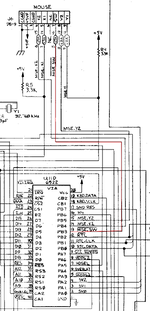 | |
| Posted by: JC8080 on 2025-07-14 09:14:54 Thanks for the info and schematic, I'll get out the meter later and check. | |
| Posted by: JC8080 on 2025-07-16 18:08:39 I checked continuity from pin 7 of the DB9 connector to pin 13 on the VIA and it is good. One of the DB9 connector solder joints looked a bit dodgy (not pin 7) so I went ahead and re-flowed them all. The mouse button works now, though I have some other odd stuff going on that I'm sure is unrelated. The machine has an accelerator and I am getting some weird system errors I haven't gotten previously. At least there is no shortage of projects with these old machines! | |
| Posted by: JC8080 on 2025-07-16 19:08:48 After more testing I think the problem is with the accelerator. I don't think there was ever a problem with the mouse button, I think the system was freezing right after booting to the desktop and the cursor was still able to move, but everything else was frozen. | |
| Posted by: Garrett B on 2025-07-17 06:09:12 What accelerator do you have installed? I recall having this same behavior with my Performer clone... never could get it to work right. Freezes, bus errors, random crashes, etc. | |
| Posted by: JC8080 on 2025-07-17 08:27:44 This is a Total Systems Mercury with the RAM expansion board. I have problems with it without the expansion board installed. Previously it was working fine, which is odd. The machine also works great with my Performer clone. That's odd you are having problems with your Performer clone, I have built a couple and they have been rock solid with no issues. | |
| 1 |