68kMLA Classic Interface
This is a version of the 68kMLA forums for viewing on your favorite old mac. Visitors on modern platforms may prefer the main site.
| Click here to select a new forum. | |
| Sad Mac - how to identify which RAM modules are bad | |
| Posted by: joshlac on 2025-07-02 09:11:11 Hi, I've an original Macintosh from 1984 and the sad Mac error I get on boot is 04ACBA How to pinpoint which RAM chips are bad? Where to get replacements? I'm based in Dublin, Ireland. 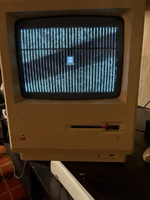 | |
| Posted by: Builder68 on 2025-07-02 09:23:12 Go here: 
Sad Mac Error CodesUPDATE! :) Gary Rice generously released the Black & Bleu - The Ultimate Mac Error Codes Utility on Macintosh Garden. This is an excellent resource for making sense of the Sad Mac codes, more than what is listed below. Apple's overview below is...
 tinkerdifferent.com
| |
Posted by: joshlac on 2025-07-02 09:33:25Go here:Thank you. I found this website earlier, but I've no idea how to indetify the bad chip/chips. So, for 04ACBA Class Code: 04 - Memory test--Mod3 test Subcode: ACBA - Do I convert it like below:
| |
| Posted by: Builder68 on 2025-07-02 09:42:45 My best advice is to replace them all. That subcode usually means that more than one IC is gone bad. The RAM chips on the original 128k and IIc are known for going bad after some time. Some failed even back in the day. Could be also one of the 74244s. Have you try to clean the ROM sockets re-seat the ROM ICs?. 04= Bad RAM, you should start by replacing all RAM ICs. | |
| Posted by: joshlac on 2025-07-02 09:54:10 Ok, thank you. Where would I source them? EBay? | |
| Posted by: cheesestraws on 2025-07-02 10:13:44 Yes, if it's a 128k those use Micron DRAMs that are a bit notable for self-destructing. You may wish to replace them all, or if you don't, you may wish to keep (non-Micron) spares for when the remaining micron ones disintegrate. I think I got mine from ebay, but it was so long ago I can't remember. | |
| Posted by: bibilit on 2025-07-02 10:56:09 I agree, probably too many bad chips to generate a correct fault code. You can try the piggybackîng method to narrow down the issue. | |
Posted by: Juror22 on 2025-07-02 12:25:21You can try the piggybackîng method to narrow down the issue.This worked for me when I had a similar problem on an old Compaq PC - its good to be reminded of the options for troubleshooting! | |
| 1 |