68kMLA Classic Interface
This is a version of the 68kMLA forums for viewing on your favorite old mac. Visitors on modern platforms may prefer the main site.
| Click here to select a new forum. | |
| Decent video capture for ~$30 | |
| Posted by: noglin on 2025-05-18 10:28:30 I'll write down a few notes on what I did to get pretty decent video capture as it wasn't obvious. 1. DB15 -> VGA. This is well documented. 2. active VGA to HDMI adapter. I used "FOINNEX VGA to HDMI Converter Adapter with Audio 1080P" (https://www.amazon.es/dp/B072NCTBVP?) 3. HDMI capture card, take one with MS2130 chip, I got this one: https://www.amazon.es/dp/B0CL3H7PMF Make sure to power #2 sufficiently or you won't get anything out. Make sure to connect 3 using 5GB USB port/cables (or else you will get a USB2 video capture card, and low quality) What I got up to this point was "ok" but with obvious artifacts. By default it will clip YUV to range [16..235], and the other format (MJPEG) that does not clip is a compressed format and causes the typical low res jpeg artifacts. Fortunately, folks have hacked the firmware: 4. Flash its firmware: https://github.com/steve-m/ms2130_patcher git clone https://github.com/BertoldVdb/ms-tools.git cd ms-tools go build -o /tmp/ms2130 ./cli cd .. make a backup ./cli --log-level=7 read FLASH 0 --filename=backup.bin then flash: ./cli --log-level=7 --no-patch write-file FLASH 0 ms2130_patched_v1.bin 5. At this step, for me it worked on windows to get a perfect capture (uncompressed, YUV, no clipping) - compared pixel values. On linux I use: ffplay -f v4l2 -video_size 640x480 -input_format yuyv422 \ -color_range jpeg \ -colorspace smpte170m \ -i /dev/video0 I did not retry on my macbook but should work there too. | |
| Posted by: Mk.558 on 2025-05-18 11:35:03 How are you using this setup? How does the output look like? I'm using an Extron RGB-300A, which is decent, and a Elgato HD60S. The Extron has to be configured to input 720x480p, which can also output back as 720x480p. It looks like this in OBS: 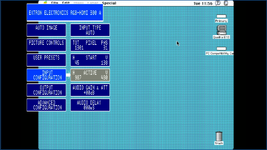 | |
| Posted by: noglin on 2025-05-18 15:40:17 The HDMI capture card has usb connection, I connect it to the usb port of any of my win/mac/linux computers, and it behaves like if it was a webcam. On linux I use terminal ffplay or OBS, on Mac/Win I use OBS. This is how it looks like, but it looks better than this when capturing on Windows. This is a Performa 5200, the vga cable is too long (on the todo list to fix) and I think signal degradation is what is causing the ca 10px shift - and the noise in the image. | |
| 1 |