68kMLA Classic Interface
This is a version of the 68kMLA forums for viewing on your favorite old mac. Visitors on modern platforms may prefer the main site.
| Click here to select a new forum. | |
| 040 PDS SCSI card: Storage Dimensions DataCannon/PDS aka TechNoir NX720 | |
| Posted by: cheesestraws on 2025-05-04 14:27:26 (this thread is a followon of a kind from @jeremywork's sixty eight thousand thread, which got diverted into discussion of different PDS SCSI cards. To enable that thread to keep talking about sixty eight thousand stuff when anyone has more to say, and to help people who might find this card, I've started a new thread here.) The Storage Dimensions DataCannon/PDS is an 040 PDS SCSI card. Mine has the version 1.1 ROM (attached below). Mine also had the Storage Dimensions stickers torn off (before I had it) revealing the name of the presumed actual manufacturer of the board, "Tech Noir". Because the forum search isn't very smart, I'm going to also say TechNoir here without the space to assist people in finding it. 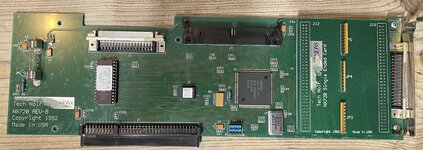 I know some people have had trouble getting this to work, but for me this was relatively easy to get going. The trick is:
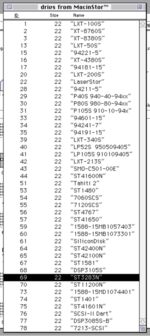 I chose the Seagate ST3283N totally at random and told a ZuluSCSI to present itself as that. You probably want to resist the urge to click 'Initialise' - when I did that it froze - and instead use the Auto Setup function to set up partitions. After I did this, the drive appeared on the desktop with a cannon icon, and this now mounts every startup. 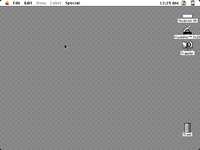 | |
| Posted by: cheesestraws on 2025-05-04 15:24:49 (and yes, you can select the drive in the Startup Disk control panel and it is bootable) | |
| Posted by: finkmac on 2025-05-04 19:35:59 does it work the other way? if you edit one of those values to match a Zulu will that work too? | |
Posted by: cheesestraws on 2025-05-05 00:22:58does it work the other way? if you edit one of those values to match a Zulu will that work too? Haven't tried yet, but you're right, it's a good idea to try | |
Posted by: cheesestraws on 2025-05-05 02:56:24does it work the other way? if you edit one of those values to match a Zulu will that work too? Further notes:
| |
Posted by: lobust on 2025-05-05 05:09:25This is a deeply impractical card to have in a Q700.How so? | |
Posted by: joshc on 2025-05-05 06:25:18How so?My guess is because it’s a full length card and probably barely fits in the Q700 case? | |
Posted by: lobust on 2025-05-05 06:36:56My guess is because it’s a full length card and probably barely fits in the Q700 case? Possible. I wonder if cables/connectors interfere with the lid? | |
Posted by: cheesestraws on 2025-05-05 07:36:43How so? My guess is because it’s a full length card and probably barely fits in the Q700 case? Yes - full length card and the 040 slot in the 700 is the bottom slot. So the card has to run over or around the next-to-bottom card if you have one installed, then all the way across the case somehow without knackering the airflow and into the drive cage. And the SCSI connector is on the top edge of the card, so as you say @lobust it gets caught between the lid and whatever else is under it very easily. Designed for a rather larger case, I think. | |
Posted by: lobust on 2025-05-05 09:06:00Yes - full length card and the 040 slot in the 700 is the bottom slot. So the card has to run over or around the next-to-bottom card if you have one installed, then all the way across the case somehow without knackering the airflow and into the drive cage. Are any of the Quadra pds slots not on the bottom? Wombat is certainly that way but idk about 900/950? Cable routing is not any easier on the 800 style case, there is no access window at the bottom of the drive cage where it would make sense. So you have to fold and shoehorn the ribbon in through the side of the cage behind the PSU. I picked up some round 68pin cables on ebay to neaten things up a bit and I have some very compact 50<>68pin adapters for the various SD devices. Not got around to installing them in anything tho... | |
Posted by: cheesestraws on 2025-05-05 09:30:14Are any of the Quadra pds slots not on the bottom? Wombat is certainly that way but idk about 900/950? 950 it's on the top. I picked up some round 68pin cables on ebay to neaten things up a bit and I have some very compact 50<>68pin adapters for the various SD devices. Not got around to installing them in anything tho... Oh, that's a good idea! | |
| Posted by: jeremywork on 2025-05-13 03:50:46 This is really cool. I'm looking forward to trying this out when I have some free time. Also thanks @cheesestraws for pointing me to this listing for a Data Cannon ROM v2.4 upgrade kit which also included MacinStor v3.2.5. https://www.ebay.com/itm/354631040717 All of the contents are attached. ROM on a TMS27C256. (mirror of eBay auction photos) 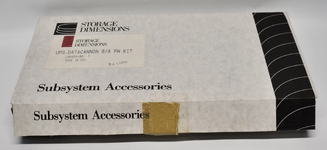 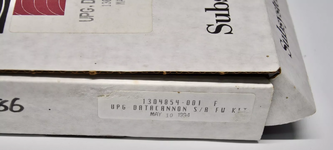 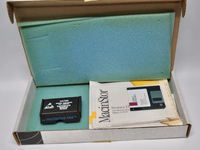 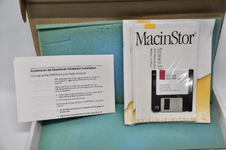 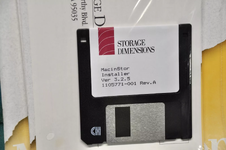 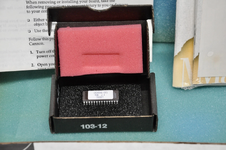 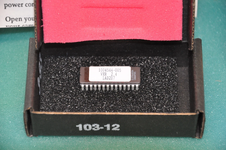 | |
| 1 |