68kMLA Classic Interface
This is a version of the 68kMLA forums for viewing on your favorite old mac. Visitors on modern platforms may prefer the main site.
| Click here to select a new forum. | |
| how to format large drive | |
| Posted by: reddrag0n on 2025-04-22 14:05:25 i have a performa 475 that i want to put in a 16gb sd drive and partition it into 4gb chunks for macos 8.1 i have a gbscsi and i'm trying to figure it out in emulation which i'm pulling my hair out. nothing i do seems to work. And before anyone says it doesn't work, it does! i have done the same on my performa 638cd with a DOM 16gb ide and it has 4 separate partitions for applications, system, games and storage and it's running 8.1 i'm wondering, since i have a zuluscsi slim, can i try using that and formatting the sd using the 638cd? or should i sell all that i have and get a few zuluscsi v1.2's since they run on raw and not images | |
| Posted by: cheesestraws on 2025-04-22 14:20:45 I think you'll need to use something like Hard Disk Toolkit or Lido or Silverlining or something for SCSI: IIRC Apple's driver doesn't play very nicely with partitions. Either that or just create four smaller images on your SD card, though that will eat 4 SCSI IDs. | |
| Posted by: robin-fo on 2025-04-22 14:27:32 Just format your SD card as ExFat and copy a slightly-less-than 16 GB file on there. Name it accordingly to the SCSI id you want to give this drive and then partition and format it from your 475 using the disk utility of your choice. But there will be little use for such a big amount of disk space… | |
| Posted by: adespoton on 2025-04-22 14:29:05 I've got this to work in the past using FWB HD Toolkit (although not on a ZuluSCSI slim), but as @cheesestraws says, if you've got the spare SCSI IDs, 4 4GB images would likely be more stable. | |
| Posted by: reddrag0n on 2025-04-22 15:03:10 i have external 2 cd roms (apple 600 and cd-rw), the internal drive (which is what i'm trying to work on), an external zip drive and 2 external 9gb avid drives | |
Posted by: reddrag0n on 2025-04-22 15:04:27I've got this to work in the past using FWB HD Toolkit (although not on a ZuluSCSI slim), but as @cheesestraws says, if you've got the spare SCSI IDs, 4 4GB images would likely be more stable.i'm not putting it on a slim, i am using the gbscsi with the pico2w | |
| Posted by: cheesestraws on 2025-04-22 15:52:40 OK so you are ID-constrained. Use FWB HD toolkit or something, then. | |
| Posted by: reddrag0n on 2025-04-22 16:07:26 i was able to download a 30 gb file and a 10 gb file, finally got them to show up in sheepshaver using 9.0.4 boot cd but when i use disk utility in the cd, it doesn't see either of images. i can format them under the finder menu as hfs or hfs+ but that's it | |
| Posted by: reddrag0n on 2025-04-22 16:17:33 first screen shows them formatted as hfs and disk util not finding them second screen is using the finder to format them as hfs+ third screen shows version of disk util 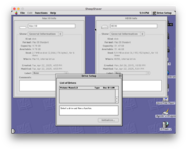 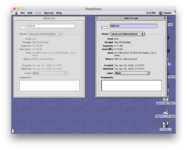 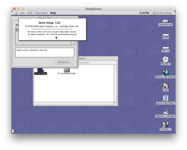 | |
Posted by: obsolete on 2025-04-22 16:33:49i'm not putting it on a slim, i am using the gbscsi with the pico2wDoesn't GBSCSI just run ZuluSCSI firmware? | |
| Posted by: reddrag0n on 2025-04-22 16:36:32 yes, and i was able to update that, took me forever to find an sd card that didn't give me 5 led flashes | |
Posted by: nathall on 2025-04-22 22:25:07first screen shows them formatted as hfs and disk util not finding them Official Apple versions of Drive Setup will only recognize “official” Apple drives… | |
| Posted by: cheesestraws on 2025-04-23 01:02:23 Drive Setup will not reliably help you here. Nor will HD SC Setup. Use a third-party formatter and driver. FWB HD Toolkit has been repeatedly suggested upthread as one that works. It's available on the Garden. | |
Posted by: reddrag0n on 2025-04-23 01:15:29Drive Setup will not reliably help you here. Nor will HD SC Setup.so why was i able to format my IDE DOM (disk on module) using the 8.1 universal boot cd on my 638CD? that's what i don't understand. it's not an apple drive, it's an ssd that plugs directly into the IDE slot. there is no sd card, no images to mess with and it was 16 gb but yet drive setup on the cd was able to look at it, split it into 4 separate parts and i have been running it for about a year now. so why the h*** can't the same damn thing look at a scsi drive to do the same thing? unless that's the problem, scsi vs ide i broke down and bought a zuluscsi v1.2 just for it's raw passthrough, so the whole sd card is seen as a drive, no images required. | |
Posted by: cheesestraws on 2025-04-23 01:21:39so why the h*** can't the same damn thing look at a scsi drive to do the same thing? unless that's the problem, scsi vs ide Yes, the problem is that the SCSI driver is not the same software as the IDE driver. I don't know much about the Apple IDE driver but the Apple SCSI driver has never been any good at multiple Mac partitions. So you need to use a third party driver. | |
| Posted by: adespoton on 2025-04-23 12:10:00 I bought my first personal non-Apple SCSI HDD in 1994; it came with FWB HD Toolkit PE bundled. I tried using the patched HD SC Setup, but while it would run (with the patch), the resulting driver wasn't reliable. I even tried the Silverlining driver because everyone at the time said it was great... but found that there were certain boot scenarios where it didn't seem to perform as well with the same HDD as FWB's driver. So, I went back to the FWB driver, and have been using it for SCSI drives (and images) ever since. | |
Posted by: obsolete on 2025-04-23 12:44:44Doesn't GBSCSI just run ZuluSCSI firmware? yes, and i was able to update that, took me forever to find an sd card that didn't give me 5 led flashesOkay, so you are not constrained to a single SCSI ID. 4 x 4GB images seems like it would be the most practical solution then. | |
| Posted by: reddrag0n on 2025-04-23 15:05:15 in the long run, i went and bought a zuluscsi 1.2 so i don't have to mess with stupid images and renaming them and trying to calculate sizes and figuring out the rest of that mess and installing vmware software and trying to make images on that... images, images, images, images, images, images, images, images.......... just format the damn sd card and thats your hard drive!!!!! oh wait!!, the version 1.2 does that!!! | |
| Posted by: reddrag0n on 2025-04-23 21:05:41 ok, after severe headaches and a crapload of fiddling, i think i got this. using fwb toolkit pe, i was able to format the image. then after i got some screwy drive sizes instead of all being universal, the hd sc formatter was able to see the drive and format it into the partitions that i needed. so now i have the exact clone of what my 638cd is (ok, i noticed i keep on mistyping my machine, it's a 637cd) so now as i speak, i am able to clone all my partition contents onto the scsi card. 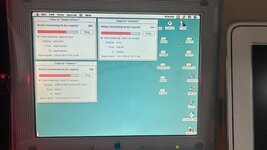 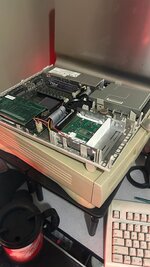 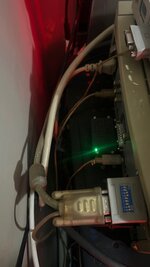 and while it was doing that, i was able to make a 26 gb file for my avid 9gb external drive. modded it with another gbscsi, put that into a 3.5 to 5 1/2 and put in a silent fan. now it's quieter and weighs less than my coffee cup 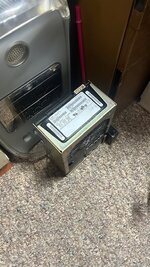 yes, that's the original 9gb avid scsi drive 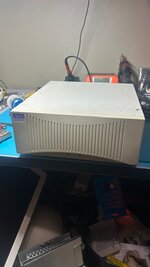 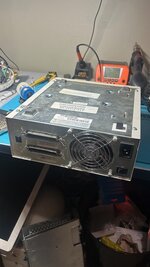 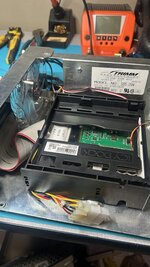 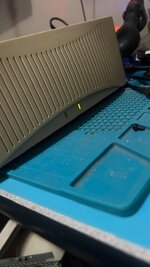 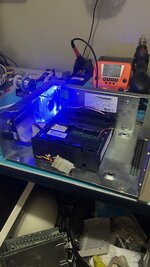 | |
| 1 |