68kMLA Classic Interface
This is a version of the 68kMLA forums for viewing on your favorite old mac. Visitors on modern platforms may prefer the main site.
| Click here to select a new forum. | |
| PM7600 don't boot | |
| Posted by: indibil on 2025-04-11 09:49:48 Hi, although I already mentioned something in this thread, I was only asking how to adapt a SCSI disk that was not from a Mac. https://68kmla.org/bb/index.php?threads/hd-scsi-for-powermac-7600.46081/ Shortly after those tests, I decided to add a SIL3112 SATA PCI card, a 160GB 3.5" SATA HDD, and a SATA DVD drive (the original SCSI one didn't work), and I tried installing OS8 from a BlueSCSI connected to the external port. At the same time, I added a PCI card with USB/FW and an ATI Rage PCI card from a B&W G3. It seemed to work, but occasionally it wouldn't boot. I removed a PCI card, moved the others, and it started again, but after a short while, it stopped booting. The LED lights up, but there's no chime, no video, or anything else. If I then press the Power button, it immediately turns off. The first thing I did was remove all the PCI cards, but it still didn't work. Then I replaced/moved the RAM and VRAM. I also checked the CACHE, but it still didn't work. Then I recapped the CPU, but that didn't fix it either. I've had it parked for a year since then due to other obligations. This week I recapped the PSU. The caps weren't bad, but some of them showed wear values in the checker. That didn't fix it either. Today I recapped all the electrolytic capacitors on the motherboard, and guess what? It still doesn't work; it's still the same. I don't know what else to check. If I turn it on without the CPU connected, it behaves the same. Could it be a CPU failure? I don't know if there's a common fault with this model; I'm not very familiar with it. My era was the LCs, then the "modern" G3/G4s. Thanks. | |
| Posted by: indibil on 2025-04-14 05:24:20 Has anything similar happened to anyone with this model? | |
| Posted by: finkmac on 2025-04-14 05:29:47 did you do a CUDA reset? worth a shot... 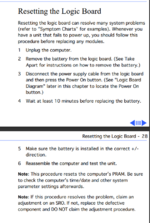 | |
| Posted by: Zarwox on 2025-04-14 05:31:19 I had one with a flaky CPU card connector once. It would only boot if I put sideways pressure on the card. | |
| Posted by: indibil on 2025-04-14 07:20:43 Thanks for the replies. I've reset CUDA several times, tried with and without a battery... And I've removed and reinstalled the CPU several times, always with the same result. It's a shame I don't have another spare CPU to test. | |
Posted by: indibil on 2025-04-14 09:51:04I had one with a flaky CPU card connector once. It would only boot if I put sideways pressure on the card. I just tried moving the CPU to one side and then the other, and it doesn't work. I've also cleaned the CPU slot. No improvement. | |
| Posted by: finkmac on 2025-04-14 11:23:50 very odd. i think it's probably time to break out the logic analyzer and oscilloscope and start checking clocks and data lines. | |
| Posted by: indibil on 2025-04-17 03:01:31 Unfortunately, I don't have an oscilloscope, so I don't know if I'd be able to locate a fault using that method. Yesterday, they lent me another CPU to test, but it doesn't work either. The fault must be in the motherboard; it will be complicated. | |
| 1 |