68kMLA Classic Interface
This is a version of the 68kMLA forums for viewing on your favorite old mac. Visitors on modern platforms may prefer the main site.
| Click here to select a new forum. | |
| G4 dual 450MHz CPU fail | |
| Posted by: indibil on 2025-03-27 12:05:45 Hi, today I received a G4 Gigabit Dual 450MHz. When I press the power button, it turns on, but the power LED stays off, there's no chime, and it won't boot. I suspected the CPU and installed a Single 400MHz, and it booted up fine, with the power LED on, but no chime. I don't know if this is a common issue with dual 450MHz processors, but I wanted to ask, based on your experience, if it could be due to a failed processor, a cache chip, or a damaged PCB. I'd like to repair it | |
| Posted by: Unknown_K on 2025-03-27 12:19:25 I remember when I installed dual G4 processors on my Sawtooth machines you needed a specific revision board for them to work. Never owned a Gigabit G4 and from what I see they made them with single and dual G4 CPUs no idea if there is a difference in firmware between them. | |
| Posted by: indibil on 2025-03-27 12:31:27 I didn't explain myself well. I received an original, unmodified GE Dual 450MHz from the factory. All GEs accept duals; only the early Sawtooth models are incompatible. The CPU board seems defective, but I don't know how to find out what's wrong. | |
| Posted by: Unknown_K on 2025-03-27 12:44:19 Was it working before it shipped? Any bent pins or missing capacitors on the CPU card? | |
| Posted by: indibil on 2025-03-27 12:54:59 I bought it with that defect, and given the OS installed, I think it hasn't been used for a long time. OSX 10.2 The CPU board looks great, nothing's burned out, and the caps are made of tantalum. I'll take a closer look tomorrow. | |
| Posted by: Byrd on 2025-03-27 13:28:36 Bit confused you bought just the dual G4 CPU or an entire machine sold as faulty? If switching CPUs around press the CUDA switch for a second and clean the CPU contacts with electronic cleaning solvent. Strip down to one known good stick of RAM, and check PSU voltages | |
Posted by: indibil on 2025-03-27 23:33:45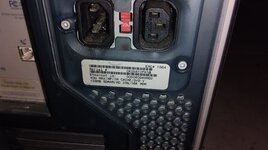 | |
Posted by: GorfTheChosen on 2025-03-28 00:26:37Hi, today I received a G4 Gigabit Dual 450MHz. When I press the power button, it turns on, but the power LED stays off, there's no chime, and it won't boot. I suspected the CPU and installed a Single 400MHz, and it booted up fine, with the power LED on, but no chime. I don't know if it's "a common issue" with dual 450Mhz processors ... but I do know that the one I have sitting next to me here, which I bought new 25+ years ago (?), has been rock-solid. Wish my Quicksilver was as reliable. but I wanted to ask, based on your experience, if it could be due to a failed processor, a cache chip, or a damaged PCB. I would guess that it could be due to any of those things. Did you try cleaning the contacts and re-seating the original processor card ? | |
Posted by: indibil on 2025-03-28 01:37:51I would guess that it could be due to any of those things. Thanks for your reply. I'll try to spend some time on it this weekend, but it seems like it's never been disassembled. When I put the single 400MHz chip in to test, it started right away without any problems. I'll try to check the Vcore to see if it's present or if there's a defect. I don't know what else I could check. | |
| Posted by: indibil on 2025-03-28 10:21:12 I measured the Vcore and it's at 2.1v, which would be correct. I turned it on without a heatsink, and both processors get very hot, but it won't boot. The power LED is still off and there's no chime. I've noticed that the PCB is bulging downwards, I imagine from having the heatsink on it for so many years putting pressure on it. I tried putting some rubber under the PCB to try to straighten it and see if any of the processor BGAs have come loose, but it still won't boot. The only thing left to do is perform a reflow or reballing, which I won't do for the moment out of laziness, but you can see the balls at different heights due to the PCB's curvature. If it were the cache, I suspect it would boot, because I have a 1GHz dual QS with a damaged cache chip, and it boots with an error with the external cache; it's not shown. @herd, do you have any idea what could be happening? | |
| Posted by: Unknown_K on 2025-03-28 10:49:18 Pictures of the board would help | |
Posted by: indibil on 2025-03-28 11:27:37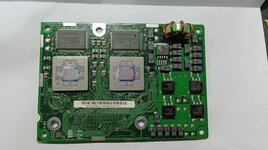 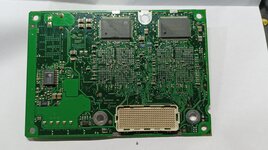 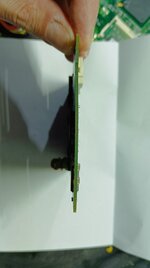 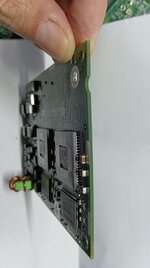 | |
| Posted by: herd on 2025-03-28 11:59:48 Did you already try a PMU reset with a good battery? PRAM reset? Does the USB or video power up? You could try pressing on the 300-pin connector while powering on. Of course if you have a different dual CPU board that does work, then it's pretty clear that the problem is with the CPU board in question. In one of your pictures it looks like there is maybe some sort of sludge on the board. You could try cleaning it. Before re-soldering big chips I would first remove the eeprom and see what it does. | |
| Posted by: Unknown_K on 2025-03-28 14:21:53 Probably an optical illusion but some capacitors above the apple logo on the back side seem disconnected at the solder joint. | |
Posted by: indibil on 2025-03-29 02:24:11Did you already try a PMU reset with a good battery? PRAM reset? Does the USB or video power up? You could try pressing on the 300-pin connector while powering on. Of course if you have a different dual CPU board that does work, then it's pretty clear that the problem is with the CPU board in question. In one of your pictures it looks like there is maybe some sort of sludge on the board. You could try cleaning it. Before re-soldering big chips I would first remove the eeprom and see what it does. Thanks for the suggestions. I've performed the tests you suggested. I've cleaned thoroughly, tried pressing the 300-pin connector, the USB has power but no video, I've removed the EEPROM without success, and then put it back in. I performed another test, tried it on another GE that works fine, and it didn't work either. But I noticed something. After plugging in power on either GE, the first time I press power, it turns on and off immediately. The next time I try, it turns on but with the power LED off and no chime or video. And when I reinstalled the original processor in the working GE, the date and time were erased. It seems the NVRAM was reset without doing anything. | |
| Posted by: indibil on 2025-04-03 09:56:39 This afternoon, I had a little time, and I reflowed the CPUs. But the result is strange. Now the GE won't power on. Sometimes the red LED on the motherboard lights up for less than a second, then turns off again. No matter how hard I try, it won't power on. If I put in another CPU card, it works without problems. Could one of the 7400s be damaged? Did the reflow cause more damage? I haven't performed a severe reflow. I took the precaution of covering the cache chips and capacitors with thermal tape. | |
| Posted by: Unknown_K on 2025-04-03 13:11:33 Did you use flux when reflowing the CPU's? Also was this with a heat gun or a temp controlled hot air station? | |
| Posted by: indibil on 2025-04-03 21:07:57 Yes, I know how to do it, I have done several G4 CPU swaps. | |
| 1 |