68kMLA Classic Interface
This is a version of the 68kMLA forums for viewing on your favorite old mac. Visitors on modern platforms may prefer the main site.
| Click here to select a new forum. | |
| PICT Data Format | |
| Posted by: jmacz on 2025-03-20 18:41:03 I was looking through the system ROM for a PowerBook Duo 280c as part of looking into a strange icon using my duo dock. I saw what looked to be images in the ROM so I extracted out that data for 13 images and wrote a quick program that would render the images as ASCII. Here's an example of one of images outputted using the program. 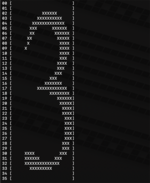 It's a 28x36 bitmap with a PICT header. But there's around 22 bytes inside the data that I don't quite understand based on documentation I've found describing the PICT format. What I'm seeing:
PICT documentation I have found was confusing. Was wondering if anyone had a pointer to solid documentation. | |
| Posted by: chelseayr on 2025-03-20 19:33:58 I almost thought I would help but the one particular site I sometimes like to refer myself to seemingly has no actual entry for pict format but somehow does mention it a few times in the eps format page nevertheless Encapsulated PostScript (EPS) File Format, Version 3.xFormat Description for EPS_3 -- a graphics format developed by Adobe Systems Incorporated in the late 1980s to enable the incorporation of illustrations into textual documents for printing. EPS is based on Adobe's PostScript programming language and designed for images to be placed in documents...
www.loc.gov
I guess the only real question could be if you have yet managed to check out any archived quickdraw references from apple themselves? | |
| Posted by: dougg3 on 2025-03-20 19:36:46 This documentation is still on Apple's site and I think it might help explain some of it:
| |
| Posted by: jmacz on 2025-03-20 20:01:27 Thanks @chelseayr @dougg3. Maybe I need to just be more open minded 🙂 The stuff that was confusing me as I was looking at the opcodes was for example the title of the table in that link is Table A-2Opcodes for extended version 2 and version 2 pictures so I was thinking it was specific to a v2 PICT (whereas mine is version 1). But I ended up looking at it anyway and as I was looking at the Clip opcode, the additional data just says region size so it was not clear to me that the 0x0a (10) I was seeing was correct as I didn't think to assume it was five shorts (the total size of the additional data including the short for the size + four shorts for the bounding rect). But this definitely helps me, thanks!! | |
| Posted by: dougg3 on 2025-03-20 20:14:30 I wonder if there's an older doc somewhere that was written before version 2 existed. Maybe one of the earlier Inside Macintosh volumes? It might be easier to read. I certainly found Apple's docs confusing about what was expected after the ClipRgn opcode! If you scroll down further on that page, they have a separate table for the version 1 PICTs "Table A-3 Opcodes for version 1 pictures". | |
| Posted by: jmacz on 2025-03-20 20:24:14 Aww man, buried down there. I see it now. But yeah, still confusing on the additional data. Thanks for the pointers though! | |
| Posted by: jmacz on 2025-03-20 23:02:21 So that was really useful. Appreciate the help @dougg3! I was able to use the more textual doc you linked (which was actually easier to follow) and implement enough opcodes including the run length encoded bits to get what I needed. Alas, the images are cool but not the one I was specifically looking for (the duo dock icon). Will need to continue hunting for that when I have time. But some of the outputs: 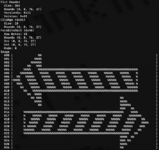 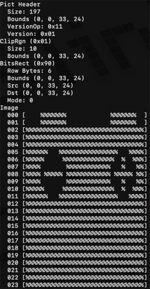 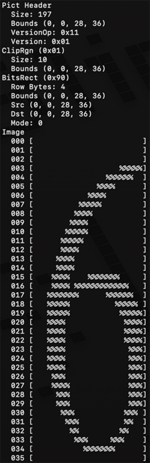 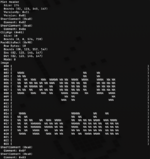 | |
| Posted by: joevt on 2025-03-21 01:05:03 Resorcerer can be used to view ROM resources. Use the "Make ROM resources look like an openable file" option in the Preferences. Then select the "System ROM Resources" file from the System Folder. Some resources may be excluded if they are not for your specific Mac model. My dumpromresources script (previously discussed at https://68kmla.org/bb/index.php?threads/lc475-disassembled-rom.49526/post-557503 ) can be used to list all resources and extract their data. The result can be converted to a resource file using the Rez command.Resorcerer can view the PICT opcodes of a PICT resource (click the Data button). 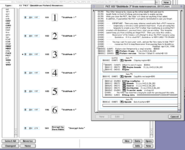 | |
| Posted by: joevt on 2025-03-21 01:24:49 The DeclData has some icons (but maybe not the duo dock icon you are looking for). The output from my SlotsParse command (included in the zip attached to my previous post) lists some icons but doesn't include their data (requires some minor modification). SlotsDump is a classic app that can get the same data and draws any icons that it finds. https://github.com/joevt/SlotsDump If you have a clear enough picture, you could maybe convert it to a bit map, then search for that hex in the rom or system file. An icon is 32x32. 1 bit per pixel. 4 bytes per line. So you could select a distinctive line of the icon and search for patterns that might match that line. | |
Posted by: cheesestraws on 2025-03-21 02:07:25duo dock icon if this is like the other boot icons, it's an ICN# not a PICT, and it's not a resource. Here's the other icons in super mario, for comparison: supermario/base/SuperMarioProj.1994-02-09/OS/StartMgr/StartSearch.a at master · elliotnunn/supermarioContribute to elliotnunn/supermario development by creating an account on GitHub.
 github.com
| |
| Posted by: joevt on 2025-03-21 03:02:06 I was looking for icons in the ROM using GraphicConverter 11. Import as raw, 1 bit gray scale. 32 pixels wide. But first you need to split it into 64K chunks so that the height of each image is 16384 pixels. therom="1994-04 - 015621D7 - Powerbook Duo 280 & 280c.ROM"
partsize=65536
numparts=$(( $(stat -f "%z" "$therom") / partsize))
for ((thepart=0;thepart<numparts;thepart++)); do
echo "part$(printf "%02d" $thepart).bin"
dd if="$therom" of="part$(printf "%02d" $thepart).bin" bs="$partsize" skip="$thepart" count=1 2> /dev/null
doneI saw a lot of arrows pointing to floppy drives of different Macs, but none for the Duo Dock. Then I looked at the Duo Dock DeclData that was referenced at #19 The DeclData has one sRsrcIcon at offset 0x0f6e for "Macintosh Duo Dock" but that's not the icon you're looking for. There's icons in the unknown sResource types. Maybe the supermario source code has info about these. All the icons in the Duo Dock DeclData are displayed in the attached BBEdit.app worksheet. | |
| Posted by: jmacz on 2025-03-21 08:11:47 @joevt @cheesestraws you guys rock as usual! Resorcerer can be used to view ROM resources. Use the "Make ROM resources look like an openable file" option in the Preferences. Then select the "System ROM Resources" file from the System Folder. Some resources may be excluded if they are not for your specific Mac model. Didn't even think to look at Resourcerer. Oh well, it was fun looking into PICT format and playing with it 🙂 My Ah neat! If you have a clear enough picture, you could maybe convert it to a bit map, then search for that hex in the rom or system file. Good call. if this is like the other boot icons, it's an ICN# not a PICT, and it's not a resource. Here's the other icons in super mario, for comparison: Ok. I saw a lot of arrows pointing to floppy drives of different Macs, but none for the Duo Dock. Then I looked at the Duo Dock DeclData that was referenced at #19 Thanks! | |
| 1 |