68kMLA Classic Interface
This is a version of the 68kMLA forums for viewing on your favorite old mac. Visitors on modern platforms may prefer the main site.
| Click here to select a new forum. | |
| Powermac Quicksilver 2002 keep overheating with Fastmac 1.4 Ghz card | |
| Posted by: ru225 on 2025-03-16 08:55:20 Hello fellow Mac enthusiasts. Could someone advice how to overcome the following issue. I upgraded my quicksilver with a Fastmac 1.4 Ghz CPU. The problem is that with heavy tasks the Mac freezes which means the CPU is overheating. What would be the best solution, the extra case fan does not help unfortunately. The heatsink makes contact with the CPU using a thermal pad (as it originally came with one). Would changing that to a thermale paste solve the problem, or is something else needed ? | |
| Posted by: herd on 2025-03-16 10:26:23 I think the usual overclocking guidelines apply. So some combination of these should help: reduce temperature, reduce speed, or increase voltage. You say it has a thermal pad? Could you post a picture or a better description? Pure Cu or Al metal would conduct heat MUCH better than any pad I've heard of. I've always had good results by placing the silicon directly against flat/smooth Cu, with a small amount of thermal paste to fill the microscopic imperfections. | |
| Posted by: demik on 2025-03-16 12:15:30 Is this a real 1.4 Ghz die ? I remember having a few gigadesign back then, and they were factory overclocked, and never stable. The only way I could get it remotely stable was to reduce speed a little bit closer to the non overclocked G4 speed and this abomination:  Before going to this, as @herd said you may want to check the cooling system first. Catch the die rated speed if possible | |
| Posted by: indibil on 2025-03-16 22:27:08 Hi, I notice a detail: the fan under the black rubber. The original QS fan is upside down. It should be drawing air in, not out. The 12cm fan below the tower draws air out. Try also reverse the CPU fan. | |
Posted by: ru225 on 2025-03-16 23:54:20Hi, I notice a detail: the fan under the black rubber. The original QS fan is upside down. It should be drawing air in, not out. The 12cm fan below the tower draws air out. I turned that fan around because there is an extra intake fan on the front that takes in the air through the Opel ZIP drive slot. (but apparently not enough cooling is happening. | |
| Posted by: indibil on 2025-03-17 00:25:51 I would run these tests: * Remove thermal pad, clean and add good thermal compound, like herd said. * Turn on the rubber fan and the CPU fan. * Disconnect the additional fan under the optical drive. Check the temperature. If it's still high: * Lower the CPU voltage by 0.05V or 0.1V and see if it's stable. * If it's not stable, lower it to 1.3GHz and see if it's stable. I'm talking about memory, but I seem to remember that the FastMacs were heavily overclocked upgrade CPUs without L3 cache. Trust the airflow circuit designed by Apple. I think it's good to have air coming through that fan under the rubber. | |
| Posted by: Byrd on 2025-03-17 02:03:40 Gotta love the advertising blurb on the box. They're really selling up what is clearly an undersized heatsink and tiny little fan on 1.4Ghz of G4! The thermal pad I'd remove the film and repaste, and pointing a large desk fan at the internals while running will help you to determine if overheating or a marginal/faulty CPU. | |
| Posted by: indibil on 2025-03-18 00:39:48 Yesterday I was reviewing the PDF for this processor, and I believe it does have an L3 cache, but there are only jumpers for selecting speed; you can't adjust Vcore without a soldering iron. If changing the airflow doesn't improve performance, try lowering the processor speed a bit. If the thermal pad is in poor condition, it can contribute to the high temperature. Switching to a thermal compound may help. | |
| Posted by: Byrd on 2025-03-18 02:48:31 If the thermal pad has never been touched it’ll be like chalk now. Also adjusting the backside cache speed might also stabilise things. | |
Posted by: ru225 on 2025-03-22 00:15:23Yesterday I was reviewing the PDF for this processor, and I believe it does have an L3 cache, but there are only jumpers for selecting speed; you can't adjust Vcore without a soldering iron.I placed a new thermal pad when I got the CPU, I will try to clock it down. It was already at 1.2 GHZ. Will try to setting it even lower. | |
| Posted by: MacUp72 on 2025-03-22 01:15:58 to check if it is indeed a thermal problem I would run it full speed with the case opened, then do some stress tests. If theres no problem, it is heat related. I once build a HackIntosh from my QS with an Gigabyte M-ATX board, 450W power supply and a GeForce 7600GT in it. Did cut some extra holes and tried some different airflow ideas, but it still was cramped in there when closed I can remember..but I didnt have temp probs..lol. 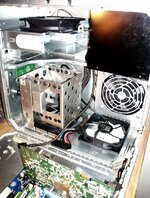 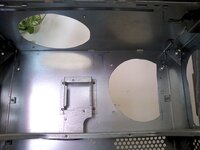 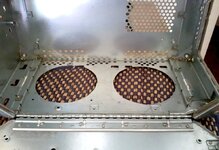 | |
Posted by: demik on 2025-03-22 01:58:00I placed a new thermal pad when I got the CPU, I will try to clock it down. It was already at 1.2 GHZ. Will try to setting it even lower.What was written on the CPU itself ? | |
Posted by: indibil on 2025-03-23 05:23:59I placed a new thermal pad when I got the CPU, I will try to clock it down. It was already at 1.2 GHZ. Will try to setting it even lower. Can you post quality photos of both sides of the processor card, without the heatsink? We'll try to locate the voltage regulator and see what Vcore it's set to. And a photo of the processor's inscription. The factory heatsink is too small, less efective. | |
| Posted by: indibil on 2025-03-23 11:27:16 Do you have a voltmeter to measure the voltage across these capacitors? 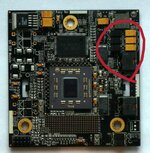 | |
| Posted by: jovianartifact on 2025-03-26 09:45:11 my interpretation is that it wants you to invent a custom liquid/peltier cooling system so you can crank it all the way up to 4GHz like some kind of alternate universe pentium 4 | |
| 1 |