68kMLA Classic Interface
This is a version of the 68kMLA forums for viewing on your favorite old mac. Visitors on modern platforms may prefer the main site.
| Click here to select a new forum. | |
| IIci/IIci/IIcx trouble | |
| Posted by: sircabulon on 2025-03-10 09:32:20 So I have a little collecting beige boxes problem. My dad's first (and my first) computer is a IIcx. He had a processor riser card added to give it a cache slot where he then installed a Mobius Speedster. I still have the IIcx. While reconnecting with this hobby, I decided to recap my old IIci I got for $5 back in 2010. Thing is pretty much brown, but hey, it worked. During that, I messed up some traces and have since gotten much better at soldering. The sound on that IIci is intermittent, and I know it's because of the damage to the board. Fast forward awhile, and I get one of Max's IIci reloaded boards and some capacitors. I was able to find a IIci board on ebay and orded that too because though my IIci is not fully working, it's also not fully broken, so I didn't want to risk screwing it up. The recently obtained board visually looks good, but had some bad caps. I just recapped it fully, but it's not working. The power comes on, and monitor activates but just stays black. If I hold down the reset button the screen turns white and stays as long as I hold it. Something is telling me this is a ROM issue, but I have no way of knowing that for sure. I tried moving some parts back and forth between my IIci and IIcx, and no changes regardless of RAM, PSU, etc. Is there a startup process anywhere I can use to troubleshoot this more? I have a basic oscilliscope and really just want to verify that these components are working or not before moving them to the new board. | |
| Posted by: finkmac on 2025-03-10 09:58:15 does it chime? are you using built-in video? (as in, not a nubus card) how many RAM SIMMs do you have installed? four? 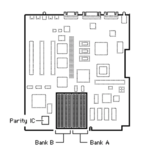 if you have four installed, which bank are they installed in... B or A? | |
| Posted by: sircabulon on 2025-03-10 14:24:14 So it wasn't chiming at all, so I reflowed everything and a couple of the chips near where the old capacitors were. I have a chime now and it immediately it does chimes of death. This is regardless of RAM configuration. I can repeat with no RAM, four simms in bank A and with 8 simms in A and B. I am using built in video at this point. | |
| Posted by: volvo242gt on 2025-03-10 14:28:16 Might be time to try a ROM SIMM... Had a IIcx many years ago that would do the chime, then sad Mac. Put a IIfx ROM SIMM in and it booted up. | |
| Posted by: sircabulon on 2025-03-10 14:30:25 that is definitely a possibility. I will bring a BMOW ROM in tomorrow and try it out. If that works, are there replacement ROM options? I am planning on putting in DIP sockets anywhere I can with the reloaded board. | |
| Posted by: volvo242gt on 2025-03-10 18:36:31 Probably could burn new PROM chips and install those on the board. Or, find a good set and swap those in, other than using a ROM SIMM. | |
| Posted by: sircabulon on 2025-03-11 06:21:18 I put my BMOW ROM in there and it started up from the ROM disk no problem, so I think my hunch about the ROM is correct. Max offered to sell me the ROM ICs but I foolishly declined. Time to get those on order! | |
| Posted by: finkmac on 2025-03-11 06:28:27 🤔 is jumper W1 present? also I'd verify ROM traces before ordering new ones. | |
| Posted by: sircabulon on 2025-03-11 07:20:13 Yes, W1 is present, though I rotated the jumber to make the BMOW sim work. Good point on the traces. Luckily I have the reloaded board already, so if they traces are bad, that will solve itself. | |
| Posted by: sircabulon on 2025-03-11 11:28:45 I started to look at the traces and realized that there is some damage to the board. It looks like scrapes as if it was in a big scrap pile or something. I am going to go ahead and solder dip sockets in place of the ROMs and then I can move them over and try them out. If they don't work, I will stick with the third party ROM I have. It's pretty cool to have two working IIci's. Now for the IIcx I just need to start looking at the poweron circuit to see why that one is giving me issues. | |
| 1 |