68kMLA Classic Interface
This is a version of the 68kMLA forums for viewing on your favorite old mac. Visitors on modern platforms may prefer the main site.
| Click here to select a new forum. | |
| G5 Death? Another one bites the dust? | |
| Posted by: VMSZealot on 2025-02-18 09:59:11 My 1.8GHz Dual G5 (the late model, with a memory ceiling of 4GB) quietly died this afternoon. No bad smells. No bangs. No drama. It just turned off, mid way through doing a CPU intensive render. Why use the G5 instead of something more modern? Well why not? In any event. It died. I thought it might have overheated at first - so I left it for an hour, and then tried again. The power light flicked on, and then flicked off again. So it does seem to be dead. Does anyone have any thoughts? I haven't opened it yet - a job for the weekend - but, as I say, nothing smells amiss. And there were no bangs. Just an absence of life. | |
| Posted by: demik on 2025-02-18 11:09:11 Sounds like logic board / processor. Most of them die like this nowadays. You gave it a good life. | |
| Posted by: Builder68 on 2025-02-18 11:39:59 In my experience, a common fault in PowerMac G5 PSUs is those tiny 3.3/4.7µF electrolytic capacitors soldered vertically onto a daughterboard attached to the PSU mainboard. These capacitors likely play a role in monitoring the DC voltage rail for stability and preventing shorts, and it seems that as they dry out due to the heat they are exposed to, their ESR increases over time. Even if the capacitance value is within range, just replace them. It's worth a try! I have two G5s of the same model as yours, and a Quad (Late 2005). Despite the PSUs being different, all three suffered the same fault at some point. I learned this from this thread. | |
| Posted by: Builder68 on 2025-02-18 12:00:15 Take the precaution of waiting 10 minutes before disassembling the PSU to allow the large capacitors to fully discharge. They can reach up to 300V when operating. It's not pleasant to receive such a jolt of electricity—speaking from experience 🙄 | |
| Posted by: Builder68 on 2025-02-18 13:20:36 This picture is from a 1 kW PSU (G5 Quad 2005). As far as I remember, there are a couple of tiny capacitors on a daughterboard on the 600W PSU (the one your model has). Just replace them all tiny electrolytic caps you may find and give it a try! 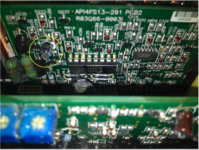 | |
| Posted by: demik on 2025-02-18 15:21:34 Damn that's interesting! I only had logic board failures (but that was a decade ago). Does the power supply power up by itself if you trickle it ? (when the caps are dead) | |
| Posted by: Builder68 on 2025-02-18 15:54:31 The PSU won't power up when this specific capacitor is dead, but it will still make the typical clicking sound.. The 3.3µF capacitor goes to pin 5 of the PWM controller on the 1kW PSU model. Apparently, from what I've found, this tiny capacitor is quite frequently the cause of the PSU's failure to start up. I know that there is an equivalent capacitor in the 600W models. I replaced all the tiny low-voltage capacitors, which brought the 1kW PSU and two 600W PSUs back to life. I also have another Power Mac G5 DP1.8 working with an adapted PC PSU, with only one CPU working. If the second CPU is installed, the machine won't start. So yes, there are a lot of logic board failures too, but as the Power Mac G5 ages, more and more failures rooted in the PSU arise due to bad capacitors. So, it's worth finding out if the PSU is the root of the failure. You could also try with another PSU first, but that depends on whether you have one readily available. | |
Posted by: oliviaiacovou on 2025-03-05 03:29:51The PSU won't power up when this specific capacitor is dead, but it will still make the typical clicking sound.. The 3.3µF capacitor goes to pin 5 of the PWM controller on the 1kW PSU model. Apparently, from what I've found, this tiny capacitor is quite frequently the cause of the PSU's failure to start up. I know that there is an equivalent capacitor in the 600W models. I replaced all the tiny low-voltage capacitors, which brought the 1kW PSU and two 600W PSUs back to life.i recently bought a power mac g5, after a couple days the power supply died, only giving the dreaded 2 clicks as its sign of life. no worry, i thought, i'll just buy this used one on ebay! it turns up, i plug it in and i get two clicks once again. i get another one (sent for free as a replacement). once again, two clicks, so i send it back. i almost turn to putting an atx psu inside but i'm not quite confident enough to do so. so i buy another! and once again it is dead on arrival and clicks twice just like the others. is this tiny cap possibly the reason all of these have the same problem? i've been searching online for the past couple weeks looking for an answer and this is the first specific one i've seen | |
Posted by: Builder68 on 2025-03-05 04:39:53i recently bought a power mac g5, after a couple days the power supply died, only giving the dreaded 2 clicks as its sign of life. no worry, i thought, i'll just buy this used one on ebay! it turns up, i plug it in and i get two clicks once again. i get another one (sent for free as a replacement). once again, two clicks, so i send it back. i almost turn to putting an atx psu inside but i'm not quite confident enough to do so.The double-click is just like seeing the tip of the iceberg! When that tiny capacitor on the daughter board of the PSU dries up, it will cause the double-click sound of the PSU relay. That being said, any short on the motherboard (MB) or the PSU will have the same symptom! | |
| Posted by: jpreza on 2025-03-22 06:18:32 Jumping in a little late. I recall that in the older G5s, the double click is confirmation that the PSU was getting power and not necessarily a sign that the PSU is bad. Can someone confirm? | |
| Posted by: VMSZealot on 2025-06-14 08:31:25 Okay. I found myself with a few spare moments this afternoon, so I popped the top of my G5 and did a little digging - and it may not be dead after all. In a tidy up, I found another AGP graphics card - popped that in instead, and bong! It booted. Put the old one back in? Dead. The card that won't boot is an Apple nVidia GeForce 6800. The card that will boot is an Apple nVidia GeForce 5200. I imagine that the 5200 draws a lot less power - so it could still be a sign of a weakening PSU, I suppose. But what do you think is more likely? A dead 6800 or a dead PSU? Still, looking on the bright side, at least the motherboard and G5s themselves can be ruled out of the "what's faulty" equation! | |
Posted by: Builder68 on 2025-06-14 08:35:45Okay. I found myself with a few spare moments this afternoon, so I popped the top of my G5 and did a little digging - and it may not be dead after all. In a tidy up, I found another AGP graphics card - popped that in instead, and bong! It booted. Put the old one back in? Dead.Dead GPU probably | |
| Posted by: VMSZealot on 2025-06-14 08:47:44 Hmm. I shall look into getting another - if I can find out for a reasonable price. I shall offer the old one for repair at the cost of the postage. | |
| 1 |